# Converter

Desktop Application (Visual Basic), installed in the [local server](https://scielo.readthedocs.io/projects/scielo-pc-programs/en/latest/concepts.html#local-server), to generate the database of the documents, by reading the files from [markup and body folders](https://scielo.readthedocs.io/projects/scielo-pc-programs/en/latest/concepts.html#folders-structure) and the databases in [title and issue folders](https://scielo.readthedocs.io/projects/scielo-pc-programs/en/latest/concepts.html#folders-structure).

## How to open the program

Use the Windows menu to open the program.

<div id="bkmrk-"><div>![_images/scielo_menu.png](https://scielo.readthedocs.io/projects/scielo-pc-programs/en/latest/_images/scielo_menu.png)</div></div>Or by the path of the program:

> <div>c:\scielo\bin\convert\convert.exe</div>

## How to change the language of the program

The programs are available in Portuguese, Spanish and English.

Use the program menu: Options &gt; Configurations.

<div id="bkmrk--0">![_images/scielo_menu_language.jpg](https://scielo.readthedocs.io/projects/scielo-pc-programs/en/latest/_images/scielo_menu_language.jpg)</div>## How to use the program

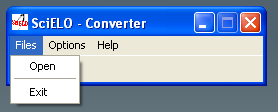
<div id="bkmrk-select-files-%3E-open."><div>1. Select Files &gt; Open.

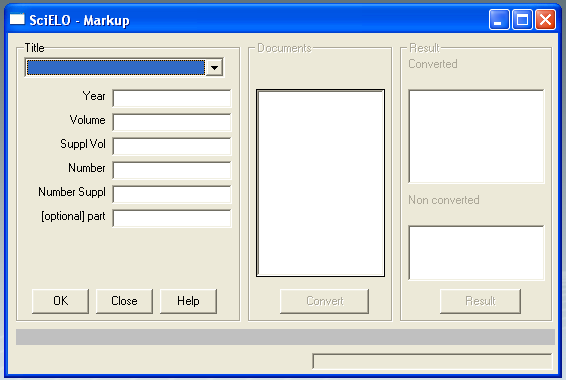
![_images/converter_open_files.png](https://scielo.readthedocs.io/projects/scielo-pc-programs/en/latest/_images/converter_open_files.png)2. Fill the fields:

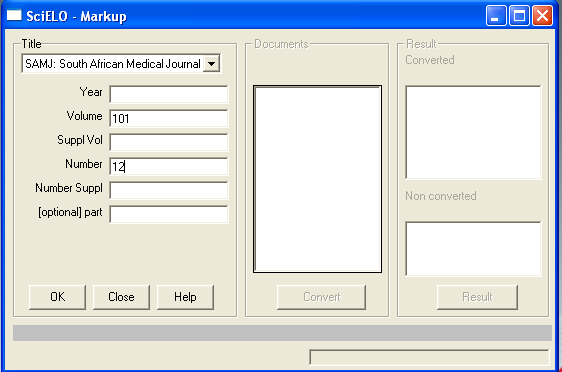
![_images/converter_form.png](https://scielo.readthedocs.io/projects/scielo-pc-programs/en/latest/_images/converter_form.png)- <dl class="first docutils" style="padding: 0px; margin: 0px !important 0px 0px 0px;"><dt>journal’s title:</dt><dd style="margin-top: 3px; margin-bottom: 10px; margin-left: 30px; hyphens: auto; line-height: 1.4em;">select the title of the journal.</dd></dl>
- <dl class="first docutils" style="padding: 0px; margin: 0px !important 0px 0px 0px;"><dt>year:</dt><dd style="margin-top: 3px; margin-bottom: 10px; margin-left: 30px; hyphens: auto; line-height: 1.4em;">FILL ONLY if it is **ahead** number</dd></dl>
- <dl class="first docutils" style="padding: 0px; margin: 0px !important 0px 0px 0px;"><dt>volume:</dt><dd style="margin-top: 3px; margin-bottom: 10px; margin-left: 30px; hyphens: auto; line-height: 1.4em;">fill it in with the volume</dd></dl>
- <dl class="first docutils" style="padding: 0px; margin: 0px !important 0px 0px 0px;"><dt>supplement of volume:</dt><dd style="margin-top: 3px; margin-bottom: 10px; margin-left: 30px; hyphens: auto; line-height: 1.4em;">fill it in with the supplement of volume, if it is applicable</dd></dl>
- <dl class="first docutils" style="padding: 0px; margin: 0px !important 0px 0px 0px;"><dt>number:</dt><dd style="margin-top: 3px; margin-bottom: 10px; margin-left: 30px; hyphens: auto; line-height: 1.4em;">fill it in with the number. If it is an ahead of print, use **ahead**, respectively</dd></dl>
- <dl class="first docutils" style="padding: 0px; margin: 0px !important 0px 0px 0px;"><dt>supplement of number:</dt><dd style="margin-top: 3px; margin-bottom: 10px; margin-left: 30px; hyphens: auto; line-height: 1.4em;">fill it in with the supplement of number, if it is applicable</dd></dl>
- <dl class="first docutils" style="padding: 0px; margin: 0px !important 0px 0px 0px;"><dt>complement:</dt><dd style="margin-top: 3px; margin-bottom: 10px; margin-left: 30px; hyphens: auto; line-height: 1.4em;">fill it in, if it exists. Recently it is used to **press release**, fill it in with **pr**.</dd></dl>

![_images/converter_issue_selected.png](https://scielo.readthedocs.io/projects/scielo-pc-programs/en/latest/_images/converter_issue_selected.png)3. Click on **OK** button.
4. Converter uses these data to identify the issue, [markup and body folders](https://scielo.readthedocs.io/projects/scielo-pc-programs/en/latest/concepts.html#folders-structure). If the data are correct, the program will list the markup files.
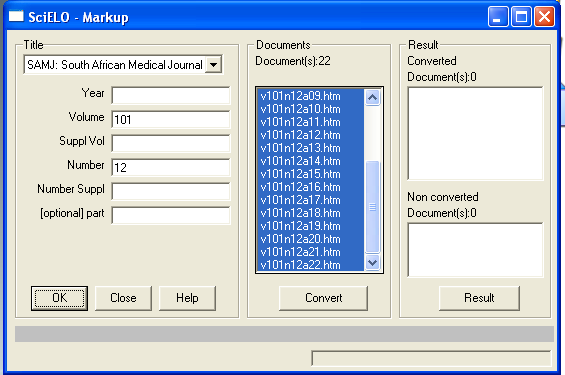
![_images/converter_files_selected.png](https://scielo.readthedocs.io/projects/scielo-pc-programs/en/latest/_images/converter_files_selected.png)5. Click on **Convert** button.
6. Converter will convert the selected files.
    
    > For each file, the program:
    > 
    > > <div><div>
    > > - extracts the identified data
    > > - compares the data in the document and the data in the issue database
    > > 
    > > <div></div></div></div>Attention
    > > 
    > > If there are any unmatched data related to the issue, the program will not create the database. It will be necessary to correct the data in Markup or in [Title Manager](https://scielo.readthedocs.io/projects/scielo-pc-programs/en/latest/titlemanager.html)
    > 
    > If the database is generated, the result will be shown on the screen.
    > 
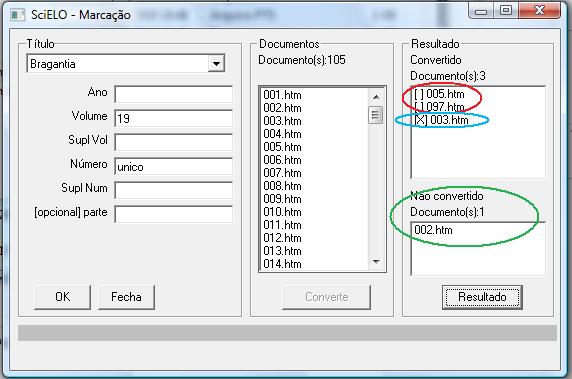
    > <div><div>![_images/converter_resultado.jpg](https://scielo.readthedocs.io/projects/scielo-pc-programs/en/latest/_images/converter_resultado.jpg)</div></div>Results:
    > 
    > <div>
    > - successfully converted: \[ \] (in red)
    > - <dl class="first docutils" style="padding: 0px; margin: 0px !important 0px 0px 0px;"><dt>converted, with errors: \[X\] (in blue)</dt><dd style="margin-top: 3px; margin-bottom: 10px; margin-left: 30px; hyphens: auto; line-height: 1.4em;">There are some not fatal markup errors, which could have been corrected at SGML Parser stage.</dd></dl>
    > - <dl class="first docutils" style="padding: 0px; margin: 0px !important 0px 0px 0px;"><dt>not converted: (in green)</dt><dd style="margin-top: 3px; margin-bottom: 10px; margin-left: 30px; hyphens: auto; line-height: 1.4em;">It is related to unmatched data of the issue database and the data in the markup file. For instance: - The issue’s volume is 30, and the volume in the document is 3. The program will indicates an error. In this case, the correction is in the markup file.</dd></dl>
    > 
    > </div>
7. Click on each file in the result area, then on **Result** button, to view the result of the convertion.

</div></div>**Successfully converted**

<div id="bkmrk--1"><div>![_images/converter_view_report.png](https://scielo.readthedocs.io/projects/scielo-pc-programs/en/latest/_images/converter_view_report.png)</div></div>**Converted, but no fatal errors: markup error**

<div id="bkmrk--2"><div>![_images/converter_resultado2.jpg](https://scielo.readthedocs.io/projects/scielo-pc-programs/en/latest/_images/converter_resultado2.jpg)</div></div>**Converted, but no fatal error: some bibliography references not identified**

> Converter also marks, in the body file, the end of the paragraph of each bibliography reference found in markup file. It is used by the website to create \[ Links \] at the end of the paragraph of each reference.
> 
> <div><div>![_images/converter_resultado6.jpg](https://scielo.readthedocs.io/projects/scielo-pc-programs/en/latest/_images/converter_resultado6.jpg) ![_images/converter_resultado6b.jpg](https://scielo.readthedocs.io/projects/scielo-pc-programs/en/latest/_images/converter_resultado6b.jpg)</div></div>If Converter was not able to find the markup references in body references:
> 
> <div><div>![_images/converter_resultado5.jpg](https://scielo.readthedocs.io/projects/scielo-pc-programs/en/latest/_images/converter_resultado5.jpg)</div></div>It is necessary to evaluate the references in markup and in body. There must be some different character that causes the error.

**Not converted, because of fatal errors**

> <div>![_images/converter_resultado3.jpg](https://scielo.readthedocs.io/projects/scielo-pc-programs/en/latest/_images/converter_resultado3.jpg)</div>