# Classic SciELO Website with Docker
### HOW TO CONFIGURE LINUX SERVER WITH DOCKER
Installing [docker-compose](https://docs.docker.com/compose/install/)
```shell
sudo curl -L "https://github.com/docker/compose/releases/download/1.29.2/docker-compose-$(uname -s)-$(uname -m)" -o /usr/local/bin/docker-compose
sudo chmod +x /usr/local/bin/docker-compose
sudo ln -s /usr/local/bin/docker-compose /usr/bin/docker-compose
docker-compose --version
```
Installing [Docker](https://www.digitalocean.com/community/tutorials/how-to-install-and-use-docker-on-rocky-linux-9)
O pacote de instalação do Docker disponível no repositório oficial do Rocky Linux 9 pode não ser a versão mais recente.
Para obter a versão mais recente e melhor, instale o Docker do repositório oficial do Docker.
Esta seção mostra como fazer exatamente isso.
Mas primeiro, vamos atualizar o banco de dados de pacotes:
```shell
sudo dnf check-update
```
Em seguida, adicione o repositório oficial do Docker:
```shell
sudo dnf config-manager --add-repo https://download.docker.com/linux/centos/docker-ce.repo
```
Embora não haja um repositório específico do Rocky Linux do Docker, o Rocky Linux é baseado no CentOS e pode usar o mesmo repositório. Com o repositório adicionado, instale o Docker, que é composto de três pacotes:
```shell
sudo dnf install docker-ce docker-ce-cli containerd.io
```
Após a conclusão da instalação, inicie o daemon do Docker:
```shell
sudo systemctl start docker
```
Verifique se está em execução:
```shell
sudo systemctl status docker
```
A saída deve ser semelhante à seguinte, mostrando que o serviço está ativo e em execução:
Output
```
● docker.service - Docker Application Container Engine
Loaded: loaded (/lib/systemd/system/docker.service; enabled; vendor preset: enabled)
Active: active (running) since Sun 2016-05-01 06:53:52 CDT; 1 weeks 3 days ago
Docs: https://docs.docker.com
Main PID: 749 (docker)
```
Creating the file docker-compose.yml
```YAML
version: '2'
services:
metodologia:
image: infrascielo/classic-site:latest
environment:
INSTANCE_NAME: scielo_br
USER_SUPERVISOR: root
PASS_SUPERVISOR: toor
SITE_NAME: www.scielo.br
USER_FTP: usuario ftp
PASSWD_FTP: clave del usuario ftp
USER_PASS: scielo123
GIT_BRANCH_NAME: scielo_scl
volumes:
- /var/www/scielo:/var/www/scielo
- /var/www/apache:/var/www/apache
- /etc/localtime:/etc/localtime
ports:
- "80:80"
- "2222:22"
restart: always
```
##### Necessaries changes:
Please change the variables bellow:
**INSTANCE\_NAME**: This field must be change to the website's domain with undescore. For instance: scielo.org.ve muste be scielo\_org\_ve
**PASS\_SUPERVISOR**: You have to choose a new password. The default is toor. Never leave the default value.
**SITE\_NAME**: This field corresponding to your website.
**USER\_FTP**: This field must be filled up with the user created by SciELO Brasil. If you don't have, you have to request to SciELO Brasil.
**PASSWD\_FTP**: This field must be filled up with the password from ftp user create by SciELO Brasil.
**USER\_PASS**: This field is the password from the user scielo used to do ssh
**GIT\_BRANCH\_NAME**: Each SciELO Collection has its own branch. If you don't have, please use the default scielo\_scl or request your. If you don't know yours, please visit [GitHub SciELO](https://github.com/scieloorg/web)
Required variables: **INSTANCE\_NAME, SITE\_NAME** and **GIT\_BRANCH\_NAME**
##### Volumes changes:
The path /var/www/scielo is the source of your installation.
\- /var/www/scielo:/var/www/scielo
The path /var/www/apache is where will be stored the Apache Logs
\- /var/www/apache:/var/www/apache
The path /etc/localtime is the file to keep the clock equal from the server.
\- /etc/localtime:/etc/localtime
##### How to start the container
```shell
docker-compose up -d
```
##### how to stop the container
```shell
docker-compose down
```
##### How to list all containers running
```shell
docker-compose ps
```
### How to upgrade databases, Images and PDFs from SciELO Methodology
En el Servidor Windows ejecute el programa CMD entre en la carpeta C:\\var\\www\\scielo\\proc digite:
GeraPadrao.bat
Espere hasta que termine. Para analizar la generación de las bases hay una carpeta en C:\\var\\www\\scielo\\proc\\log Busque el archivo log GeraPadrao.log
Obs.: La generación de las bases está condicionada a la existencia de las bases en la carpeta C:\\var\\www\\scielo\\serial y un fichero C:\\var\\www\\scielo\\serial\\scilista.lst. El fichero scilista.lst sigue el padrón: Acrónimo volumen y número
Ejemplo:
```shell
maskay v6n1
sophia n22
```
Una vez que se ve en el navegador el resultado del procesamiento ya es posible enviar las bases, imágenes y pdfs para el servidor de desarrollo. Para enviar los ficheros necesarios usamos el script C:\\PAPERBOY\\paperboy.bat. El resultado del envío es salvo en C:\\PAPERBOY\\logs\\paperboy-scielo.log
Una vez que enviamos bases, imágenes y pdfs para el servidor de desarrollo tenemos que procesar las bases en el formato linux.
Sigue los pasos:
- Acceda al servidor de desarrollo;
- Ejecute *docker ps* para verificar cuales contenedor está en ejecución;
- Identificando el CONTAINER ID del contenedor metodología, accedemos a el con el comando: *docker exec -ti <CONTAINER ID> bash. *Cambie CONTAINER ID por la secuencia numérica
- Una vez que estamos dentro del bash del contenedor entre en la carpeta
```shell
$ cd /var/www/scielo/proc/
Ejecute:
$./GeraPadrao.bat
```
Cuando finalize verifique se el sitio [http://your.domain.scielo](http://your.domain.scielo "http://your.domain.scielo") este actualizado
Si sí vamos enviar las bases procesadas desde este contenedor.
Ejecute el comando exit para salir desde el contenedor
```shell
$exit
```
Es importante que la instrucción ahora sea hecha usando el usuário scielo, pues no funciona con el usuario root
```shell
#su - scielo
```
#### Scripts para actualización
atualiza-bases-scielo.sh
```shell
#!/bin/bash
# Script: function.sh - Criação das funções que será utilizado pelo script update_bases.sh
# para atualizar os arquivos da instância SciELO processada.
# Mantenedor: Rondineli Saad e Fábio Batalha
# Criado em: 08/05/2019
# Versão: 11
# Funcao para atualizar bases:-->
# |->$1 Coleção
# |->$2 Diretório em /rancher/scielo_ve_data/
#
DIR_INSTANCIA_ORIG="/var/www/scielo"
DIR_INSTANCIA_DEST="/var/www/scielo"
DIR_BASES="artigo areasgeo issue title related cited iah scimago img lattes medline newissue translation"
DATA_ATUAL=`date +"%d-%m-%Y-%H_%m_%S"`
IP_SERVER="192.168.2.19"
update(){
echo "Update ScieLO Data"
if [ -e update_bases_scielo-novo.log ]
then
mv update_bases_scielo-novo.log update_bases_scielo-novo-${DATA_ATUAL}.log
fi
for j in $DIR_BASES
do
echo "RSYNC - BASES"
echo "$j"
ssh ${IP_SERVER} mkdir ${DIR_INSTANCIA_DEST}/bases-new/${j}
rsync -Cravp -e 'ssh' ${DIR_INSTANCIA_OIRG}/bases/${j}/ ${IP_SERVER}:${DIR_INSTANCIA_DEST}/bases-new/${j}/ 2>> update_bases_scielo_br-novo.log
done
echo "Atualizando os pdfs"
rsync -Cravp -e 'ssh' ${DIR_INSTANCIA_ORIG}/bases/pdf/ ${IP_SERVER}:${DIR_INSTANCIA_DEST}/bases/pdf/ 2>> update_bases_scielo-novo.log
echo "Copiando Páginas Secundárias"
rsync -Cravp -e 'ssh' ${DIR_INSTANCIA_ORIG}/htdocs/img/revistas/ ${IP_SERVER}:${DIR_INSTANCIA_DEST}/htdocs/img/revistas/ 2>> update_bases_scielo-novo.log
rsync -Cravp -e 'ssh' ${DIR_INSTANCIA_ORIG}/htdocs/revistas/ ${IP_SERVER}:${DIR_INSTANCIA_DEST}/htdocs/revistas/ 2>> update_bases_scielo_br.log
#echo "--->Execução do Script de Distribuição da base e Movimentação das bases"
ssh ${IP_SERVER} sh /var/www/educa_fcc_org_br/scripts/data-scielo.sh update 2>> update_bases_scielo-novo.log
echo "-----> FIM: Termino do envio da Bases, PDF, Páginas Secundária e execução do updateScielo-data-MOVE.sh" 2>> update_bases_scielo-novo.log
}
rollback(){
ssh ${IP_SERVER} sh /var/www/scielo/scripts/data-scielo.sh rollback 2>> update_bases_scielo-novo.log
}
case "$1" in
update)
update
;;
rollback)
rollback
;;
*)
echo "Option not valid: update, rollback"
;;
esac
```
data-scielo.sh
```shell
#!/bin/sh
update(){
rm -rf /var/www/scielo/bases-old/*
cd /var/www/scielo/bases
mv areasgeo artigo cited iah img issue lattes medline newissue related title translation scimago /var/www/scielo/bases-old/
mv /var/www/scielo/bases-new/* /var/www/scielo/bases/
echo "---->FIM: SciELO Atualizado com êxito\!"
}
rollback(){
rm -rf /var/www/scielo/bases-failed/*
cd /var/www/scielo/bases
mv areasgeo artigo cited iah img issue lattes medline newissue related title translation scimago /var/www/scielo/bases-failed
cd /var/www/scielo/bases-old/
mv areasgeo artigo cited iah img issue lattes medline newissue related title translation scimago /var/www/scielo/bases
}
case "$1" in
update)
update
;;
rollback)
rollback
;;
*)
echo "Option not valid: update, rollback"
;;
esac
```
Para actualizar el servidor de producción con las nuevas bases procesadas haga:
```shell
Ejecute:
$./atualiza-bases-scielo.sh update
Si en el sitio no aparece ninguna revista o si quieres volver a la base antigua, ejecute:
$./atualiza-bases-scielo.sh rollback
```
#### Como comprimir los Logs Apaches del servidor de producción y enviar para el servidor FTP de SciELO
##### Cómo ejecutar el script de compactación de logs:
```shell
Manualmente:
/usr/bin/docker exec -ti root_metodologia_1 /bin/bash /scripts/compacta_log.sh
```
##### Cómo crear el servicio systemd para enviar los logs de Apache automáticamente
Descargue el fichero modelo en el servidor de producción usando el usuário root:
```shell
#cd /etc/systemd/system/
#wget https://gist.githubusercontent.com/rondinelisaad/f0eca737640b60b88138ddc686afaa2d/raw/0348b32b5338fff3c1d1610821768c31f637fc2c/compacta.service
```
Sigue el contenido del fichero /etc/systemd/system/compacta.service
```shell
[Unit]
Description=Compactación de los LOGs Apaches
Documentation=
After=docker.service
Requires=docker.service
[Service]
TimeoutSec=0
ExecStart=/bin/sh -c '\
/usr/bin/docker exec -ti metodologia_metodologia_1 /bin/bash /scripts/compacta_log.sh'
[Install]
WantedBy=multi-user.target
```
Descargue el segundo fichero:
```shell
#cd /etc/systemd/system/
# wget https://gist.githubusercontent.com/rondinelisaad/743813e0be3315220bcdf35acf971157/raw/6b8cac576126ed366120f3c536a3d27da4003926/compacta.timer
```
Sigue el contenido del fichero /etc/systemd/system/compacta.timer:
```shell
[Unit]
Description=Execute backup every day at midnight
[Timer]
OnCalendar=*-*-* 00:00:00
Unit=compacta.service
[Install]
WantedBy=multi-user.target
```
Iniciar los servicios:
```shell
#systemctl enable compacta.timer
#systemctl start compacta.timer
```
Valide si el script está agendado:
```shell
# systemctl is-enabled compacta.timer
```
Ejecute manualmente el servicio:
```shell
# systemctl start compacta
```
#### Configurando el paperboy para enviar una vez por semana las bases iso
Es importante que configure una vez por semana y siempre después del procesamiento de las bases.
Descargue el fichero config.ini en el servidor de desarrollo
```shell
#cd /root
#wget https://raw.githubusercontent.com/scieloorg/paperboy/master/config.ini-TEMPLATE
# mv config.ini-TEMPLATE config.ini
```
Configure el fichero con las credenciales del servidor ftp.scielo.br. Sigue con deberia configurarlo:
```shell
[app:main]
## Full path to the source directory where the SciELO site is installed. It must
## contains the directories proc, bases, htdocs, cgi-bin, serial.
source_dir=/var/www/scielo
## Full path to the CISIS utilitaries. It is usually installed on the directory
## proc/cisis of the SciELO Site.
cisis_dir=/var/www/scielo/proc/cisis
## Full path to the scilista.lst file. It is usually available at the directory
## and file serial/scilista.lst
scilista=/var/www/scielo/serial/scilista.lst
## Full path to the destiny folder in the server side. It is usually the path
## to the SciELO Site in the server. When sending data to SciELO is must be
## commented or empty on the FTP will login the user to the correct path.
#destiny_dir=
## FTP or SFTP credentials
## The protocol will be defined by the server_type ['ftp', 'sftp']
server=ftp.scielo.br
server_type=ftp
port=21
user=usuario ftp
password=clave
```
Manualmente ejecute:
```shell
docker run --rm -v /var/www/scielo:/var/www/scielo -v ~/config.ini:/app/config.ini scieloorg/paperboy:stable paperboy_delivery_to_scielo
```
Configurando systemd
```shell
#cd /etc/systemd/system
#wget https://gist.githubusercontent.com/rondinelisaad/a4c25bd876de186b43938dd2148f9a7c/raw/53418856574f9b3fe1910951b6c94376e0769f9d/paperboy.service
#wget https://gist.githubusercontent.com/rondinelisaad/154aa2249f6bfb2b992a207f25f357c4/raw/b319904234abd11fd46721a3b8a9d83eece3ff32/paperboy.timer
#systemctl enable paperboy.timer
#systemctl start paperboy.timer
#systemctl is-enabled paperboy.timer
#systemctl list-timers
```
#### Como actualizar la versión del código de la metodologia SciELO
Accender al nuestro repositório Git ([https://github.com/scieloorg/web](https://github.com/scieloorg/web))
Cambiar al Branch de vuestra collección
[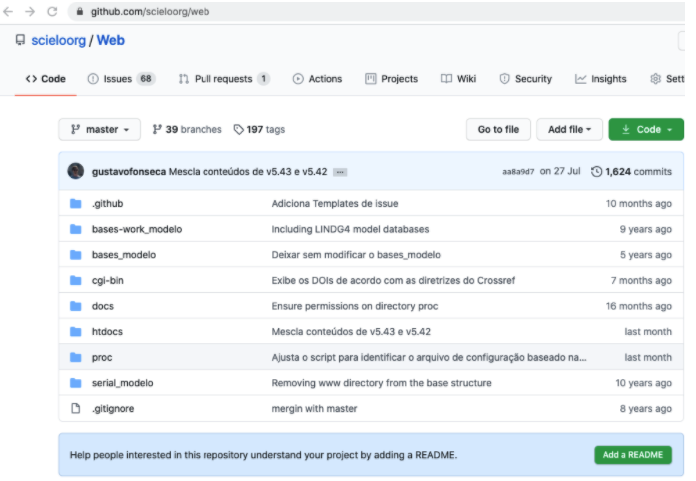](https://documentacao.scielo.org/uploads/images/gallery/2021-08/image-1630350810792.png)
[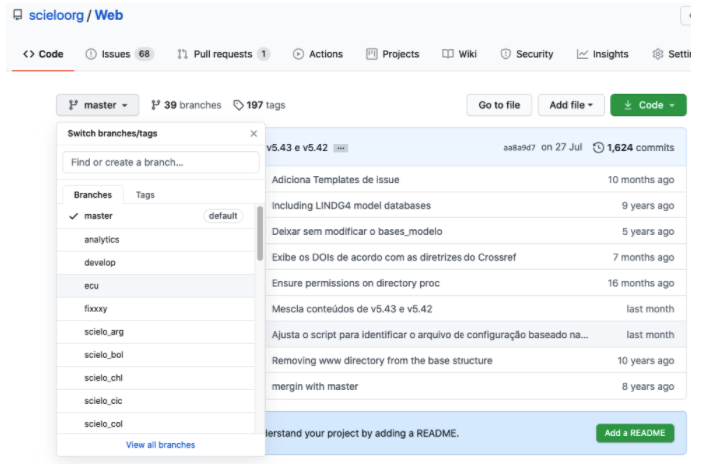](https://documentacao.scielo.org/uploads/images/gallery/2021-08/image-1630350824882.png)
Haga download del fichero ZIP
[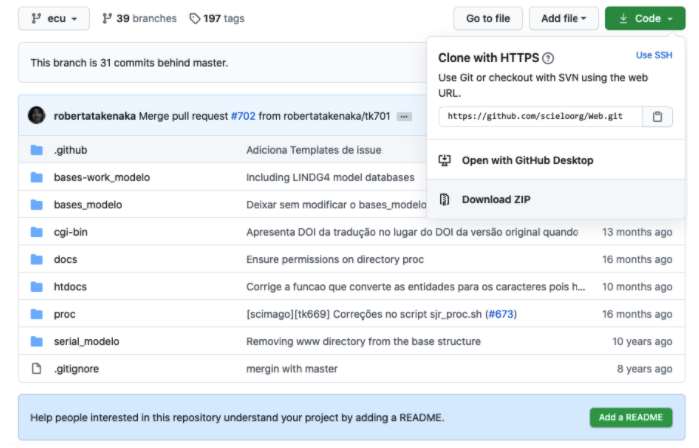](https://documentacao.scielo.org/uploads/images/gallery/2021-08/image-1630350858065.png)
En el servidor Linux, baje el fichero zip en una carpeta temporária y ejecute los comandos abajo:
Ojos: Para el ejemplo abajo usamos el branch scielo\_ecu. O sea, se vuestra collección no es de Ecuador no la use. Busque por la tuya.
```shell
cd /tmp
wget https://github.com/scieloorg/Web/archive/scielo_ecu.zip
unzip scielo_ecu.zip
La carpeta Web-scielo_ecu fue creada
cd Web-scielo_ecu
rsync -Cravp cgi-bin/ /var/www/scielo/cgi-bin/
rsync -Cravp proc/ /var/www/scielo/proc/
rsync -Cravp htdocs/ /var/www/scielo/htdocs/
```
Una vez actualizado valide la versión. Ojo: Para el ejemplo abajo usamos el sitio del Ecuador. O sea, replaze por lo tuyo.
[http://scielo.senescyt.gob.ec/versionOverview.txt](http://scielo.senescyt.gob.ec/versionOverview.txt)
Ojo: La versión deberá ser igual a la que está em [https://github.com/scieloorg/Web/blob/ecu/htdocs/versionOverview.txt](https://github.com/scieloorg/Web/blob/ecu/htdocs/versionOverview.txt)
No es necesario reiniciar el Docker.
#### Enlaces de Referencias:
[https://www.certdepot.net/rhel7-use-systemd-timers/](https://www.certdepot.net/rhel7-use-systemd-timers/)