# METODOLOGIA CLÁSSICA

# SciELO Methodology installation on Centos 7

# <span style="font-weight: 400;">Linux installation</span>

## <span style="font-weight: 400;">REQUIREMENTS</span>

<span style="font-weight: 400;">Hardware Configuration:</span>

<span style="font-weight: 400;">8GB RAM minimum</span>

<span style="font-weight: 400;">8 vCPU </span>

<span style="font-weight: 400;">150GB HD</span>

**CentOS release 7.9**

**Apache 2.2.34**

**PHP 5.2.10 or 5.2.17 (required)**

**PHP Modules**

- <span style="font-weight: 400;">libpng</span>
- <span style="font-weight: 400;">soap</span>
- <span style="font-weight: 400;">zlib</span>
- <span style="font-weight: 400;">XSL</span>
- <span style="font-weight: 400;">XML</span>

### <span style="font-weight: 400;">Installing build subsystem</span>

```shell
yum install -y perl make wget gcc libxml2-devel openssl openssl-devel openssl-libs curl libcurl-devel libjpeg-turbo-devel libpng-devel freetype-devel libxslt libxslt-devel expat-devel patch wget glibc.i686 zlib-devel curl-devel
```

### <span style="font-weight: 400;">Installing EPEL Repository to install mcrypt</span>

```shell
# yum install epel-release
# yum install libmcrypt-devel
```

### <span style="font-weight: 400;">Installing Apache 2.2.34 from source</span>

**Getting source code**

```shell
wget -O /usr/src/httpd-2.2.34.tar.gz  https://archive.apache.org/dist/httpd/httpd-2.2.34.tar.gz
```

<span style="font-weight: 400;">Uncompress</span>

```shell
# cd /usr/src
# tar -zxvf httpd-2.2.34.tar.gz
```

**Configure**

```shell
cd httpd-2.2.34
./configure --prefix=/usr --enable-layout=RedHat --enable-mods-shared=all 
```

**Compile and install**

```shell
make
make install
```

### <span style="font-weight: 400;">Installing PHP 5.2.17 from source</span>

<span style="font-weight: 400;">It is very important to use this version because php 5.2.17 doesn't work with nealy versions.</span>

**Getting source code**

```shell
wget -O /usr/src/php-5.2.17.tar.gz http://museum.php.net/php5/php-5.2.17.tar.gz
```

**Uncompress**<span style="font-weight: 400;"> </span>

```shell
# cd /usr/src
# tar -zxvf php-5.2.17.tar.gz 
# cd php-5.2.17
```

**Patching** <span style="font-weight: 400;"> </span>

[<span style="font-weight: 400;">https://stackoverflow.com/questions/28211039/phpbrew-5-3-10-build-error-dereferencing-pointer-to-incomplete-type/34107461</span>](https://stackoverflow.com/questions/28211039/phpbrew-5-3-10-build-error-dereferencing-pointer-to-incomplete-type/34107461)

```shell
curl -s https://mail.gnome.org/archives/xml/2012-August/txtbgxGXAvz4N.txt | patch -p0
Result:
patching file ext/dom/node.c
Hunk #1 succeeded at 1950 (offset 55 lines).
patching file ext/dom/documenttype.c
Hunk #1 succeeded at 215 (offset 10 lines).
patching file ext/simplexml/simplexml.c
Hunk #1 succeeded at 1343 (offset -74 lines).
```

**Configure**

```shell
./configure --prefix=/usr --exec-prefix=/usr --bindir=/usr/bin --sbindir=/usr/sbin --sysconfdir=/etc --datadir=/usr/share --includedir=/usr/include --libdir=/usr/lib64 --libexecdir=/usr/libexec --localstatedir=/var --sharedstatedir=/usr/com --mandir=/usr/share/man --infodir=/usr/share/info --cache-file=../config.cache --with-libdir=lib64 --with-config-file-path=/etc --with-config-file-scan-dir=/etc/php.d --with-pic --disable-rpath --without-pear --with-bz2 --with-curl --with-exec-dir=/usr/bin --with-freetype-dir=/usr --with-png-dir=/usr --enable-gd-native-ttf --without-gdbm --with-gettext --with-iconv --with-jpeg-dir=/usr --without-openssl --with-zlib --with-layout=Redhat --enable-exif --enable-ftp --enable-magic-quotes --enable-sockets --enable-wddx  --without-mime-magic --without-sqlite --with-libxml-dir=/usr --with-apxs2=/usr/sbin/apxs --without-mysql --disable-dom --disable-dba --without-unixODBC --disable-pdo --disable-xmlreader --disable-xmlwriter --disable-json -with-xsl --enable-dom
```

**Compile and install**

```shell
make
make install
```

<span style="font-weight: 400;">Copie o arquivo php.ini-recommended para /etc/php.ini</span>

```shell
# cp php.ini-recommended /etc/php.ini
```

<span style="font-weight: 400;">Ajuste o arquivo, modificando e depois reinicie o Apache:</span>

```shell
# vi /etc/php.ini
display_errors = Off
short_open_tag = On
```

**Creating a symbolic link for modules**

```shell
# ln -s /lib /etc/httpd/lib
```

**Configure Apache**

```shell
$ echo '
<FilesMatch "\.php$">
  SetHandler application/x-httpd-php
</FilesMatch>
' >> /etc/httpd/conf/httpd.conf
```

**Creating a system unit**

```shell
# vi /etc/systemd/system/httpd.service
[Unit]
Description=Apache Web Server
After=network.target remote-fs.target nss-lookup.target

[Service]
Type=forking
PIDFile=/run/httpd.pid
ExecStart=/usr/sbin/apachectl start
ExecStop=/usr/sbin/apachectl graceful-stop
ExecReload=/usr/sbin/apachectl graceful
PrivateTmp=true
LimitNOFILE=infinity

[Install]
WantedBy=multi-user.target

Save the file and run the follow commands

# systemctl daemon-reload
# systemctl enable --now httpd
```

# <span style="font-weight: 400;">Installation of the SciELO Methodology</span>

<span style="font-weight: 400;">Following </span>

[<span style="font-weight: 400;">http://docs.scielo.org/projects/scielo-site/en/latest/howtoinstall.html</span>](http://docs.scielo.org/projects/scielo-site/en/latest/howtoinstall.html)

<span style="font-weight: 400;">In the link above, there is instruccion to download the respective branch from your collection. If you are a new collection and you don't have a branch, you can clone the master.</span>

<span style="font-weight: 400;">The process below corresponds to Portugal's branch. If you are from another country it is very important to choose yours. It is important to read the link above to understand what is necessary to change.</span>

<span style="font-weight: 400;">For version control we use GitHub, where Tags correspond to the versions of the site.</span>

<span style="font-weight: 400;">Check the TAGs here: </span>[<span style="font-weight: 400;">SciELO’s GitHub</span>](https://github.com/scieloorg/Web/tags)

[![Screenshot at Aug 05 10-36-40.png](https://documentacao.scielo.org/uploads/images/gallery/2021-08/scaled-1680-/screenshot-at-aug-05-10-36-40.png)](https://documentacao.scielo.org/uploads/images/gallery/2021-08/screenshot-at-aug-05-10-36-40.png)

<span style="font-weight: 400;">Check the branch of the current version by region and country. See the table at the link below:</span>

[<span style="font-weight: 400;">Branch name for each collection</span>](http://docs.scielo.org/projects/scielo-site/en/latest/network.html)

<span style="font-weight: 400;">[![Screenshot at Aug 05 10-38-13.png](https://documentacao.scielo.org/uploads/images/gallery/2021-08/scaled-1680-/screenshot-at-aug-05-10-38-13.png)](https://documentacao.scielo.org/uploads/images/gallery/2021-08/screenshot-at-aug-05-10-38-13.png)</span>

<span style="font-weight: 400;">Example:</span>

<span style="font-weight: 400;">If there is no branch for your collection, we ask that you let us know.</span>

## <span style="font-weight: 400;">Download the specific version of the SciELO methodology</span>

<span style="font-weight: 400;">There are two ways to download: one through the tarball file and the other through the zip file.</span>

### <span style="font-weight: 400;">ZIP File</span>

<span style="font-weight: 400;">Download:</span>

```shell
wget https://github.com/scieloorg/Web/zipball/<versão_da_tag>
```

<span style="font-weight: 400;">Example:</span>

```shell
wget https://github.com/scieloorg/Web/archive/master.zip
```

<span style="font-weight: 400;">After extracting the files, a directory will be created with the name Web-master</span>

```shell
Web-master
```

<span style="font-weight: 400;">Enter the directory and move the content extracted to "</span><span style="font-weight: 400;">/var/www/scielo</span><span style="font-weight: 400;">”:</span>

## <span style="font-weight: 400;">Installation of the CISIS package</span>

```shell
wget ftp://produtos-scielo:produtos%40scielo@ftp.scielo.br/cisis-product/cisis.zip
```

<span style="font-weight: 400;">Extract the contents in the directory:</span>

```shell
cd /var/www/scielo/proc/
unzip cisis.zip
```

<span style="font-weight: 400;">The CISIS directory will look like this:</span>

<span style="font-weight: 400;">Delete the downloaded .zip file</span>

<span style="font-weight: 400;">To test operation:</span>

```shell
mx what
```

<span style="font-weight: 400;">Result:</span>

## <span style="font-weight: 400;">Installation of the WWWISIS package</span>

```shell
cd /var/www/scielo/cgi-bin
wget ftp://produtos-scielo:produtos%40scielo@ftp.scielo.br/cisis-product/wxis.exe
```

# <span style="font-weight: 400;">To test:</span>

```shell
./wxis.exe hello
```

# <span style="font-weight: 400;">Configuring the httpd.conf file</span>

<span style="font-weight: 400;">Edit the file:</span>

```shell
vi /etc/httpd/conf/httpd.conf
```

<span style="font-weight: 400;">In the end of the file add the line:</span>

<table id="bkmrk-%23-virtual-hosts-incl"><tbody><tr><td>*<span style="font-weight: 400;">\# Virtual hosts</span>*

*<span style="font-weight: 400;">Include /etc/httpd/conf.d/vhosts</span>*

</td></tr></tbody></table>

<span style="font-weight: 400;">Enter the directory indicated below:</span>

<table id="bkmrk-mkdir-%2Fetc%2Fhttpd%2Fcon"><tbody><tr><td>*<span style="font-weight: 400;">mkdir /etc/httpd/conf.d/vhosts</span>*

</td></tr></tbody></table>

<span style="font-weight: 400;">Enter the directory indicated below and create the file below:</span>

<table id="bkmrk-cd-%2Fetc%2Fhttpd%2Fconf.d"><tbody><tr><td>*<span style="font-weight: 400;">cd /etc/httpd/conf.d/vhosts</span>*

*<span style="font-weight: 400;">vi </span><span style="font-weight: 400;">vhosts.conf</span>*

  
***add the follow content:***

  
*<span style="font-weight: 400;">NameVirtualHost &lt;server ip&gt;:80</span>*

  
***It is important to replace &lt;server ip&gt; to the real ip from machine***

</td></tr></tbody></table>

<span style="font-weight: 400;">In the same directory create another file. The name is related to your instance. For instance, if you are from Bolivia the name will be scielo-org-bo.conf. I will use this name as template:</span>

<table id="bkmrk-%23-vi-scielo-org-bo.c"><tbody><tr><td><span style="font-weight: 400;">\# vi scielo-org-bo.conf</span>

  
<span style="font-weight: 400;">&lt;VirtualHost \*:80&gt;</span>

<span style="font-weight: 400;"> ServerName vm.scielo.br</span>

<span style="font-weight: 400;"> Alias /pdf/ /var/www/scielo/bases/pdf/</span>

<span style="font-weight: 400;"> Alias /img/fbpe/ /var/www/scielo/htdocs/img/revistas/</span>

<span style="font-weight: 400;"> Alias /img/scimago/ /var/www/scielo/bases/scimago/images/</span>

<span style="font-weight: 400;"> LimitRequestFieldSize 9000</span>

<span style="font-weight: 400;"> LimitRequestLine 9000</span>

<span style="font-weight: 400;"> DocumentRoot /var/www/scielo/htdocs</span>

<span style="font-weight: 400;"> DirectoryIndex scielo.php index.php index.html index.htm</span>

<span style="font-weight: 400;"> &lt;Directory /var/www/scielo/htdocs&gt;</span>

<span style="font-weight: 400;"> Options FollowSymLinks MultiViews</span>

<span style="font-weight: 400;"> Order deny,allow</span>

<span style="font-weight: 400;"> AcceptPathInfo On</span>

<span style="font-weight: 400;"> Allow from all</span>

<span style="font-weight: 400;"> &lt;/Directory&gt;</span>

<span style="font-weight: 400;"> &lt;Directory /var/www/scielo/bases/pdf/&gt;</span>

<span style="font-weight: 400;"> Options FollowSymLinks MultiViews</span>

<span style="font-weight: 400;"> Order deny,allow </span>

<span style="font-weight: 400;"> AcceptPathInfo On</span>

<span style="font-weight: 400;"> Allow from all</span>

<span style="font-weight: 400;"> &lt;/Directory&gt;</span>

<span style="font-weight: 400;"> &lt;Directory /var/www/scielo/bases/scimago/images/&gt;</span>

<span style="font-weight: 400;"> Options FollowSymLinks MultiViews</span>

<span style="font-weight: 400;"> Order deny,allow</span>

<span style="font-weight: 400;"> AcceptPathInfo On</span>

<span style="font-weight: 400;"> Allow from all</span>

<span style="font-weight: 400;"> &lt;/Directory&gt;</span>

<span style="font-weight: 400;"> &lt;FilesMatch "\\.(def)$"&gt;</span>

<span style="font-weight: 400;"> Order allow,deny</span>

<span style="font-weight: 400;"> Allow from all</span>

<span style="font-weight: 400;"> Satisfy All</span>

<span style="font-weight: 400;"> &lt;/FilesMatch&gt;</span>

<span style="font-weight: 400;"> ScriptAlias /cgi-bin/ /var/www/scielo/cgi-bin/</span>

<span style="font-weight: 400;"> &lt;Directory /var/www/scielo/cgi-bin/&gt;</span>

<span style="font-weight: 400;"> AddDefaultCharset ISO-8859-1</span>

<span style="font-weight: 400;"> Options FollowSymLinks MultiViews ExecCGI</span>

<span style="font-weight: 400;"> AcceptPathInfo On</span>

<span style="font-weight: 400;"> Order deny,allow</span>

<span style="font-weight: 400;"> Allow from all</span>

<span style="font-weight: 400;"> &lt;/Directory&gt;</span>

  
<span style="font-weight: 400;"> ErrorLog "|/usr/sbin/rotatelogs -l /var/www/apache/%Y-%m-%d+scielo-br-error.log 5M"</span>

<span style="font-weight: 400;"> CustomLog "| /usr/sbin/rotatelogs -l /var/www/apache/%Y-%m-%d+scielo-br-access.log 5M" combined</span>

<span style="font-weight: 400;">&lt;/VirtualHost&gt;</span>

</td></tr></tbody></table>

<span style="font-weight: 400;">Some fields you have to replace:</span>

<table id="bkmrk-servername---corresp"><tbody><tr><td>**ServerName**<span style="font-weight: 400;"> - corresponding to the domain name. Example: </span>[<span style="font-weight: 400;">www.scielo.org.bo</span>](http://www.scielo.org.bo)

**ErrorLog**<span style="font-weight: 400;"> - corresponding to the log file error. Replace from this template scielo-br to the name of you instance. Example: scielo-org-bo</span>

**CustomLog**<span style="font-weight: 400;"> - corresponding to the log file acess. Replace from this template scielo-br to the name of you instance. Example: scielo-org-bo</span>

  
<span style="font-weight: 400;">NOTES: You have to create the directory /var/www/apache to save the files created. Run the command:</span>

<span style="font-weight: 400;">mkdir /var/www/apache</span>

</td></tr></tbody></table>

# <span style="font-weight: 400;">Mandatory settings</span>

## <span style="font-weight: 400;">Configuring the scielo.def.php file</span>

<span style="font-weight: 400;">Below we will show the mandatory configurations for the SciELO Methodology to work.</span><span style="font-weight: 400;">  
</span><span style="font-weight: 400;">Copy the template file "scielo.def.php.template" to your configuration file "scielo.def.php".</span>

<span style="font-weight: 400;">Enter the directory:</span>

<table id="bkmrk-cd-%2Fvar%2Fwww%2Fscielo%2Fh"><tbody><tr><td>*<span style="font-weight: 400;">cd /var/www/scielo/htdocs/</span>*

</td></tr></tbody></table>

<span style="font-weight: 400;">Copy:</span>

<table id="bkmrk-cp-scielo.def.php.te"><tbody><tr><td><span style="font-weight: 400;">cp </span>**scielo.def.php.template**<span style="font-weight: 400;"> </span><span style="font-weight: 400;">scielo.def.php</span>

</td></tr></tbody></table>

<span style="font-weight: 400;">Edit the file as shown in the following example:</span>

<table id="bkmrk-vi-scielo.def.php"><tbody><tr><td>*<span style="font-weight: 400;">vi scielo.def.php</span>*

</td></tr></tbody></table>

<span style="font-weight: 400;">This file is separated into blocks \[BLOCK\_NAME\], and by default the configured paths point to “/home/scielo”. It is necessary to replace /home/scielo to /var/www/scielo.</span>

<table id="bkmrk-esc-%3A%25s%2F%5C%2Fhome%5C%2Fscie"><tbody><tr><td><span style="font-weight: 400;">ESC :%s/\\/home\\/scielo/\\/var\\/www\\/scielo/g</span>

</td></tr></tbody></table>

**Site identification settings**

<table id="bkmrk-%5Bsite_info%5D-site_nam"><tbody><tr><td>*<span style="font-weight: 400;">\[SITE\_INFO\]</span>*

*<span style="font-weight: 400;">SITE\_NAME=SciELO - Scientific Electronic Library Online</span>*

*<span style="font-weight: 400;">SHORT\_NAME=Scielo Brazil</span>*

*<span style="font-weight: 400;">SITE\_AUTHOR=FAPESP - CNPq - FapUNIFESP - BIREME</span>*

*<span style="font-weight: 400;">ADDRESS\_1=R. Dr. Diogo de Faria, 1087 cj.810</span>*

*<span style="font-weight: 400;">ADDRESS\_2=04037-003 - Sao Paulo/SP</span>*

*<span style="font-weight: 400;">COUNTRY=Brasil</span>*

*<span style="font-weight: 400;">PHONE\_NUMBER=+55 11 3369-4080/4085</span>*

*<span style="font-weight: 400;">\#FAX\_NUMBER=+55 11 5575-8868</span>*

*<span style="font-weight: 400;">E\_MAIL=scielo@bireme.br</span>*

*<span style="font-weight: 400;">STANDARD\_LANG=en</span>*

*<span style="font-weight: 400;">APP\_NAME=scielo</span>*

*<span style="font-weight: 400;">ANALYTICS\_CODE=scl</span>*

</td></tr></tbody></table>

**APP\_NAME and ANALYTICS\_CODE, are parameters provided by the SciELO team.**

<table id="bkmrk-%5Bscielo%5D-server_scie"><tbody><tr><td>*<span style="font-weight: 400;">\[SCIELO\]</span>*

*<span style="font-weight: 400;">SERVER\_SCIELO=vm.scielo.br</span>*

  
*<span style="font-weight: 400;">\[FULLTEXT\_SERVICES\]</span>*

*<span style="font-weight: 400;">access="http://vm.scielo.br/applications/scielo-org/pages/services/articleRequestGraphicPage.php?pid=PARAM\_PID&amp;caller=PARAM\_SERVER"</span>*

*<span style="font-weight: 400;">cited\_SciELO="http://vm.scielo.br/scieloOrg/php/citedScielo.php?pid=PARAM\_PID"</span>*

*<span style="font-weight: 400;">send\_mail="http://vm.scielo.br/applications/scielo-org/pages/services/sendMail.php?pid=PARAM\_PID&amp;caller=PARAM\_SERVER"</span>*

</td></tr></tbody></table>

**Now we will point the block \[PATH\] to the path of the application, as stated earlier**

<table id="bkmrk-%5Bpath%5D-path_data%3D%2F-p"><tbody><tr><td>*<span style="font-weight: 400;">\[PATH\]</span>*

  
*<span style="font-weight: 400;">PATH\_DATA=/</span>*

*<span style="font-weight: 400;">PATH\_CGI-BIN=/cgi-bin/</span>*

*<span style="font-weight: 400;">PATH\_SCRIPTS=ScieloXML/</span>*

*<span style="font-weight: 400;">PATH\_GENIMG=/img/</span>*

*<span style="font-weight: 400;">PATH\_SERIMG=/img/revistas/</span>*

*<span style="font-weight: 400;">PATH\_SERIAL\_HTML=/revistas/</span>*

*<span style="font-weight: 400;">PATH\_XSL=</span><span style="font-weight: 400;">/var/www/scielo</span><span style="font-weight: 400;">/htdocs/xsl/</span>*

*<span style="font-weight: 400;">PATH\_DATABASE=</span><span style="font-weight: 400;">/var/www/scielo</span><span style="font-weight: 400;">/bases/</span>*

*<span style="font-weight: 400;">PATH\_SETTINGS=</span>*

*<span style="font-weight: 400;">PATH\_PDF=</span><span style="font-weight: 400;">/var/www/scielo</span><span style="font-weight: 400;">/bases/pdf</span>*

*<span style="font-weight: 400;">PATH\_TRANSLATION=</span><span style="font-weight: 400;">/var/www/scielo/</span><span style="font-weight: 400;">bases/translation/</span>*

*<span style="font-weight: 400;">PATH\_HTDOCS=</span><span style="font-weight: 400;">/var/www/scielo</span><span style="font-weight: 400;">/htdocs/</span>*

*<span style="font-weight: 400;">PATH\_OAI=</span><span style="font-weight: 400;">/var/www/scielo</span><span style="font-weight: 400;">/htdocs/oai/</span>*

*<span style="font-weight: 400;">PATH\_PROC=</span><span style="font-weight: 400;">/var/www/scielo/</span><span style="font-weight: 400;">proc/</span>*

</td></tr></tbody></table>

## <span style="font-weight: 400;">Configuring the iah.def file</span>

<span style="font-weight: 400;">Copy the template file “iah.def.php.template” to your configuration file “iah.def.php”.</span>

<span style="font-weight: 400;">Enter the directory:</span>

<table id="bkmrk-%2Fvar%2Fwww%2Fscielo%2Fhtdo"><tbody><tr><td>*<span style="font-weight: 400;">/var/www/scielo/htdocs/iah</span>*

</td></tr></tbody></table>

<span style="font-weight: 400;">Copy:</span>

<table id="bkmrk-cp-iah.def.php.templ"><tbody><tr><td>**cp iah.def.php.template** <span style="font-weight: 400;">iah.def.php</span>

</td></tr></tbody></table>

<span style="font-weight: 400;">Edit the file as shown in the following example:</span>

<table id="bkmrk-iah.def.php"><tbody><tr><td>*<span style="font-weight: 400;">iah.def.php</span>*

</td></tr></tbody></table>

<span style="font-weight: 400;">This file is separated into blocks \[BLOCK\_NAME\], and by default the configured paths point to “/home/scielo”. We will make the move to the location where the application “/var/www/scielo” is, see the examples separated by blocks:</span>

<span style="font-weight: 400;">The blocks that must be changed are:</span>

<span style="font-weight: 400;">\[PATH\]</span>

<span style="font-weight: 400;">\[IAH\]</span>

<span style="font-weight: 400;">\[HEADER\]</span>

<span style="font-weight: 400;">For instance:</span>

<table id="bkmrk-%5Bpath%5D-path_data%3D%2Fia"><tbody><tr><td>*<span style="font-weight: 400;">\[PATH\]</span>*

*<span style="font-weight: 400;">PATH\_DATA=/iah/</span>*

*<span style="font-weight: 400;">PATH\_CGI-BIN=</span><span style="font-weight: 400;">/var/www/scielo</span><span style="font-weight: 400;">/cgi-bin/iah/</span>*

*<span style="font-weight: 400;">PATH\_DATABASE=</span><span style="font-weight: 400;">/var/www/scielo</span><span style="font-weight: 400;">/bases/</span>*

  
*<span style="font-weight: 400;">\[APPEARANCE\]</span>*

*<span style="font-weight: 400;">BODY BACKGROUND COLOR=white</span>*

*<span style="font-weight: 400;">BODY BACKGROUND IMAGE=</span>*

*<span style="font-weight: 400;">BODY TEXT COLOR=black</span>*

*<span style="font-weight: 400;">BODY LINK COLOR=blue</span>*

*<span style="font-weight: 400;">BODY VLINK COLOR=blue</span>*

*<span style="font-weight: 400;">BAR BACKGROUND COLOR=#B0C2D5</span>*

*<span style="font-weight: 400;">BAR TEXT COLOR=black</span>*

*<span style="font-weight: 400;">ERROR TEXT COLOR=</span>*

*<span style="font-weight: 400;">WARNING TEXT COLOR=</span>*

  
*<span style="font-weight: 400;">\[HEADER\]</span>*

*<span style="font-weight: 400;">LOGO IMAGE=scielog.gif</span>*

*<span style="font-weight: 400;">LOGO TEXT COLOR=</span>*

*<span style="font-weight: 400;">LOGO BACKGROUND COLOR=</span>*

*<span style="font-weight: 400;">LOGO URL=www.scielo.br</span>*

*<span style="font-weight: 400;">HEADER IMAGE=^ponlinep.gif^eonlinee.gif^ionlinei.gif</span>*

*<span style="font-weight: 400;">HEADER TEXT COLOR=</span>*

*<span style="font-weight: 400;">HEADER BACKGROUND COLOR=</span>*

*<span style="font-weight: 400;">HEADER URL=</span><span style="font-weight: 400;">www.scielo.br</span>*

  
*<span style="font-weight: 400;">\[IAH\]</span>*

*<span style="font-weight: 400;">MANAGER E-MAIL=</span><span style="font-weight: 400;">scielo@bireme.br</span>*

*<span style="font-weight: 400;">MAINTENANCE=OFF</span>*

*<span style="font-weight: 400;">REVERSE MODE=ON</span>*

*<span style="font-weight: 400;">MULTI-LANGUAGE=ON</span>*

*<span style="font-weight: 400;">LOG\_DATABASE=</span><span style="font-weight: 400;">/var/www/scielo</span><span style="font-weight: 400;">/bases/logdia/iahlog</span>*


</td></tr></tbody></table>

## <span style="font-weight: 400;">Configuring the article.def file</span>

<span style="font-weight: 400;">Copy the template file "article.def.php.template" to your configuration file "article.def.php".</span>

<span style="font-weight: 400;">Enter the directory:</span>

<table id="bkmrk-%2Fvar%2Fwww%2Fscielo%2Fhtdo-0"><tbody><tr><td>*<span style="font-weight: 400;">/var/www/scielo/htdocs/iah</span>*

</td></tr></tbody></table>

<span style="font-weight: 400;">Copy as directed:</span>

<table id="bkmrk-article.def.php.temp"><tbody><tr><td>**article.def.php.template** *<span style="font-weight: 400;">to</span>* <span style="font-weight: 400;">article.def.php</span>

</td></tr></tbody></table>

<span style="font-weight: 400;">Edit the file as shown in the following example:</span>

<table id="bkmrk-article.def.php"><tbody><tr><td>*<span style="font-weight: 400;">article.def.php</span>*

</td></tr></tbody></table>

<span style="font-weight: 400;">This file is separated into blocks \[BLOCK\_NAME\], and by default the configured paths point to “/home/scielo”. We will make the move to the location where the application “/var/www/scielo” is, see the examples separated by blocks:</span>

<span style="font-weight: 400;">The blocks that must be changed are:</span>

<table id="bkmrk-%5Bfile_location%5D-%5Bvar"><tbody><tr><td>*<span style="font-weight: 400;">\[FILE\_LOCATION\]</span>*

*<span style="font-weight: 400;">\[VARIABLES\]</span>*

  
*<span style="font-weight: 400;">Exemplo:</span>*

  
*<span style="font-weight: 400;">\[FILE\_LOCATION\]</span>*

  
*<span style="font-weight: 400;">FILE HEADER.IAH=</span><span style="font-weight: 400;">/var/www/scielo</span><span style="font-weight: 400;">/cgi-bin/iah-styles/header.pft</span>*

*<span style="font-weight: 400;">FILE QUERY.IAH=</span><span style="font-weight: 400;">/var/www/scielo</span><span style="font-weight: 400;">/cgi-bin/iah-styles/query.pft</span>*

*<span style="font-weight: 400;">FILE LIST6003.PFT=</span><span style="font-weight: 400;">/var/www/scielo</span><span style="font-weight: 400;">/cgi-bin/iah-styles/list6003.pft</span>*

*<span style="font-weight: 400;">FILE PROC.PFT=</span><span style="font-weight: 400;">/var/www/scielo</span><span style="font-weight: 400;">/htdocs/pfts/proc\_split\_mst.pft</span>*

*<span style="font-weight: 400;">FILE iso.pft=</span><span style="font-weight: 400;">/var/www/scielo</span><span style="font-weight: 400;">/cgi-bin/iah-styles/fbiso.pft</span>*

*<span style="font-weight: 400;">FILE abn.pft=</span><span style="font-weight: 400;">/var/www/scielo</span><span style="font-weight: 400;">/cgi-bin/iah-styles/fbabn.pft</span>*

*<span style="font-weight: 400;">FILE van.pft=</span><span style="font-weight: 400;">/var/www/scielo</span><span style="font-weight: 400;">/cgi-bin/iah-styles/fbvan.pft</span>*

*<span style="font-weight: 400;">FILE places.pft=</span><span style="font-weight: 400;">/var/www/scielo</span><span style="font-weight: 400;">/cgi-bin/iah-styles/place-generico.pft</span>*

*<span style="font-weight: 400;">FILE month1.pft=</span><span style="font-weight: 400;">/var/www/scielo</span><span style="font-weight: 400;">/cgi-bin/iah-styles/month1.pft</span>*

*<span style="font-weight: 400;">FILE month2.pft=</span><span style="font-weight: 400;">/var/www/scielo</span><span style="font-weight: 400;">/cgi-bin/iah-styles/month2.pft</span>*

*<span style="font-weight: 400;">FILE scistyle.pft=</span><span style="font-weight: 400;">/var/www/scielo</span><span style="font-weight: 400;">/cgi-bin/iah-styles/scistyle.pft</span>*

*<span style="font-weight: 400;">FILE AHBTOP.HTM=</span><span style="font-weight: 400;">/var/www/scielo</span><span style="font-weight: 400;">/cgi-bin/iah-styles/%lang%/ahbtop.htm</span>*

*<span style="font-weight: 400;">FILE AHLIST.PFT=</span><span style="font-weight: 400;">/var/www/scielo</span><span style="font-weight: 400;">/cgi-bin/iah-styles/%lang%/ahlist.pft</span>*

*<span style="font-weight: 400;">FILE ahlist.pft=</span><span style="font-weight: 400;">/var/www/scielo</span><span style="font-weight: 400;">/cgi-bin/iah-styles/%lang%/ahlist.pft</span>*

*<span style="font-weight: 400;">FILE LATTES.\*=%path\_database%lattes/lattes.\*</span>*

*<span style="font-weight: 400;">FILE citation.xml=</span><span style="font-weight: 400;">/var/www/scielo</span><span style="font-weight: 400;">/cgi-bin/iah-styles/fbisoXML.pft</span>*

  
*<span style="font-weight: 400;">\[VARIABLES\]</span>*

*<span style="font-weight: 400;">VARIABLE APP\_PATH=</span><span style="font-weight: 400;">/var/www/scielo/</span>*

*<span style="font-weight: 400;">VARIABLE APP\_REVISTAS\_PATH=</span><span style="font-weight: 400;">/var/www/scielo/htdocs</span><span style="font-weight: 400;">/revistas/</span>*

*<span style="font-weight: 400;">VARIABLE APP\_REVISTAS\_RELPATH=/revistas/</span>*

*<span style="font-weight: 400;">VARIABLE APP\_IMG\_REVISTAS\_RELPATH=/img/revistas/</span>*

*<span style="font-weight: 400;">VARIABLE APP\_IMG\_RELPATH=/img/</span>*

</td></tr></tbody></table>

## <span style="font-weight: 400;">Configuring the title.def file</span>

<span style="font-weight: 400;">Copy the “title.def.php.template” template file to your “title.def.php” configuration file.</span>

<span style="font-weight: 400;">Enter the directory:</span>

<table id="bkmrk-%2Fvar%2Fwww%2Fscielo%2Fhtdo-1"><tbody><tr><td>*<span style="font-weight: 400;">/var/www/scielo/htdocs/iah</span>*

</td></tr></tbody></table>

<span style="font-weight: 400;">Copy as directed:</span>

<table id="bkmrk-title.def.php.templa"><tbody><tr><td>**title.def.php.template** *<span style="font-weight: 400;">to</span>* <span style="font-weight: 400;">title.def.php</span>

</td></tr></tbody></table>

<span style="font-weight: 400;">Edit the file as shown in the following example:</span>

<table id="bkmrk-title.def.php"><tbody><tr><td>*<span style="font-weight: 400;">title.def.php</span>*

</td></tr></tbody></table>

<span style="font-weight: 400;">This file is separated into blocks \[BLOCK\_NAME\], and by default the configured paths point to “/ home / scielo”. We will make the move to the location where the application “/var/www/scielo” is, see the examples separated by blocks:</span>

<span style="font-weight: 400;">The blocks that must be changed are:</span>

<table id="bkmrk-%5Bfile_location%5D-%5Bvar-0"><tbody><tr><td>  
*<span style="font-weight: 400;">\[FILE\_LOCATION\]</span>*

*<span style="font-weight: 400;">\[VARIABLES\]</span>*

  
*<span style="font-weight: 400;">\[FILE\_LOCATION\]</span>*

  
*<span style="font-weight: 400;">FILE DATABASE.\*=%path\_database%title/title.\*</span>*

*<span style="font-weight: 400;">FILE FULINV.\*=%path\_database%title/titsrc.\*</span>*

*<span style="font-weight: 400;">FILE PREINV.\*=%path\_database%title/titsrcp.\*</span>*

  
*<span style="font-weight: 400;">FILE HEADER.IAH=</span><span style="font-weight: 400;">/var/www/scielo</span><span style="font-weight: 400;">/cgi-bin/iah-styles/header.pft</span>*

  
*<span style="font-weight: 400;">FILE scistyle.pft=</span><span style="font-weight: 400;">/var/www/scielo</span><span style="font-weight: 400;">/cgi-bin/iah-styles/scistyle.pft</span>*

*<span style="font-weight: 400;">FILE places.pft=</span><span style="font-weight: 400;">/var/www/scielo</span><span style="font-weight: 400;">/cgi-bin/iah-styles/place-generico.pft</span>*

*<span style="font-weight: 400;">FILE iso.pft=</span><span style="font-weight: 400;">/var/www/scielo</span><span style="font-weight: 400;">/cgi-bin/iah-styles/fbsrc1.pft</span>*

*<span style="font-weight: 400;">FILE van.pft=</span><span style="font-weight: 400;">/var/www/scielo</span><span style="font-weight: 400;">/cgi-bin/iah-styles/fbsrc1.pft</span>*

*<span style="font-weight: 400;">FILE abn.pft=</span><span style="font-weight: 400;">/var/www/scielo</span><span style="font-weight: 400;">/cgi-bin/iah-styles/fbsrc1.pft</span>*

*<span style="font-weight: 400;">FILE issue.\*=%path\_database%issue/issue.\*</span>*

*<span style="font-weight: 400;">FILE facic.\*=%path\_database%issue/facic.\*</span>*

*<span style="font-weight: 400;">FILE artigo.\*=%path\_database%artigo/artigo.\*</span>*

*<span style="font-weight: 400;">FILE author.\*=%path\_database%artigo/author.\*</span>*

*<span style="font-weight: 400;">FILE title.\*=%path\_database%title/title.\*</span>*

  
*<span style="font-weight: 400;">\[VARIABLES\]</span>*

*<span style="font-weight: 400;">VARIABLE APP\_PATH=</span><span style="font-weight: 400;">/var/www/scielo</span><span style="font-weight: 400;">/</span>*

*<span style="font-weight: 400;">VARIABLE APP\_REVISTAS\_PATH=</span><span style="font-weight: 400;">/var/www/scielo</span><span style="font-weight: 400;">/htdocs/revistas/</span>*

*<span style="font-weight: 400;">VARIABLE APP\_REVISTAS\_RELPATH=/revistas/</span>*

*<span style="font-weight: 400;">VARIABLE APP\_IMG\_REVISTAS\_RELPATH=/img/revistas/</span>*

*<span style="font-weight: 400;">VARIABLE APP\_IMG\_RELPATH=/img/</span>*

</td></tr></tbody></table>

# <span style="font-weight: 400;">Configuring php.ini</span>

<span style="font-weight: 400;">The php.ini file is located in the standard PHP installation directory, as shown below.</span>

<table id="bkmrk-vi-%2Fetc%2Fphp.ini"><tbody><tr><td>*<span style="font-weight: 400;">vi /etc/php.ini</span>*

</td></tr></tbody></table>

<span style="font-weight: 400;">When opening the file with an editor, search for the word short\_open\_tag, it is defined according to the model:</span>

<table id="bkmrk-short_open_tag-%3D-off"><tbody><tr><td>*<span style="font-weight: 400;">short\_open\_tag = Off</span>*

</td></tr></tbody></table>

<span style="font-weight: 400;">Change to:</span>

<table id="bkmrk-short_open_tag-%3D-on"><tbody><tr><td>*<span style="font-weight: 400;">short\_open\_tag = On</span>*

</td></tr></tbody></table>

<span style="font-weight: 400;">Save the file and restart apache.</span>

# <span style="font-weight: 400;">Configuration of "hosts" and "Vhost"</span>

<span style="font-weight: 400;">Check the IP of the Server that is installing the methodology:</span>

<span style="font-weight: 400;">Edit the "hosts" file of the Server and or make the correct notes on your DNS server:</span>

<table id="bkmrk-vi-%2Fetc%2Fhosts"><tbody><tr><td>*<span style="font-weight: 400;">vi /etc/hosts</span>*

</td></tr></tbody></table>

<span style="font-weight: 400;">Add the following line:</span>

<table id="bkmrk-%3Cip_do_servidor%3E-%C2%A0%C2%A0%C2%A0"><tbody><tr><td>*<span style="font-weight: 400;">&lt;ip\_do\_servidor&gt; </span><span style="font-weight: 400;"> vm.scielo.br</span>*

</td></tr></tbody></table>

<span style="font-weight: 400;">To test the functioning of wwwisis in the web environment, type in your browser:</span>

[<span style="font-weight: 400;">http://vm.scielo.br/cgi-bin/wxis.exe?hello</span>](http://vm.scielo.br/cgi-bin/wxis.exe?hello)

# <span style="font-weight: 400;">Access the site</span>

<span style="font-weight: 400;">vm.scielo.br/scielo.php</span>

[![Screenshot at Aug 05 10-43-18.png](https://documentacao.scielo.org/uploads/images/gallery/2021-08/scaled-1680-/screenshot-at-aug-05-10-43-18.png)](https://documentacao.scielo.org/uploads/images/gallery/2021-08/screenshot-at-aug-05-10-43-18.png)

# <span style="font-weight: 400;">Gera Padrao Script</span>

<span style="font-weight: 400;">Edit the gerapadrão.bat file:</span>

<table id="bkmrk-vi-%2Fvar%2Fwww%2Fscielo%2Fp"><tbody><tr><td>*<span style="font-weight: 400;">vi /var/www/scielo/proc/GeraPadrao.bat</span>*

</td></tr></tbody></table>

<span style="font-weight: 400;">Changing the following parameters:</span>

<span style="font-weight: 400;">Before:</span>

<table id="bkmrk-call-notepad-%5Cscielo"><tbody><tr><td>*<span style="font-weight: 400;">call notepad \\scielo\\serial\\scilista.lst</span>*

</td></tr></tbody></table>

<span style="font-weight: 400;">After:</span>

<table id="bkmrk-call-notepad-%5Cvar%5Cww"><tbody><tr><td>*<span style="font-weight: 400;">call notepad </span><span style="font-weight: 400;">\\var\\www</span><span style="font-weight: 400;">\\scielo\\serial\\scilista.lst</span>*

</td></tr></tbody></table>

<span style="font-weight: 400;">Before:</span>

<table id="bkmrk-md-%5Cscielo%5Cweb%5Cbases"><tbody><tr><td>*<span style="font-weight: 400;">md \\scielo\\web\\bases-work</span>*

</td></tr></tbody></table>

<span style="font-weight: 400;">After:</span>

<table id="bkmrk-md-%5Cvar%5Cwww%5Cscielo%5Cw"><tbody><tr><td>*<span style="font-weight: 400;">md </span><span style="font-weight: 400;">\\var\\www</span><span style="font-weight: 400;">\\scielo\\web\\bases-work</span>*

</td></tr></tbody></table>

<span style="font-weight: 400;">Before:</span>

<table id="bkmrk-call-gerascielo.bat-"><tbody><tr><td>*<span style="font-weight: 400;">call GeraScielo.bat \\scielo \\scielo\\web log\\GeraPadrao.log adiciona</span>*

</td></tr></tbody></table>

<span style="font-weight: 400;">After:</span>

<table id="bkmrk-call-gerascielo.bat--0"><tbody><tr><td>*<span style="font-weight: 400;">call GeraScielo.bat .. .. log\\GeraPadrao.log adiciona</span>*

</td></tr></tbody></table>

# <span style="font-weight: 400;">Rename the directory:</span>

<table id="bkmrk-cd-%2Fvar%2Fwww%2Fscielo-m"><tbody><tr><td>*<span style="font-weight: 400;">cd /var/www/scielo</span>*

**mv serial-modelo** <span style="font-weight: 400;">serial</span>

</td></tr></tbody></table>

## <span style="font-weight: 400;">Creating user scielo and set permission</span>

<span style="font-weight: 400;">This user will be used to update files and processing databases.</span>

<table id="bkmrk-%23-useradd--c-%22scielo"><tbody><tr><td><span style="font-weight: 400;">\# useradd -c "SciELO User Admin" scielo</span>

</td></tr></tbody></table>

### <span style="font-weight: 400;">Set permission to scielo user</span>

<span style="font-weight: 400;">I am considering Apache Root Dir is /var/www/scielo</span>

<table id="bkmrk-%23-chown--r-scielo.-%2F"><tbody><tr><td><span style="font-weight: 400;">\# chown -R scielo. /var/www/scielo/</span>

</td></tr></tbody></table>

### <span style="font-weight: 400;">Fixing Directory and File permissions</span>

<table id="bkmrk-%23-find-%2Fvar%2Fwww%2Fscie"><tbody><tr><td><span style="font-weight: 400;">\# find /var/www/scielo/ -type d -exec chmod 755 {} \\;</span>

<span style="font-weight: 400;">\# find /var/www/scielo/ -type f -exec chmod 644 {} \\;</span>

<span style="font-weight: 400;">\# cd /var/www/scielo/</span>

<span style="font-weight: 400;">\# find proc/ -name \*.bat -exec chmod 755 {} \\;</span>

<span style="font-weight: 400;">\# find proc/ -name \*.sh -exec chmod 755 {} \\;</span>

<span style="font-weight: 400;">\# find cgi-bin/ -name \*.bat -exec chmod 755 {} \\;</span>

<span style="font-weight: 400;">\# find cgi-bin/ -name \*.sh -exec chmod 755 {} \\;</span>

<span style="font-weight: 400;">\# find cgi-bin/ -name \*.exe -exec chmod 755 {} \\;</span>

<span style="font-weight: 400;">\# cd proc</span>

<span style="font-weight: 400;">\# chmod 755 cisis/\*</span>

<span style="font-weight: 400;">\# chmod 755 call</span>

<span style="font-weight: 400;">\# chmod 755 rem</span>

</td></tr></tbody></table>

# <span style="font-weight: 400;">Possible errors</span>

<span style="font-weight: 400;">The error below is common, to fix it we have to change the php.ini file</span>

[![Screenshot at Aug 05 10-44-14.png](https://documentacao.scielo.org/uploads/images/gallery/2021-08/scaled-1680-/screenshot-at-aug-05-10-44-14.png)](https://documentacao.scielo.org/uploads/images/gallery/2021-08/screenshot-at-aug-05-10-44-14.png)

<span style="font-weight: 400;">The php.ini file is located in the standard PHP installation directory, as shown below.</span>

<table id="bkmrk-vi-%2Fetc%2Fphp.ini-0"><tbody><tr><td>*<span style="font-weight: 400;">vi /etc/php.ini</span>*

</td></tr></tbody></table>

<span style="font-weight: 400;">When opening the file with an editor, search for the word short\_open\_tag, it is defined according to the model:</span>

<table id="bkmrk-short_open_tag-%3D-off-0"><tbody><tr><td>*<span style="font-weight: 400;">short\_open\_tag = Off</span>*

</td></tr></tbody></table>

<span style="font-weight: 400;">Change to:</span>

<table id="bkmrk-short_open_tag-%3D-on-0"><tbody><tr><td>*<span style="font-weight: 400;">short\_open\_tag = On</span>*

</td></tr></tbody></table>

<span style="font-weight: 400;">Save the file and restart apache.</span>

# <span style="font-weight: 400;">Paperboy installation</span>

[<span style="font-weight: 400;">GitHub PaperBoy Repository</span>](https://github.com/scieloorg/paperboy)

# <span style="font-weight: 400;">What is PaperBoy?</span>

<span style="font-weight: 400;">PaperBoy is a utility for sending SciELO data from local website servers for processing and also from servers in a collection for network processing. The utility allows sending bases for processing, images, pdfs, translations and XML's.</span>

- <span style="font-weight: 400;">Windows Local Server - Installed and configured the PaperBoy utility on the Windows Local server to send databases to the homologation site methodology server.</span>
- <span style="font-weight: 400;">Methodology Linux Server - Installed and configured the PaperBoy utility on the new methodology server, for sending server bases to the SciELO FTP server, to process the data and add it to the SciELO Analytics website.</span>

## <span style="font-weight: 400;">Prerequisites for the functioning of PaperBoy - Linux</span>

<span style="font-weight: 400;">NOTE: The following configuration is for sending bases from the Linux server Production application methodology to the SciELO FTP server.</span>

<span style="font-weight: 400;">As described at the beginning of the PaperBoy topic, the installation and configuration of the paperboy on the new server Methodology is necessary for sending bases to the SciELO FTP server, the data sent will go through a normalization process and inserted on the Analytics SciELO website, the data are used as collection metrics.</span>

- <span style="font-weight: 400;">Metrics data from the Bolivia collection that are on the Analytics site :.</span>

<span style="font-weight: 400;">For the operation of the PaperBoy utility on linux it is important to note that it is not necessary to install prerequisites. By default Python is already included in the Linux distribution, in which case we have the distribution is Centos.</span>

<span style="font-weight: 400;">To find the version of the distribution used, run the following command :.</span>

<table id="bkmrk-centos-linux-release"><tbody><tr><td><span style="font-weight: 400;">CentOS Linux release 7.7.1908 (Core)</span>

</td></tr></tbody></table>

<span style="font-weight: 400;">As stated earlier, it is not necessary to install Python since it is installed in the distribution.</span>

<span style="font-weight: 400;">To find the version of python installed, run the following command :.</span>

<table id="bkmrk-python---version"><tbody><tr><td><span style="font-weight: 400;">python --version</span>

</td></tr></tbody></table>

<span style="font-weight: 400;">NOTE:The commands must be executed at the server terminal.</span>

<span style="font-weight: 400;">In linux distributions as python is native, the modules are already pre-installed, so we don't need to install the paramiko and pycrypto modules, as we did on windows.</span>

### <span style="font-weight: 400;">Configuring PaperBoy - Linux</span>

<span style="font-weight: 400;">In the Methodology server, the use of the PaperBoy utility will be in Docker, as stated above, we do not need to install Python or the modules since python is native to linux distributions.</span>

<span style="font-weight: 400;">We need to follow some steps to create the container :.</span>

- <span style="font-weight: 400;">Step 1:. Create the directory to store the paperboy configuration file :.</span>
- <span style="font-weight: 400;">mkdir -m 775 /var/www/scielo/scripts/paperboy</span>


- <span style="font-weight: 400;">Step 2: Go to the newly created directory :.</span>
- <span style="font-weight: 400;">cd /var/www/scielo/scripts/paperboy</span>


- <span style="font-weight: 400;">Step 3: Create paperboy configuration file :.</span>
- <span style="font-weight: 400;">touch config.ini</span>


- <span style="font-weight: 400;">Step 4: Open the configuration file we just created :.</span>
- <span style="font-weight: 400;">vim config.ini</span>


### <span style="font-weight: 400;">Configuring PaperBoy for sending bases - Linux</span>

- <span style="font-weight: 400;">Step 1:. Make a copy of the paperboy configuration data to the configuration file we created in the previous topic Configuring PaperBoy - Linux</span>
- <span style="font-weight: 400;">Observation: In the github paperboy repository it is possible to make a copy of the data that we are going to use in the configuration file.</span>
- <span style="font-weight: 400;">Step 2: Now with the data copied to the config.ini file we will edit and add the credentials for collecting and sending data to FTP ScIELO.</span>
- <span style="font-weight: 400;">Step 3: See the config.ini file below without changes.</span>

<table border="1" id="bkmrk-%23diret%C3%B3rio-de-origem" style="border-collapse: collapse; width: 100%;"><tbody><tr><td style="width: 100%;"><span style="font-weight: 400;">\#Diretório de origem de coleta dos dados de bases</span>

<span style="font-weight: 400;">source\_dir=/var/www/scielo</span>

<span style="font-weight: 400;">\#Diretório do Cisis </span>

<span style="font-weight: 400;">cisis\_dir=/var/www/scielo/proc/cisis</span>

<span style="font-weight: 400;">\#Diretório onde fica o arquivo da scilista.lst</span>

<span style="font-weight: 400;">scilista=/var/www/scielo/serial/scilista.lst</span>

<span style="font-weight: 400;">\#Diretório de destino dos dados enviados</span>

<span style="font-weight: 400;">destiny\_dir=</span>

<span style="font-weight: 400;">\#Dados do servidor FTP </span>

<span style="font-weight: 400;">\#Servidor FTP usado</span>

<span style="font-weight: 400;">server=</span>

<span style="font-weight: 400;">tipo de servidor ftp</span>

<span style="font-weight: 400;">server\_type=sftp</span>

<span style="font-weight: 400;">\#Porta de conexão com o servidor FTP</span>

<span style="font-weight: 400;">port=22</span>

<span style="font-weight: 400;">\#Usuário FTP</span>

<span style="font-weight: 400;">user=</span>

<span style="font-weight: 400;">\#Senha de acesso</span>

<span style="font-weight: 400;">password=</span>

</td></tr></tbody></table>

<span style="font-weight: 400;">NOTE:I removed comments from the config.ini file for explanation purposes.</span>

<span style="font-weight: 400;">Below we have the config.ini file already configured with all the necessary parameters for sending the bases.</span>

<table border="1" id="bkmrk-%23diret%C3%B3rio-de-origem-0" style="border-collapse: collapse; width: 100%;"><tbody><tr><td style="width: 100%;"><span style="font-weight: 400;">\#Diretório de origem de coleta dos dados de bases</span>

<span style="font-weight: 400;">source\_dir=/var/www/scielo</span>

<span style="font-weight: 400;">\#Diretório do Cisis </span>

<span style="font-weight: 400;">cisis\_dir=/var/www/scielo/proc/cisis</span>

<span style="font-weight: 400;">\#Diretório onde fica o arquivo da scilista.lst</span>

<span style="font-weight: 400;">scilista=/var/www/scielo/serial/scilista.lst</span>

<span style="font-weight: 400;">\#Diretório de destino dos dados enviados</span>

<span style="font-weight: 400;">destiny\_dir=</span>

<span style="font-weight: 400;">Observação:. Não configuramos o destino dos dados uma vez que o usuário de ftp já possui o acesso ao diretório da coleção.</span>

<span style="font-weight: 400;">\#Dados do servidor FTP </span>

<span style="font-weight: 400;">server=ftp.scielo.br</span>

<span style="font-weight: 400;">server\_type=ftp</span>

<span style="font-weight: 400;">port=21</span>

<span style="font-weight: 400;">user=scielo.bo</span>

<span style="font-weight: 400;">password=blabla</span>

</td></tr></tbody></table>

<span style="font-weight: 400;">NOTE:I removed comments from the config.ini file for explanation purposes.</span>

# <span style="font-weight: 400;">How to upgrade SciELO Methodology</span>

<span style="font-weight: 400;">To upgrade SciELO Methodology you have to download the latest code from our </span>[<span style="font-weight: 400;">GitHub Repository</span>](https://github.com/scieloorg/web)<span style="font-weight: 400;">. Before updating, check what version is your website. For instance, we are going to check the version from SciELO ZA: </span><a>http://www.scielo.org.za/versionOverview.txt</a>

<span style="font-weight: 400;">[![Screenshot at Aug 05 10-49-44.png](https://documentacao.scielo.org/uploads/images/gallery/2021-08/scaled-1680-/screenshot-at-aug-05-10-49-44.png)](https://documentacao.scielo.org/uploads/images/gallery/2021-08/screenshot-at-aug-05-10-49-44.png)</span>

<span style="font-weight: 400;">The first line that shows is the version. Click here to check which version SciELO Methodology is: </span>[<span style="font-weight: 400;">https://github.com/scieloorg/Web/tags</span>](https://github.com/scieloorg/Web/tags)

[![Screenshot at Aug 05 10-50-14.png](https://documentacao.scielo.org/uploads/images/gallery/2021-08/scaled-1680-/screenshot-at-aug-05-10-50-14.png)](https://documentacao.scielo.org/uploads/images/gallery/2021-08/screenshot-at-aug-05-10-50-14.png)

<span style="font-weight: 400;">From this moment, SciELO code is in 5.44.1 and SciELO ZA is in 5.37. To upgrade we have to download the branch from SciELO ZA. Each collection has its own branch. To check yours, click in the bottom master and select the branch scielo\_&lt;acron from your collection&gt;. In this example we selecting the scielo\_sza</span>

<span style="font-weight: 400;">[![Screenshot at Aug 05 10-50-50.png](https://documentacao.scielo.org/uploads/images/gallery/2021-08/scaled-1680-/screenshot-at-aug-05-10-50-50.png)](https://documentacao.scielo.org/uploads/images/gallery/2021-08/screenshot-at-aug-05-10-50-50.png)</span>

<span style="font-weight: 400;">After selecting the branch click in the bottom right corner code and select Download ZIP:</span>

<span style="font-weight: 400;">[![Screenshot at Aug 05 10-51-31.png](https://documentacao.scielo.org/uploads/images/gallery/2021-08/scaled-1680-/screenshot-at-aug-05-10-51-31.png)](https://documentacao.scielo.org/uploads/images/gallery/2021-08/screenshot-at-aug-05-10-51-31.png)</span>

<span style="font-weight: 400;">After downloading the zip package you have to send it to the Linux Server. You can use WinSCP to send it.</span>

<span style="font-weight: 400;">The other alternative is download it directly from the link </span>[<span style="font-weight: 400;">https://github.com/scieloorg/Web/archive/refs/heads/scielo\_sza.zip</span>](https://github.com/scieloorg/Web/archive/refs/heads/scielo_sza.zip)<span style="font-weight: 400;"> using wget command. If your collection isn't sza you have to change the acronym from this link.</span>

<table id="bkmrk-%24-cd-%2Ftmp-%24-wget-htt"><tbody><tr><td><span style="font-weight: 400;">$ cd /tmp</span>

<span style="font-weight: 400;">$ wget https://github.com/scieloorg/Web/archive/refs/heads/scielo\_sza.zip</span>

<span style="font-weight: 400;">$ unzip scielo\_sza.zip</span>

<span style="font-weight: 400;">$ rsync -Cravp /tmp/</span><span style="font-weight: 400;">Web-scielo\_sza/htdocs/ /var/www/scielo/htdocs/</span>

<span style="font-weight: 400;">$ rsync -Cravp /tmp/</span><span style="font-weight: 400;">Web-scielo\_sza/cgi-bin/ /var/www/scielo/cgi-bin/</span>

<span style="font-weight: 400;">$ rsync -Cravp /tmp/</span><span style="font-weight: 400;">Web-scielo\_sza/proc/ /var/www/scielo/proc/</span>

</td></tr></tbody></table>

## <span style="font-weight: 400;">Fixing permissions </span>

<span style="font-weight: 400;">Once you have upgrade the directories you have to fix the permissions.</span>

<table id="bkmrk-find-%2Fvar%2Fwww%2Fscielo"><tbody><tr><td><span style="font-weight: 400;">find /var/www/scielo/ -type d -exec chmod 755 {} \\;</span>

<span style="font-weight: 400;">find /var/www/scielo/ -type f -exec chmod 644 {} \\;</span>

<span style="font-weight: 400;">cd /var/www/scielo/</span>

<span style="font-weight: 400;">find proc/ -name \*.bat -exec chmod 755 {} \\;</span>

<span style="font-weight: 400;">find proc/ -name \*.sh -exec chmod 755 {} \\;</span>

<span style="font-weight: 400;">find cgi-bin/ -name \*.bat -exec chmod 755 {} \\;</span>

<span style="font-weight: 400;">find cgi-bin/ -name \*.sh -exec chmod 755 {} \\;</span>

<span style="font-weight: 400;">find cgi-bin/ -name \*.exe -exec chmod 755 {} \\;</span>

<span style="font-weight: 400;">cd proc</span>

<span style="font-weight: 400;">chmod 755 cisis/\*</span>

<span style="font-weight: 400;">chmod 755 call</span>

<span style="font-weight: 400;">chmod 755 rem</span>

</td></tr></tbody></table>

# <span style="font-weight: 400;">References</span>

<span style="font-weight: 400;">The following descriptions were based on the existing document:</span>

[<span style="font-weight: 400;">http://docs.scielo.org/projects/scielo-site/en/latest/howtoinstall.html</span>](http://docs.scielo.org/projects/scielo-site/en/latest/howtoinstall.html)

# SciELO Web (Português)

[english](https://documentacao.scielo.org/books/manuais-publicos/page/scielo-web-english) | [español](https://documentacao.scielo.org/books/manuais-publicos/page/scielo-web-espanol)

SciELO Web é a aplicação web da [Metodologia SciELO](https://github.com/scieloorg/Web/wiki/Scielomethodology-pt).

[SciELO PC Programs](https://github.com/scieloorg/PC-Programs/wiki/Home-pt) fazem parte desta metodologia.

## Guias de instalação

### Pré requisitos

Manual de instalação dos pré-requisitos do aplicativo. [ver](https://github.com/scieloorg/Web/wiki/prerequisitos_pt)

### Instalação

Manual de instalação do aplicativo. [ver](https://github.com/scieloorg/Web/wiki/instalacao_pt)

Configurações Especiais (XML Google, DOAJ, Crossref DOI, SCIMAGO, etc). [ver](https://github.com/scieloorg/Web/wiki/configespec_pt)

### Atualização

Manual de atualização do site SciELO. [ver](https://github.com/scieloorg/Web/wiki/actualizacion_pt)

### Mailing List

#### SciELO-Dev

Essa é a lista de discussão da equipe de Tecnologia do SciELO. Nessa lista você poderá fazer perguntas, discutir sobre ocorrências, problemas, sugestões e melhorias para os produtos SciELO. Todos profissionais de TI do projeto SciELO devem se inscrever nessa lista.

[http://groups.google.com/group/scielo-dev](http://groups.google.com/group/scielo-dev)

**Como se inscrever:**

Para inscrever envie um email sem conteúdo para: **scielo-dev+subscribe@googlegroups.com**

**Como cancelar a incrição:**

Para cancelar a inscrição envie um email sem conteúdo para: **scielo-dev+unsubscribe@googlegroups.com**

**Como enviar emails para a lista:**

Para enviar emails utilizar o seguinte email: **scielo-dev@googlegroups.com**

O conteúdo dessa lista pode ser consultado na web, e fortemente recomendada a pesquisa no conteúdo da lista antes de enviar emails com dúvidas pois tais dúvidas já podem ter sido esclarecidas

# SciELO Web (Español)

[english](https://documentacao.scielo.org/books/manuais-publicos/page/scielo-web-english) | [português](https://documentacao.scielo.org/books/manuais-publicos/page/scielo-web-portugues)

Es la aplicación web de la [Metodología SciELO](https://github.com/scieloorg/Web/wiki/Scielomethodology-es).

También relacionados:

- [SciELO PC Programs](https://github.com/scieloorg/PC-Programs/wiki/Home-es)
- [Web para Windows](https://github.com/scieloorg/Web-Windows/wiki/Home-es)

## Guias de instalación

### Prérequisitos

Manual de instalación de los prerequisitos del aplicativo. [ver](https://github.com/scieloorg/Web/wiki/prerequisitos_es)

### Instalación

Manual de instalación del aplicativo. [ver](https://github.com/scieloorg/Web/wiki/Instalacao_es)

Configuraciones Especiales (XML Google, DOAJ, Crossref DOI, SCIMAGO, etc). [ver](https://github.com/scieloorg/Web/wiki/configespec_es)

Troubleshootings [ver](https://github.com/scieloorg/Web/wiki/troubleshootings_es)

### Actualización

Manual de actualización del aplicativo. [ver](https://github.com/scieloorg/Web/wiki/actualizacion_es)

### Mailing Lists

#### SciELO-Dev

This is the list where the SciELO IT Team can use to discuss about questions and issues, problems and suggestions of enhancements for the SciELO products. This includes current and future features, release schedules, and simply developer discussion of various related topics. All SciELO IT Managers should be subscribed to this list.

[http://groups.google.com/group/scielo-dev](http://groups.google.com/group/scielo-dev)

**How to subscribe:**

To subscribe, send an e-mail to this list: **scielo-dev+subscribe@googlegroups.com**

**How to unsubscribe:**

To unsubscribe, send an e-mail to this list: **scielo-dev+unsubscribe@googlegroups.com**

**How to send a e-mail do SciELO Dev:**

To send an e-mail to this list: **scielo-dev@googlegroups.com**

The archives for this list can also be browsed online.

# Procesamiento y actualización de sitios Venezuela (Español)

#####   


##### **Visión geral**

O objetivo deste documento é explicar de forma simples os procedimentos necessários para a submissão de bases, processamento do site de homologação e atualização do site de produção.

##### **Objetivo**

- Envio de bases a través de PaperBoy
- Acceso remoto al servidor
- Recoger bases para procesamiento
- Procesamiento y validación en el sitio de homologación
- Actualización del sitio de producción

##### **Envio de bases a través de PaperBoy**

En el servidor local de Windows, Paperboy ya está instalado y configurado para enviar bases y activos digitales, llamado "paperboy.bat"

[![image-1631274707285.33.02.png](https://documentacao.scielo.org/uploads/images/gallery/2021-09/scaled-1680-/image-1631274707285-33-02.png)](https://documentacao.scielo.org/uploads/images/gallery/2021-09/image-1631274707285-33-02.png)

Simplemente haciendo doble clic en el acceso directo comenzará a enviar las bases.

El atajo "paperboy.bat" ejecuta una serie de comandos:

El siguiente comando establece la variable con la configuración del "Paperboy"

<table border="1" id="bkmrk-set-paperboy_setting" style="border-collapse: collapse; width: 100%;"><tbody><tr><td style="width: 100%;"><span style="color: #3366ff;">set PAPERBOY\_SETTINGS\_FILE=config.ini</span></td></tr></tbody></table>

[![image-1631275655145.33.31.png](https://documentacao.scielo.org/uploads/images/gallery/2021-09/scaled-1680-/image-1631275655145-33-31.png)](https://documentacao.scielo.org/uploads/images/gallery/2021-09/image-1631275655145-33-31.png)

A continuación tenemos el comando para enviar las bases, el log de ejecución se dirige a un archivo:

<table border="1" id="bkmrk-paperboy_delivery_to" style="border-collapse: collapse; width: 100%;"><tbody><tr><td style="width: 100%;">paperboy\_delivery\_to\_server -m &gt; paperboy.log 2&gt;&amp;1</td></tr></tbody></table>

[![image-1631275690290.34.51.png](https://documentacao.scielo.org/uploads/images/gallery/2021-09/scaled-1680-/image-1631275690290-34-51.png)](https://documentacao.scielo.org/uploads/images/gallery/2021-09/image-1631275690290-34-51.png)

##### **Procesamiento y validación en el sitio de homologación**

Para comenzar a procesar tenemos que estar en el directorio correcto:

```
cd cd /var/www/hml_ve_scielo_org/proc
./GeraPadrao.bat
```

Después del procesamiento, podemos consultar el registro y validar si el sitio ha sido actualizado:

```
cd /var/www/hml_scielo/proc/log
```

Una forma de buscar posibles errores que ocurrieron durante el procesamiento es ejecutar el siguiente comando:

En el directorio proc, ejecute el siguiente comando:

```
cat GeraPadrao.log |grep ERRO
```

Si el resultado del comando está vacío es una señal de que no tuvimos errores de procesamiento, ahora tenemos que validar si el sitio fue actualizado.

Verifique la actualización en el sitio web de homologación de la colección

<table border="1" id="bkmrk-homolog-ve.scielo.or" style="border-collapse: collapse; width: 100%;"><tbody><tr><td style="width: 100%;">[homolog-ve.scielo.org](http://homolog-ve.scielo.org/ "homolog-ve.scielo.org")</td></tr></tbody></table>

[![image-1631387449048.10.04.png](https://documentacao.scielo.org/uploads/images/gallery/2021-09/scaled-1680-/image-1631387449048-10-04.png)](https://documentacao.scielo.org/uploads/images/gallery/2021-09/image-1631387449048-10-04.png)

Antes del procesamiento, el sitio solo tenía las bases del modelo:

[![image-1631387295943.37.54.png](https://documentacao.scielo.org/uploads/images/gallery/2021-09/scaled-1680-/image-1631387295943-37-54.png)](https://documentacao.scielo.org/uploads/images/gallery/2021-09/image-1631387295943-37-54.png)

Después de procesar el sitio se actualizó:

[![image-1631387428179.09.32.png](https://documentacao.scielo.org/uploads/images/gallery/2021-09/scaled-1680-/image-1631387428179-09-32.png)](https://documentacao.scielo.org/uploads/images/gallery/2021-09/image-1631387428179-09-32.png)

##### **Actualización del sitio web de producción**

Para actualizar el sitio de producción, usaremos un script que copia las bases del sitio de aprobación.

#####   


##### **Informaciones importantes**

El script de actualización del sitio se encuentra en el directorio:

```
/var/www/ve_scielo_org/scripts
```

Tenemos un directorio separado para almacenar los registros de actualización y reversión del sitio:

```
/var/www/ve_scielo_org/logs-update-sitio/
```

[![Screen Shot 2021-11-03 at 08.32.10.png](https://documentacao.scielo.org/uploads/images/gallery/2021-11/scaled-1680-/screen-shot-2021-11-03-at-08-32-10.png)](https://documentacao.scielo.org/uploads/images/gallery/2021-11/screen-shot-2021-11-03-at-08-32-10.png)

Empecemos la actualización accediendo de forma remota al servidor, (se puede consultar en "Acceso remoto al servidor")

Una vez en el servidor, vayamos al directorio donde se encuentra el script update\_bases.sh

```
cd /var/www/scripts/
```

Para actualizar el sitio, usemos el siguiente comando a continuación:

```
nohup sh -x update_bases.sh update &>/var/www/ve_scielo_org/logs-update-sitio/update_bases_03112021.log &
```

##### **Nota importante**

<span style="color: #ff0000;">En el comando anterior informamos la ruta donde se almacena el log y el nombre con la fecha del log, para cada actualización debemos informar la fecha, esta práctica es importante cuando es necesario analizar logs, en un posible error que puede ocurrir en una actualización, a continuación daré algunos ejemplos:</span>

Tenemos una actualización del sitio web el 4 de noviembre de 2021

```
nohup sh -x update_bases.sh update &>/var/www/ve_scielo_org/logs-update-sitio/update_bases_04112021.log &
```

Tenemos otra actualización del sitio, pero ahora el 10 de enero de 2022

```
nohup sh -x update_bases.sh update &>/var/www/ve_scielo_org/logs-update-sitio/update_bases_10012022.log &
```

##### **Consulta de registros durante la actualización**

Podemos seguir los registros usando el siguiente comando:

```
tail -f /var/www/ve_scielo_org/logs-update-sitio/update_bases_03112021.log &
```

##### **Explicando el comando del sitio de actualización**

```
nohup sh -x update_bases.sh update &>/var/www/ve_scielo_org/logs-update-sitio/update_bases_03112021.log &
```

<table border="1" id="bkmrk-nohup-par%C3%A1metro-para" style="border-collapse: collapse; width: 100%; height: 260px;"><tbody><tr style="height: 29px;"><td style="width: 33.8272%; height: 29px;">nohup</td><td style="width: 66.1728%; height: 29px;">Parámetro para insertar el comando en segundo plano</td></tr><tr style="height: 29px;"><td style="width: 33.8272%; height: 29px;">sh -x</td><td style="width: 66.1728%; height: 29px;">Parámetro utilizado para la ejecución del script </td></tr><tr style="height: 29px;"><td style="width: 33.8272%; height: 29px;">update\_bases</td><td style="width: 66.1728%; height: 29px;">Script que usaremos para actualizar el sitio web</td></tr><tr style="height: 28px;"><td style="width: 33.8272%; height: 28px;">update</td><td style="width: 66.1728%; height: 28px;">Parámetros para actualizar el sitio web</td></tr><tr><td style="width: 33.8272%;">rollback</td><td style="width: 66.1728%;">Parámetros para revertir la actualización</td></tr><tr style="height: 29px;"><td style="width: 33.8272%; height: 29px;">&amp;</td><td style="width: 66.1728%; height: 29px;">carácter utilizado en la formación del comando para ejecutar el script en segundo plano.</td></tr><tr style="height: 29px;"><td style="width: 33.8272%; height: 29px;">&gt;</td><td style="width: 66.1728%; height: 29px;">Parámetro que indica hacia dónde vamos a dirigir la salida de ejecución del registro</td></tr><tr style="height: 29px;"><td style="width: 33.8272%; height: 29px;">/var/www/scielove/logs-update-sitio/</td><td style="width: 66.1728%; height: 29px;">directorio donde se almacenan los registros de actualización</td></tr><tr><td style="width: 33.8272%;">update\_bases\_03112021.log</td><td style="width: 66.1728%;">archivo de actualización del sitio web</td></tr><tr style="height: 29px;"><td style="width: 33.8272%; height: 29px;">rollback\_bases\_03112021.log</td><td style="width: 66.1728%; height: 29px;">archivo de rollback del sitio web</td></tr><tr style="height: 29px;"><td style="width: 33.8272%; height: 29px;">&amp;</td><td style="width: 66.1728%; height: 29px;">carácter utilizado en la formación del comando para ejecutar el script en segundo plano.</td></tr></tbody></table>

<p class="callout info"><span style="color: #000000;">**Enlace esencial donde tenemos el script[ update\_bases.sh](https://gist.github.com/anderson-attilio/0d9628fcd5e75f832134a94c195a9668 "update_bases.sh") a analizar**</span></p>

registro de actualización

[![Screen Shot 2021-11-09 at 19.43.07.png](https://documentacao.scielo.org/uploads/images/gallery/2021-11/scaled-1680-/screen-shot-2021-11-09-at-19-43-07.png)](https://documentacao.scielo.org/uploads/images/gallery/2021-11/screen-shot-2021-11-09-at-19-43-07.png)

Fin de actualización

[![Screen Shot 2021-11-09 at 19.47.43.png](https://documentacao.scielo.org/uploads/images/gallery/2021-11/scaled-1680-/screen-shot-2021-11-09-at-19-47-43.png)](https://documentacao.scielo.org/uploads/images/gallery/2021-11/screen-shot-2021-11-09-at-19-47-43.png)
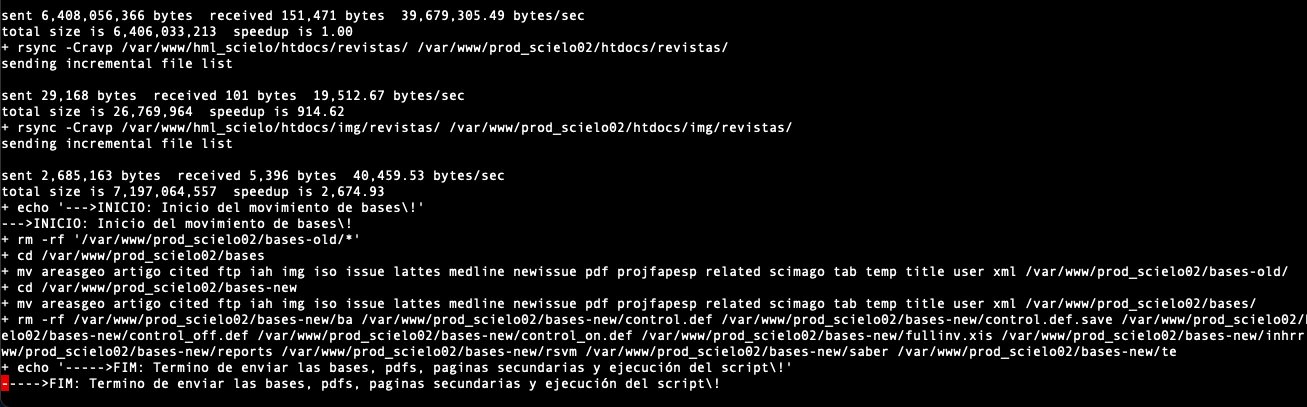
[![Screen Shot 2021-11-09 at 19.36.43.png](https://documentacao.scielo.org/uploads/images/gallery/2021-11/scaled-1680-/screen-shot-2021-11-09-at-19-36-43.png)](https://documentacao.scielo.org/uploads/images/gallery/2021-11/screen-shot-2021-11-09-at-19-36-43.png)
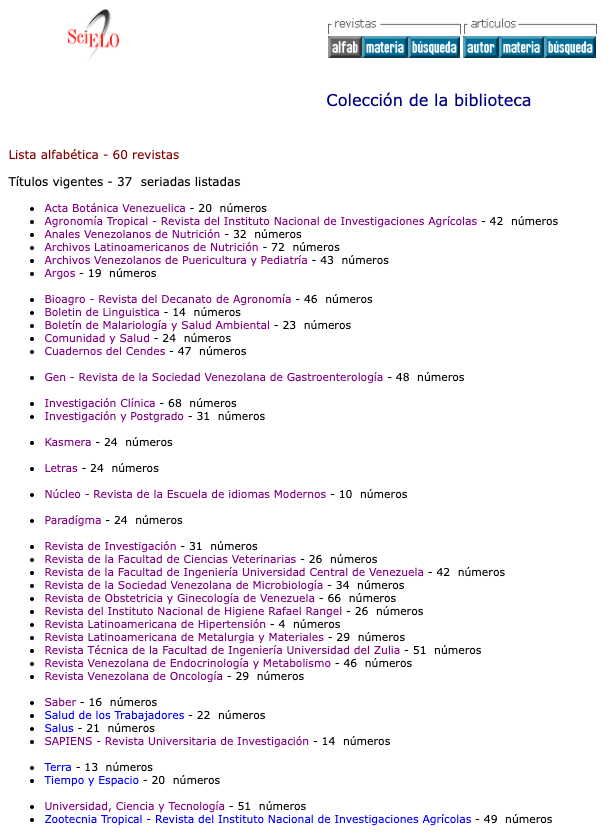
Si es necesario, pudimos revertir la actualización de la siguiente manera:

```
nohup sh -x update_bases.sh rollback &>/var/www/ve_scielo_org/logs-update-sitio/rollback_bases_03112021.log &
```

[![Screen Shot 2021-11-09 at 20.02.50.png](https://documentacao.scielo.org/uploads/images/gallery/2021-11/scaled-1680-/screen-shot-2021-11-09-at-20-02-50.png)](https://documentacao.scielo.org/uploads/images/gallery/2021-11/screen-shot-2021-11-09-at-20-02-50.png)
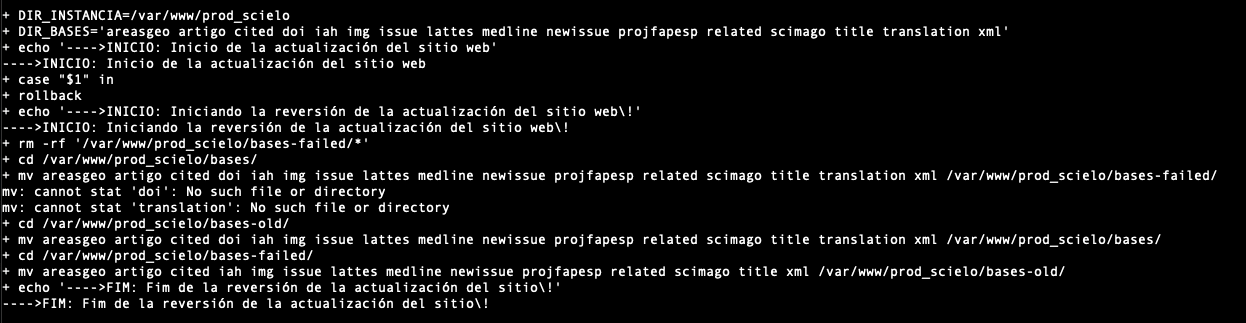
Este procedimiento revertirá las bases del sitio antes del proceso de actualización descrito en **Consulta de registros durante la actualización.**

# SciELO Web (English)

[português](https://documentacao.scielo.org/books/manuais-publicos/page/scielo-web-portugues) | [español](https://documentacao.scielo.org/books/manuais-publicos/page/scielo-web-espanol)

SciELO Web is the web application of [SciELO Methodology](https://github.com/scieloorg/Web/wiki/Scielomethodology-en).

[SciELO PC Programs](https://github.com/scieloorg/PC-Programs/wiki/home) are also part of this methodology.

## Install Guide

### Requirements

Requirements installation guide. [read](https://github.com/scieloorg/Web/wiki/prerequisitos_en)

### Install

SciELO Web Installation guide. [read](https://github.com/scieloorg/Web/wiki/instalacao_en)

Special Configs (XML Google, DOAJ, Crossref DOI, SCIMAGO, etc). [read](https://github.com/scieloorg/Web/wiki/configespec_en)

### Update

Update Guide from SciELO Web Site. [read](https://github.com/scieloorg/Web/wiki/actualizacion_en)

### Mailing List

#### SciELO-Dev

This is the list where the SciELO IT Team can use to discuss about questions and issues, problems and suggestions of enhancements for the SciELO products. This includes current and future features, release schedules, and simply developer discussion of various related topics. All SciELO IT Managers should be subscribed to this list.

[http://groups.google.com/group/scielo-dev](http://groups.google.com/group/scielo-dev)

**How to subscribe:**

To subscribe, send an e-mail to this list: **scielo-dev+subscribe@googlegroups.com**

**How to unsubscribe:**

To unsubscribe, send an e-mail to this list: **scielo-dev+unsubscribe@googlegroups.com**

**How to send a e-mail do SciELO Dev:**

To send an e-mail to this list: **scielo-dev@googlegroups.com**

The archives for this list can also be browsed online.

# Classic SciELO Website with Docker

### HOW TO CONFIGURE LINUX SERVER WITH DOCKER

Installing [docker-compose](https://docs.docker.com/compose/install/)

```shell
 sudo curl -L "https://github.com/docker/compose/releases/download/1.29.2/docker-compose-$(uname -s)-$(uname -m)" -o /usr/local/bin/docker-compose
 sudo chmod +x /usr/local/bin/docker-compose
 sudo ln -s /usr/local/bin/docker-compose /usr/bin/docker-compose
 docker-compose --version
```

Installing [Docker](https://www.digitalocean.com/community/tutorials/how-to-install-and-use-docker-on-rocky-linux-9)

O pacote de instalação do Docker disponível no repositório oficial do Rocky Linux 9 pode não ser a versão mais recente.   
Para obter a versão mais recente e melhor, instale o Docker do repositório oficial do Docker.   
Esta seção mostra como fazer exatamente isso.

Mas primeiro, vamos atualizar o banco de dados de pacotes:

```shell
sudo dnf check-update
```

Em seguida, adicione o repositório oficial do Docker:

```shell
sudo dnf config-manager --add-repo https://download.docker.com/linux/centos/docker-ce.repo
```

Embora não haja um repositório específico do Rocky Linux do Docker, o Rocky Linux é baseado no CentOS e pode usar o mesmo repositório. Com o repositório adicionado, instale o Docker, que é composto de três pacotes:

```shell
sudo dnf install docker-ce docker-ce-cli containerd.io
```

Após a conclusão da instalação, inicie o daemon do Docker:

```shell
sudo systemctl start docker
```

Verifique se está em execução:

```shell
sudo systemctl status docker
```

A saída deve ser semelhante à seguinte, mostrando que o serviço está ativo e em execução:

<div class="secondary-code-label" id="bkmrk-output" title="Output">Output</div>```
● docker.service - Docker Application Container Engine
   Loaded: loaded (/lib/systemd/system/docker.service; enabled; vendor preset: enabled)
   Active: <mark>active (running)</mark> since Sun 2016-05-01 06:53:52 CDT; 1 weeks 3 days ago
     Docs: https://docs.docker.com
 Main PID: 749 (docker)
```

Creating the file docker-compose.yml

```YAML
version: '2'

services:
  metodologia:
    image: infrascielo/classic-site:latest
    environment:
      INSTANCE_NAME: scielo_br
      USER_SUPERVISOR: root
      PASS_SUPERVISOR: toor
      SITE_NAME: www.scielo.br
      USER_FTP: usuario ftp
      PASSWD_FTP: clave del usuario ftp
      USER_PASS: scielo123
      GIT_BRANCH_NAME: scielo_scl
    volumes:
      - /var/www/scielo:/var/www/scielo
      - /var/www/apache:/var/www/apache
      - /etc/localtime:/etc/localtime
    ports:
      - "80:80"
      - "2222:22"
    restart: always

```

##### Necessaries changes:

Please change the variables bellow:

**INSTANCE\_NAME**: This field must be change to the website's domain with undescore. For instance: scielo.org.ve muste be scielo\_org\_ve

**PASS\_SUPERVISOR**: You have to choose a new password. The default is toor. Never leave the default value.

**SITE\_NAME**: This field corresponding to your website.

**USER\_FTP**: This field must be filled up with the user created by SciELO Brasil. If you don't have, you have to request to SciELO Brasil.

**PASSWD\_FTP**: This field must be filled up with the password from ftp user create by SciELO Brasil.

**USER\_PASS**: This field is the password from the user scielo used to do ssh

**GIT\_BRANCH\_NAME**: Each SciELO Collection has its own branch. If you don't have, please use the default scielo\_scl or request your. If you don't know yours, please visit [GitHub SciELO](https://github.com/scieloorg/web)

Required variables: **INSTANCE\_NAME, SITE\_NAME** and **GIT\_BRANCH\_NAME**

##### Volumes changes:

The path /var/www/scielo is the source of your installation.

\- /var/www/scielo:/var/www/scielo

The path /var/www/apache is where will be stored the Apache Logs  
\- /var/www/apache:/var/www/apache

The path /etc/localtime is the file to keep the clock equal from the server.  
\- /etc/localtime:/etc/localtime

##### How to start the container

```shell
docker-compose up -d
```

##### how to stop the container

```shell
docker-compose down
```

##### How to list all containers running

```shell
docker-compose ps
```

### How to upgrade databases, Images and PDFs from SciELO Methodology

<span style="font-weight: 400;">En el Servidor Windows ejecute el programa CMD entre en la carpeta C:\\var\\www\\scielo\\proc digite:</span>

<span style="font-weight: 400;">GeraPadrao.bat</span>

<span style="font-weight: 400;">Espere hasta que termine. Para analizar la generación de las bases hay una carpeta en C:\\var\\www\\scielo\\proc\\log Busque el archivo log GeraPadrao.log</span>

<span style="font-weight: 400;">Obs.: La generación de las bases está condicionada a la existencia de las bases en la carpeta C:\\var\\www\\scielo\\serial y un fichero C:\\var\\www\\scielo\\serial\\scilista.lst. El fichero scilista.lst sigue el padrón: Acrónimo volumen y número </span>

<span style="font-weight: 400;">Ejemplo: </span>

```shell
maskay v6n1
sophia  n22
```

<span style="font-weight: 400;">Una vez que se ve en el navegador el resultado del procesamiento ya es posible enviar las bases, imágenes y pdfs para el servidor de desarrollo. Para enviar los ficheros necesarios usamos el script C:\\PAPERBOY\\paperboy.bat. El resultado del envío es salvo en C:\\PAPERBOY\\logs\\paperboy-scielo.log</span>

<span style="font-weight: 400;">Una vez que enviamos bases, imágenes y pdfs para el servidor de desarrollo tenemos que procesar las bases en el formato linux.</span>

<span style="font-weight: 400;">Sigue los pasos:</span>

- <span style="font-weight: 400;">Acceda al servidor de desarrollo;</span>
- <span style="font-weight: 400;">Ejecute </span>*<span style="font-weight: 400;">docker ps</span>*<span style="font-weight: 400;"> para verificar cuales contenedor está en ejecución;</span>
- <span style="font-weight: 400;">Identificando el CONTAINER ID del contenedor metodología, accedemos a el con el comando: </span>*<span style="font-weight: 400;">docker exec -ti &lt;CONTAINER ID&gt; bash. </span>*<span style="font-weight: 400;">Cambie CONTAINER ID por la secuencia numérica</span>
- <span style="font-weight: 400;">Una vez que estamos dentro del bash del contenedor entre en la carpeta</span>

```shell
$ cd /var/www/scielo/proc/
Ejecute:
$./GeraPadrao.bat
```

<span style="font-weight: 400;">Cuando finalize verifique se el sitio </span>[http://your.domain.scielo](http://your.domain.scielo "http://your.domain.scielo")<span style="font-weight: 400;"> este actualizado</span>

<span style="font-weight: 400;">Si sí vamos enviar las bases procesadas desde este contenedor.</span>

<span style="font-weight: 400;">Ejecute el comando exit para salir desde el contenedor</span>

```shell
$exit
```

<span style="font-weight: 400;">Es importante que la instrucción ahora sea hecha usando el usuário scielo, pues no funciona con el usuario root</span>

```shell
#su - scielo
```

#### Scripts para actualización

atualiza-bases-scielo.sh

```shell
#!/bin/bash
# Script: function.sh - Criação das funções que será utilizado pelo script update_bases.sh
#         para atualizar os arquivos da instância SciELO processada.
# Mantenedor: Rondineli Saad e Fábio Batalha
# Criado em: 08/05/2019
# Versão: 11
# Funcao para atualizar bases:-->
#                               |->$1 Coleção
#                               |->$2 Diretório em /rancher/scielo_ve_data/
#
DIR_INSTANCIA_ORIG="/var/www/scielo"
DIR_INSTANCIA_DEST="/var/www/scielo"
DIR_BASES="artigo areasgeo issue title related cited iah scimago img lattes medline newissue translation"
DATA_ATUAL=`date  +"%d-%m-%Y-%H_%m_%S"`
IP_SERVER="192.168.2.19"

update(){
        echo "Update ScieLO Data"

if [ -e update_bases_scielo-novo.log ]
        then
                mv update_bases_scielo-novo.log update_bases_scielo-novo-${DATA_ATUAL}.log
fi

for j in $DIR_BASES
do
        echo "RSYNC - BASES"
        echo "$j"
        ssh ${IP_SERVER} mkdir ${DIR_INSTANCIA_DEST}/bases-new/${j}
        rsync  -Cravp -e 'ssh' ${DIR_INSTANCIA_OIRG}/bases/${j}/  ${IP_SERVER}:${DIR_INSTANCIA_DEST}/bases-new/${j}/ 2>> update_bases_scielo_br-novo.log
done

echo "Atualizando os pdfs"
rsync  -Cravp -e 'ssh' ${DIR_INSTANCIA_ORIG}/bases/pdf/  ${IP_SERVER}:${DIR_INSTANCIA_DEST}/bases/pdf/ 2>> update_bases_scielo-novo.log


echo "Copiando Páginas Secundárias"
rsync -Cravp -e 'ssh' ${DIR_INSTANCIA_ORIG}/htdocs/img/revistas/  ${IP_SERVER}:${DIR_INSTANCIA_DEST}/htdocs/img/revistas/ 2>> update_bases_scielo-novo.log
rsync -Cravp -e 'ssh' ${DIR_INSTANCIA_ORIG}/htdocs/revistas/      ${IP_SERVER}:${DIR_INSTANCIA_DEST}/htdocs/revistas/ 2>> update_bases_scielo_br.log

#echo "--->Execução do Script de Distribuição da base e Movimentação das bases"
ssh ${IP_SERVER} sh /var/www/educa_fcc_org_br/scripts/data-scielo.sh update  2>> update_bases_scielo-novo.log

echo "-----> FIM: Termino do envio da Bases, PDF, Páginas Secundária e execução do updateScielo-data-MOVE.sh" 2>> update_bases_scielo-novo.log
}

rollback(){
ssh ${IP_SERVER} sh /var/www/scielo/scripts/data-scielo.sh rollback  2>> update_bases_scielo-novo.log
}

case "$1" in
        update)
                update
                ;;
        rollback)
                rollback
                ;;
        *)
                echo "Option not valid: update, rollback"
                ;;
esac
```

data-scielo.sh

```shell
#!/bin/sh
update(){
  rm -rf /var/www/scielo/bases-old/*
  cd /var/www/scielo/bases
  mv areasgeo artigo  cited  iah  img  issue  lattes  medline  newissue related  title translation scimago /var/www/scielo/bases-old/
  mv /var/www/scielo/bases-new/* /var/www/scielo/bases/
  echo "---->FIM: SciELO Atualizado com êxito\!" 
}

rollback(){
  rm -rf /var/www/scielo/bases-failed/*
  cd /var/www/scielo/bases
  mv areasgeo artigo  cited  iah  img  issue  lattes  medline  newissue related  title translation scimago /var/www/scielo/bases-failed
  cd /var/www/scielo/bases-old/
  mv areasgeo artigo  cited  iah  img  issue  lattes  medline  newissue related  title translation scimago /var/www/scielo/bases
}

case "$1" in
        update)
                update
                ;;
        rollback)
                rollback
                ;;
        *)
                echo "Option not valid: update, rollback"
                ;;
esac
```

<span style="font-weight: 400;">Para actualizar el servidor de producción con las nuevas bases procesadas haga:</span>

```shell
Ejecute:
$./atualiza-bases-scielo.sh update
Si en el sitio no aparece ninguna revista o si quieres volver a la base antigua, ejecute:
$./atualiza-bases-scielo.sh rollback
```

#### <span style="font-weight: 400;">Como comprimir los Logs Apaches del servidor de producción y enviar para el servidor FTP de SciELO</span>

##### <span style="font-weight: 400;">Cómo ejecutar el script de compactación de logs:</span>

```shell
Manualmente: 
/usr/bin/docker exec -ti root_metodologia_1 /bin/bash /scripts/compacta_log.sh
```

##### <span style="font-weight: 400;">Cómo crear el servicio systemd para enviar los logs de Apache automáticamente</span>

<span style="font-weight: 400;">Descargue el fichero modelo en el servidor de producción usando el usuário root:</span>

```shell
#cd /etc/systemd/system/
#wget https://gist.githubusercontent.com/rondinelisaad/f0eca737640b60b88138ddc686afaa2d/raw/0348b32b5338fff3c1d1610821768c31f637fc2c/compacta.service
```

<span style="font-weight: 400;">Sigue el contenido del fichero /etc/systemd/system/compacta.service</span>

```shell
[Unit]
Description=Compactación de los LOGs Apaches
Documentation=
After=docker.service
Requires=docker.service

[Service]
TimeoutSec=0

ExecStart=/bin/sh -c '\
   /usr/bin/docker exec -ti metodologia_metodologia_1 /bin/bash /scripts/compacta_log.sh'

[Install]
WantedBy=multi-user.target 
```

<span style="font-weight: 400;">Descargue el segundo fichero:</span>

```shell
#cd /etc/systemd/system/
# wget https://gist.githubusercontent.com/rondinelisaad/743813e0be3315220bcdf35acf971157/raw/6b8cac576126ed366120f3c536a3d27da4003926/compacta.timer
```

<span style="font-weight: 400;">Sigue el contenido del fichero /etc/systemd/system/compacta.timer:</span>

```shell
[Unit]
Description=Execute backup every day at midnight

[Timer]
OnCalendar=*-*-* 00:00:00
Unit=compacta.service

[Install]
WantedBy=multi-user.target
```

<span style="font-weight: 400;">Iniciar los servicios:</span>

```shell
#systemctl enable compacta.timer
#systemctl start compacta.timer
```

<span style="font-weight: 400;">Valide si el script está agendado:</span>

```shell
# systemctl is-enabled compacta.timer
```

<span style="font-weight: 400;">Ejecute manualmente el servicio:</span>

```shell
# systemctl start compacta
```

#### <span style="font-weight: 400;">Configurando el paperboy para enviar una vez por semana las bases iso</span>

<span style="font-weight: 400;">Es importante que configure una vez por semana y siempre después del procesamiento de las bases.</span>

<span style="font-weight: 400;">Descargue el fichero config.ini en el servidor de desarrollo</span>

```shell
#cd /root
#wget https://raw.githubusercontent.com/scieloorg/paperboy/master/config.ini-TEMPLATE
# mv config.ini-TEMPLATE config.ini
```

<span style="font-weight: 400;">Configure el fichero con las credenciales del servidor ftp.scielo.br. Sigue con deberia configurarlo:  
</span>

```shell
[app:main]

## Full path to the source directory where the SciELO site is installed. It must 
## contains the directories proc, bases, htdocs, cgi-bin, serial.
source_dir=/var/www/scielo

## Full path to the CISIS utilitaries. It is usually installed on the directory
## proc/cisis of the SciELO Site.
cisis_dir=/var/www/scielo/proc/cisis

## Full path to the scilista.lst file. It is usually available at the directory
## and file serial/scilista.lst
scilista=/var/www/scielo/serial/scilista.lst

## Full path to the destiny folder in the server side. It is usually the path
## to the SciELO Site in the server. When sending data to SciELO is must be 
## commented or empty on the FTP will login the user to the correct path.
#destiny_dir=

## FTP or SFTP credentials
## The protocol will be defined by the server_type ['ftp', 'sftp']
server=ftp.scielo.br
server_type=ftp
port=21
user=usuario ftp
password=clave

```

<span style="font-weight: 400;">Manualmente ejecute:</span>

```shell
docker run --rm -v /var/www/scielo:/var/www/scielo -v ~/config.ini:/app/config.ini scieloorg/paperboy:stable paperboy_delivery_to_scielo
```

<span style="font-weight: 400;">Configurando systemd</span>

```shell
#cd /etc/systemd/system
#wget https://gist.githubusercontent.com/rondinelisaad/a4c25bd876de186b43938dd2148f9a7c/raw/53418856574f9b3fe1910951b6c94376e0769f9d/paperboy.service
#wget https://gist.githubusercontent.com/rondinelisaad/154aa2249f6bfb2b992a207f25f357c4/raw/b319904234abd11fd46721a3b8a9d83eece3ff32/paperboy.timer
#systemctl enable paperboy.timer
#systemctl start paperboy.timer
#systemctl is-enabled paperboy.timer 
#systemctl list-timers
```

#### <span style="font-weight: 400;">Como actualizar la versión del código de la metodologia SciELO</span>

<span style="font-weight: 400;">Accender al nuestro repositório Git ([https://github.com/scieloorg/web](https://github.com/scieloorg/web))</span>

<span style="font-weight: 400;">Cambiar al Branch de vuestra collección  
</span>

[![image-1630350810792.png](https://documentacao.scielo.org/uploads/images/gallery/2021-08/scaled-1680-/image-1630350810792.png)](https://documentacao.scielo.org/uploads/images/gallery/2021-08/image-1630350810792.png)

[![image-1630350824882.png](https://documentacao.scielo.org/uploads/images/gallery/2021-08/scaled-1680-/image-1630350824882.png)](https://documentacao.scielo.org/uploads/images/gallery/2021-08/image-1630350824882.png)

<span style="font-weight: 400;">Haga download del fichero ZIP</span>

[![image-1630350858065.png](https://documentacao.scielo.org/uploads/images/gallery/2021-08/scaled-1680-/image-1630350858065.png)](https://documentacao.scielo.org/uploads/images/gallery/2021-08/image-1630350858065.png)

<span style="font-weight: 400;">En el servidor Linux, baje el fichero zip </span><span style="font-weight: 400;"> en una carpeta temporária y ejecute los comandos abajo:</span>

<span style="font-weight: 400;">Ojos: Para el ejemplo abajo usamos el branch scielo\_ecu. O sea, se vuestra collección no es de Ecuador no la use. Busque por la tuya.</span>

```shell
cd /tmp
wget https://github.com/scieloorg/Web/archive/scielo_ecu.zip
unzip scielo_ecu.zip
La carpeta Web-scielo_ecu fue creada
cd Web-scielo_ecu
rsync -Cravp cgi-bin/ /var/www/scielo/cgi-bin/
rsync -Cravp proc/ /var/www/scielo/proc/
rsync -Cravp htdocs/ /var/www/scielo/htdocs/
```

<span style="font-weight: 400;">Una vez actualizado valide la versión. Ojo: Para el ejemplo abajo usamos el sitio del Ecuador. O sea, replaze por lo tuyo.  
</span>

[<span style="font-weight: 400;">http://scielo.senescyt.gob.ec/versionOverview.txt</span>](http://scielo.senescyt.gob.ec/versionOverview.txt)

<span style="font-weight: 400;">Ojo: La versión deberá ser igual a la que está em </span>[<span style="font-weight: 400;">https://github.com/scieloorg/Web/blob/ecu/htdocs/versionOverview.txt</span>](https://github.com/scieloorg/Web/blob/ecu/htdocs/versionOverview.txt)

<span style="font-weight: 400;">No es necesario reiniciar el Docker.</span>

#### Enlaces de Referencias:

[<span style="font-weight: 400;">https://www.certdepot.net/rhel7-use-systemd-timers/</span>](https://www.certdepot.net/rhel7-use-systemd-timers/)

# SciELO Methodology installation on Rocky 8

# <span style="font-weight: 400;">Linux installation</span>

## <span style="font-weight: 400;">REQUIREMENTS</span>

<span style="font-weight: 400;">Hardware Configuration:</span>

<span style="font-weight: 400;">8GB RAM minimum</span>

<span style="font-weight: 400;">8 vCPU </span>

<span style="font-weight: 400;">150GB HD</span>

<span class="s1">Rocky Linux release 8.4 (Green Obsidian)</span>

**Apache 2.2.34**

**PHP 5.2.10 or 5.2.17 (required)**

**PHP Modules**

- <span style="font-weight: 400;">libpng</span>
- <span style="font-weight: 400;">soap</span>
- <span style="font-weight: 400;">zlib</span>
- <span style="font-weight: 400;">XSL</span>
- <span style="font-weight: 400;">XML</span>

### <span style="font-weight: 400;">Installing build subsystem</span>

```shell
yum install -y perl make wget gcc libxml2-devel openssl openssl-devel openssl-libs curl libcurl-devel libjpeg-turbo-devel libpng-devel freetype-devel libxslt libxslt-devel expat-devel patch wget glibc.i686 zlib-devel curl-devel
```

### <span style="font-weight: 400;">Installing EPEL Repository to install mcrypt</span>

```shell
# yum install epel-release
# yum install libmcrypt-devel
```

### <span style="font-weight: 400;">Installing Apache 2.2.34 from source</span>

**Getting source code**

```shell
wget -O /usr/src/httpd-2.2.34.tar.gz  https://archive.apache.org/dist/httpd/httpd-2.2.34.tar.gz
```

<span style="font-weight: 400;">Uncompress</span>

```shell
# cd /usr/src
# tar -zxvf httpd-2.2.34.tar.gz
```

**Configure**

```shell
cd httpd-2.2.34
./configure --prefix=/usr --enable-layout=RedHat --enable-mods-shared=all 
```

**Compile and install**

```shell
make
make install
```

### <span style="font-weight: 400;">Installing PHP 5.2.17 from source</span>

<span style="font-weight: 400;">It is very important to use this version because php 5.2.17 doesn't work with nealy versions.</span>

**Getting source code**

```shell
wget -O /usr/src/php-5.2.17.tar.gz http://museum.php.net/php5/php-5.2.17.tar.gz --no-check-certificate
```

**Uncompress**<span style="font-weight: 400;"> </span>

```shell
# cd /usr/src
# tar -zxvf php-5.2.17.tar.gz 
# cd php-5.2.17
```

**Patching** <span style="font-weight: 400;"> </span>

[<span style="font-weight: 400;">https://stackoverflow.com/questions/28211039/phpbrew-5-3-10-build-error-dereferencing-pointer-to-incomplete-type/34107461</span>](https://stackoverflow.com/questions/28211039/phpbrew-5-3-10-build-error-dereferencing-pointer-to-incomplete-type/34107461)

```shell
curl -s https://mail.gnome.org/archives/xml/2012-August/txtbgxGXAvz4N.txt | patch -p0
Result:
patching file ext/dom/node.c
Hunk #1 succeeded at 1950 (offset 55 lines).
patching file ext/dom/documenttype.c
Hunk #1 succeeded at 215 (offset 10 lines).
patching file ext/simplexml/simplexml.c
Hunk #1 succeeded at 1343 (offset -74 lines).
```

**Configure**

```shell
./configure --prefix=/usr --exec-prefix=/usr --bindir=/usr/bin --sbindir=/usr/sbin --sysconfdir=/etc --datadir=/usr/share --includedir=/usr/include --libdir=/usr/lib64 --libexecdir=/usr/libexec --localstatedir=/var --sharedstatedir=/usr/com --mandir=/usr/share/man --infodir=/usr/share/info --cache-file=../config.cache --with-libdir=lib64 --with-config-file-path=/etc --with-config-file-scan-dir=/etc/php.d --with-pic --disable-rpath --without-pear --with-bz2 --with-curl --with-exec-dir=/usr/bin --with-freetype-dir=/usr --with-png-dir=/usr --enable-gd-native-ttf --without-gdbm --with-gettext --with-iconv --with-jpeg-dir=/usr --without-openssl --with-zlib --with-layout=Redhat --enable-exif --enable-ftp --enable-magic-quotes --enable-sockets --enable-wddx  --without-mime-magic --without-sqlite --with-libxml-dir=/usr --with-apxs2=/usr/sbin/apxs --without-mysql --disable-dom --disable-dba --without-unixODBC --disable-pdo --disable-xmlreader --disable-xmlwriter --disable-json -with-xsl --enable-dom
```

**Compile and install**

```shell
make
make install
```

<span style="font-weight: 400;">Copie o arquivo php.ini-recommended para /etc/php.ini</span>

```shell
# cp php.ini-recommended /etc/php.ini
```

<span style="font-weight: 400;">Ajuste o arquivo, modificando e depois reinicie o Apache:</span>

```shell
# vi /etc/php.ini
display_errors = Off
short_open_tag = On
```

**Creating a symbolic link for modules**

```shell
# ln -s /lib /etc/httpd/lib
```

**Configure Apache**

```shell
$ echo '
<FilesMatch "\.php$">
  SetHandler application/x-httpd-php
</FilesMatch>
' >> /etc/httpd/conf/httpd.conf
```

**Creating a system unit**

```shell
# vi /etc/systemd/system/httpd.service
[Unit]
Description=Apache Web Server
After=network.target remote-fs.target nss-lookup.target

[Service]
Type=forking
PIDFile=/run/httpd.pid
ExecStart=/usr/sbin/apachectl start
ExecStop=/usr/sbin/apachectl graceful-stop
ExecReload=/usr/sbin/apachectl graceful
PrivateTmp=true
LimitNOFILE=infinity

[Install]
WantedBy=multi-user.target

Save the file and run the follow commands

# systemctl daemon-reload
# systemctl enable --now httpd
```

# <span style="font-weight: 400;">Installation of the SciELO Methodology</span>

<span style="font-weight: 400;">Following </span>

[<span style="font-weight: 400;">http://docs.scielo.org/projects/scielo-site/en/latest/howtoinstall.html</span>](http://docs.scielo.org/projects/scielo-site/en/latest/howtoinstall.html)

<span style="font-weight: 400;">In the link above, there is instruccion to download the respective branch from your collection. If you are a new collection and you don't have a branch, you can clone the master.</span>

<span style="font-weight: 400;">The process below corresponds to Portugal's branch. If you are from another country it is very important to choose yours. It is important to read the link above to understand what is necessary to change.</span>

<span style="font-weight: 400;">For version control we use GitHub, where Tags correspond to the versions of the site.</span>

<span style="font-weight: 400;">Check the TAGs here: </span>[<span style="font-weight: 400;">SciELO’s GitHub</span>](https://github.com/scieloorg/Web/tags)

[![Screenshot at Aug 05 10-36-40.png](https://documentacao.scielo.org/uploads/images/gallery/2021-08/scaled-1680-/screenshot-at-aug-05-10-36-40.png)](https://documentacao.scielo.org/uploads/images/gallery/2021-08/screenshot-at-aug-05-10-36-40.png)

<span style="font-weight: 400;">Check the branch of the current version by region and country. See the table at the link below:</span>

[<span style="font-weight: 400;">Branch name for each collection</span>](http://docs.scielo.org/projects/scielo-site/en/latest/network.html)

<span style="font-weight: 400;">[![Screenshot at Aug 05 10-38-13.png](https://documentacao.scielo.org/uploads/images/gallery/2021-08/scaled-1680-/screenshot-at-aug-05-10-38-13.png)](https://documentacao.scielo.org/uploads/images/gallery/2021-08/screenshot-at-aug-05-10-38-13.png)</span>

<span style="font-weight: 400;">Example:</span>

<span style="font-weight: 400;">If there is no branch for your collection, we ask that you let us know.</span>

## <span style="font-weight: 400;">Download the specific version of the SciELO methodology</span>

<span style="font-weight: 400;">There are two ways to download: one through the tarball file and the other through the zip file.</span>

### <span style="font-weight: 400;">ZIP File</span>

<span style="font-weight: 400;">Download:</span>

```shell
wget https://github.com/scieloorg/Web/zipball/<versão_da_tag>
```

<span style="font-weight: 400;">Example:</span>

```shell
wget https://github.com/scieloorg/Web/archive/master.zip
```

<span style="font-weight: 400;">After extracting the files, a directory will be created with the name Web-master</span>

```shell
Web-master
```

<span style="font-weight: 400;">Enter the directory and move the content extracted to "</span><span style="font-weight: 400;">/var/www/scielo</span><span style="font-weight: 400;">”:</span>

## <span style="font-weight: 400;">Installation of the CISIS package</span>

```shell
wget ftp://produtos-scielo:produtos%40scielo@ftp.scielo.br/cisis-product/cisis.zip
```

<span style="font-weight: 400;">Extract the contents in the directory:</span>

```shell
cd /var/www/scielo/proc/
unzip cisis.zip
```

<span style="font-weight: 400;">The CISIS directory will look like this:</span>

<span style="font-weight: 400;">Delete the downloaded .zip file</span>

<span style="font-weight: 400;">To test operation:</span>

```shell
mx what
```

<span style="font-weight: 400;">Result:</span>

## <span style="font-weight: 400;">Installation of the WWWISIS package</span>

```shell
cd /var/www/scielo/cgi-bin
wget ftp://produtos-scielo:produtos%40scielo@ftp.scielo.br/cisis-product/wxis.exe
```

# <span style="font-weight: 400;">To test:</span>

```shell
./wxis.exe hello
```

# <span style="font-weight: 400;">Configuring the httpd.conf file</span>

<span style="font-weight: 400;">Edit the file:</span>

```shell
vi /etc/httpd/conf/httpd.conf
```

<span style="font-weight: 400;">In the end of the file add the line:</span>

<table id="bkmrk-%23-virtual-hosts-incl"><tbody><tr><td>*<span style="font-weight: 400;">\# Virtual hosts</span>*

*<span style="font-weight: 400;">Include /etc/httpd/conf.d/vhosts</span>*

</td></tr></tbody></table>

<span style="font-weight: 400;">Enter the directory indicated below:</span>

<table id="bkmrk-mkdir-%2Fetc%2Fhttpd%2Fcon"><tbody><tr><td>*<span style="font-weight: 400;">mkdir /etc/httpd/conf.d/vhosts</span>*

</td></tr></tbody></table>

<span style="font-weight: 400;">Enter the directory indicated below and create the file below:</span>

<table id="bkmrk-cd-%2Fetc%2Fhttpd%2Fconf.d"><tbody><tr><td>*<span style="font-weight: 400;">cd /etc/httpd/conf.d/vhosts</span>*

*<span style="font-weight: 400;">vi </span><span style="font-weight: 400;">vhosts.conf</span>*

  
***add the follow content:***

  
*<span style="font-weight: 400;">NameVirtualHost &lt;server ip&gt;:80</span>*

  
***It is important to replace &lt;server ip&gt; to the real ip from machine***

</td></tr></tbody></table>

<span style="font-weight: 400;">In the same directory create another file. The name is related to your instance. For instance, if you are from Bolivia the name will be scielo-org-bo.conf. I will use this name as template:</span>

<table id="bkmrk-%23-vi-scielo-org-bo.c"><tbody><tr><td><span style="font-weight: 400;">\# vi scielo-org-bo.conf</span>

  
<span style="font-weight: 400;">&lt;VirtualHost \*:80&gt;</span>

<span style="font-weight: 400;"> ServerName vm.scielo.br</span>

<span style="font-weight: 400;"> Alias /pdf/ /var/www/scielo/bases/pdf/</span>

<span style="font-weight: 400;"> Alias /img/fbpe/ /var/www/scielo/htdocs/img/revistas/</span>

<span style="font-weight: 400;"> Alias /img/scimago/ /var/www/scielo/bases/scimago/images/</span>

<span style="font-weight: 400;"> LimitRequestFieldSize 9000</span>

<span style="font-weight: 400;"> LimitRequestLine 9000</span>

<span style="font-weight: 400;"> DocumentRoot /var/www/scielo/htdocs</span>

<span style="font-weight: 400;"> DirectoryIndex scielo.php index.php index.html index.htm</span>

<span style="font-weight: 400;"> &lt;Directory /var/www/scielo/htdocs&gt;</span>

<span style="font-weight: 400;"> Options FollowSymLinks MultiViews</span>

<span style="font-weight: 400;"> Order deny,allow</span>

<span style="font-weight: 400;"> AcceptPathInfo On</span>

<span style="font-weight: 400;"> Allow from all</span>

<span style="font-weight: 400;"> &lt;/Directory&gt;</span>

<span style="font-weight: 400;"> &lt;Directory /var/www/scielo/bases/pdf/&gt;</span>

<span style="font-weight: 400;"> Options FollowSymLinks MultiViews</span>

<span style="font-weight: 400;"> Order deny,allow </span>

<span style="font-weight: 400;"> AcceptPathInfo On</span>

<span style="font-weight: 400;"> Allow from all</span>

<span style="font-weight: 400;"> &lt;/Directory&gt;</span>

<span style="font-weight: 400;"> &lt;Directory /var/www/scielo/bases/scimago/images/&gt;</span>

<span style="font-weight: 400;"> Options FollowSymLinks MultiViews</span>

<span style="font-weight: 400;"> Order deny,allow</span>

<span style="font-weight: 400;"> AcceptPathInfo On</span>

<span style="font-weight: 400;"> Allow from all</span>

<span style="font-weight: 400;"> &lt;/Directory&gt;</span>

<span style="font-weight: 400;"> &lt;FilesMatch "\\.(def)$"&gt;</span>

<span style="font-weight: 400;"> Order allow,deny</span>

<span style="font-weight: 400;"> Allow from all</span>

<span style="font-weight: 400;"> Satisfy All</span>

<span style="font-weight: 400;"> &lt;/FilesMatch&gt;</span>

<span style="font-weight: 400;"> ScriptAlias /cgi-bin/ /var/www/scielo/cgi-bin/</span>

<span style="font-weight: 400;"> &lt;Directory /var/www/scielo/cgi-bin/&gt;</span>

<span style="font-weight: 400;"> AddDefaultCharset ISO-8859-1</span>

<span style="font-weight: 400;"> Options FollowSymLinks MultiViews ExecCGI</span>

<span style="font-weight: 400;"> AcceptPathInfo On</span>

<span style="font-weight: 400;"> Order deny,allow</span>

<span style="font-weight: 400;"> Allow from all</span>

<span style="font-weight: 400;"> &lt;/Directory&gt;</span>

  
<span style="font-weight: 400;"> ErrorLog "|/usr/sbin/rotatelogs -l /var/www/apache/%Y-%m-%d+scielo-br-error.log 5M"</span>

<span style="font-weight: 400;"> CustomLog "| /usr/sbin/rotatelogs -l /var/www/apache/%Y-%m-%d+scielo-br-access.log 5M" combined</span>

<span style="font-weight: 400;">&lt;/VirtualHost&gt;</span>

</td></tr></tbody></table>

<span style="font-weight: 400;">Some fields you have to replace:</span>

<table id="bkmrk-servername---corresp"><tbody><tr><td>**ServerName**<span style="font-weight: 400;"> - corresponding to the domain name. Example: </span>[<span style="font-weight: 400;">www.scielo.org.bo</span>](http://www.scielo.org.bo)

**ErrorLog**<span style="font-weight: 400;"> - corresponding to the log file error. Replace from this template scielo-br to the name of you instance. Example: scielo-org-bo</span>

**CustomLog**<span style="font-weight: 400;"> - corresponding to the log file acess. Replace from this template scielo-br to the name of you instance. Example: scielo-org-bo</span>

  
<span style="font-weight: 400;">NOTES: You have to create the directory /var/www/apache to save the files created. Run the command:</span>

<span style="font-weight: 400;">mkdir /var/www/apache</span>

</td></tr></tbody></table>

# <span style="font-weight: 400;">Mandatory settings</span>

## <span style="font-weight: 400;">Configuring the scielo.def.php file</span>

<span style="font-weight: 400;">Below we will show the mandatory configurations for the SciELO Methodology to work.</span><span style="font-weight: 400;">  
</span><span style="font-weight: 400;">Copy the template file "scielo.def.php.template" to your configuration file "scielo.def.php".</span>

<span style="font-weight: 400;">Enter the directory:</span>

<table id="bkmrk-cd-%2Fvar%2Fwww%2Fscielo%2Fh"><tbody><tr><td>*<span style="font-weight: 400;">cd /var/www/scielo/htdocs/</span>*

</td></tr></tbody></table>

<span style="font-weight: 400;">Copy:</span>

<table id="bkmrk-cp-scielo.def.php.te"><tbody><tr><td><span style="font-weight: 400;">cp </span>**scielo.def.php.template**<span style="font-weight: 400;"> </span><span style="font-weight: 400;">scielo.def.php</span>

</td></tr></tbody></table>

<span style="font-weight: 400;">Edit the file as shown in the following example:</span>

<table id="bkmrk-vi-scielo.def.php"><tbody><tr><td>*<span style="font-weight: 400;">vi scielo.def.php</span>*

</td></tr></tbody></table>

<span style="font-weight: 400;">This file is separated into blocks \[BLOCK\_NAME\], and by default the configured paths point to “/home/scielo”. It is necessary to replace /home/scielo to /var/www/scielo.</span>

<table id="bkmrk-esc-%3A%25s%2F%5C%2Fhome%5C%2Fscie"><tbody><tr><td><span style="font-weight: 400;">ESC :%s/\\/home\\/scielo/\\/var\\/www\\/scielo/g</span>

</td></tr></tbody></table>

**Site identification settings**

<table id="bkmrk-%5Bsite_info%5D-site_nam"><tbody><tr><td>*<span style="font-weight: 400;">\[SITE\_INFO\]</span>*

*<span style="font-weight: 400;">SITE\_NAME=SciELO - Scientific Electronic Library Online</span>*

*<span style="font-weight: 400;">SHORT\_NAME=Scielo Brazil</span>*

*<span style="font-weight: 400;">SITE\_AUTHOR=FAPESP - CNPq - FapUNIFESP - BIREME</span>*

*<span style="font-weight: 400;">ADDRESS\_1=R. Dr. Diogo de Faria, 1087 cj.810</span>*

*<span style="font-weight: 400;">ADDRESS\_2=04037-003 - Sao Paulo/SP</span>*

*<span style="font-weight: 400;">COUNTRY=Brasil</span>*

*<span style="font-weight: 400;">PHONE\_NUMBER=+55 11 3369-4080/4085</span>*

*<span style="font-weight: 400;">\#FAX\_NUMBER=+55 11 5575-8868</span>*

*<span style="font-weight: 400;">E\_MAIL=scielo@bireme.br</span>*

*<span style="font-weight: 400;">STANDARD\_LANG=en</span>*

*<span style="font-weight: 400;">APP\_NAME=scielo</span>*

*<span style="font-weight: 400;">ANALYTICS\_CODE=scl</span>*

</td></tr></tbody></table>

**APP\_NAME and ANALYTICS\_CODE, are parameters provided by the SciELO team.**

<table id="bkmrk-%5Bscielo%5D-server_scie"><tbody><tr><td>*<span style="font-weight: 400;">\[SCIELO\]</span>*

*<span style="font-weight: 400;">SERVER\_SCIELO=vm.scielo.br</span>*

  
*<span style="font-weight: 400;">\[FULLTEXT\_SERVICES\]</span>*

*<span style="font-weight: 400;">access="http://vm.scielo.br/applications/scielo-org/pages/services/articleRequestGraphicPage.php?pid=PARAM\_PID&amp;caller=PARAM\_SERVER"</span>*

*<span style="font-weight: 400;">cited\_SciELO="http://vm.scielo.br/scieloOrg/php/citedScielo.php?pid=PARAM\_PID"</span>*

*<span style="font-weight: 400;">send\_mail="http://vm.scielo.br/applications/scielo-org/pages/services/sendMail.php?pid=PARAM\_PID&amp;caller=PARAM\_SERVER"</span>*

</td></tr></tbody></table>

**Now we will point the block \[PATH\] to the path of the application, as stated earlier**

<table id="bkmrk-%5Bpath%5D-path_data%3D%2F-p"><tbody><tr><td>*<span style="font-weight: 400;">\[PATH\]</span>*

  
*<span style="font-weight: 400;">PATH\_DATA=/</span>*

*<span style="font-weight: 400;">PATH\_CGI-BIN=/cgi-bin/</span>*

*<span style="font-weight: 400;">PATH\_SCRIPTS=ScieloXML/</span>*

*<span style="font-weight: 400;">PATH\_GENIMG=/img/</span>*

*<span style="font-weight: 400;">PATH\_SERIMG=/img/revistas/</span>*

*<span style="font-weight: 400;">PATH\_SERIAL\_HTML=/revistas/</span>*

*<span style="font-weight: 400;">PATH\_XSL=</span><span style="font-weight: 400;">/var/www/scielo</span><span style="font-weight: 400;">/htdocs/xsl/</span>*

*<span style="font-weight: 400;">PATH\_DATABASE=</span><span style="font-weight: 400;">/var/www/scielo</span><span style="font-weight: 400;">/bases/</span>*

*<span style="font-weight: 400;">PATH\_SETTINGS=</span>*

*<span style="font-weight: 400;">PATH\_PDF=</span><span style="font-weight: 400;">/var/www/scielo</span><span style="font-weight: 400;">/bases/pdf</span>*

*<span style="font-weight: 400;">PATH\_TRANSLATION=</span><span style="font-weight: 400;">/var/www/scielo/</span><span style="font-weight: 400;">bases/translation/</span>*

*<span style="font-weight: 400;">PATH\_HTDOCS=</span><span style="font-weight: 400;">/var/www/scielo</span><span style="font-weight: 400;">/htdocs/</span>*

*<span style="font-weight: 400;">PATH\_OAI=</span><span style="font-weight: 400;">/var/www/scielo</span><span style="font-weight: 400;">/htdocs/oai/</span>*

*<span style="font-weight: 400;">PATH\_PROC=</span><span style="font-weight: 400;">/var/www/scielo/</span><span style="font-weight: 400;">proc/</span>*

</td></tr></tbody></table>

## <span style="font-weight: 400;">Configuring the iah.def file</span>

<span style="font-weight: 400;">Copy the template file “iah.def.php.template” to your configuration file “iah.def.php”.</span>

<span style="font-weight: 400;">Enter the directory:</span>

<table id="bkmrk-%2Fvar%2Fwww%2Fscielo%2Fhtdo"><tbody><tr><td>*<span style="font-weight: 400;">/var/www/scielo/htdocs/iah</span>*

</td></tr></tbody></table>

<span style="font-weight: 400;">Copy:</span>

<table id="bkmrk-cp-iah.def.php.templ"><tbody><tr><td>**cp iah.def.php.template** <span style="font-weight: 400;">iah.def.php</span>

</td></tr></tbody></table>

<span style="font-weight: 400;">Edit the file as shown in the following example:</span>

<table id="bkmrk-iah.def.php"><tbody><tr><td>*<span style="font-weight: 400;">iah.def.php</span>*

</td></tr></tbody></table>

<span style="font-weight: 400;">This file is separated into blocks \[BLOCK\_NAME\], and by default the configured paths point to “/home/scielo”. We will make the move to the location where the application “/var/www/scielo” is, see the examples separated by blocks:</span>

<span style="font-weight: 400;">The blocks that must be changed are:</span>

<span style="font-weight: 400;">\[PATH\]</span>

<span style="font-weight: 400;">\[IAH\]</span>

<span style="font-weight: 400;">\[HEADER\]</span>

<span style="font-weight: 400;">For instance:</span>

<table id="bkmrk-%5Bpath%5D-path_data%3D%2Fia"><tbody><tr><td>*<span style="font-weight: 400;">\[PATH\]</span>*

*<span style="font-weight: 400;">PATH\_DATA=/iah/</span>*

*<span style="font-weight: 400;">PATH\_CGI-BIN=</span><span style="font-weight: 400;">/var/www/scielo</span><span style="font-weight: 400;">/cgi-bin/iah/</span>*

*<span style="font-weight: 400;">PATH\_DATABASE=</span><span style="font-weight: 400;">/var/www/scielo</span><span style="font-weight: 400;">/bases/</span>*

  
*<span style="font-weight: 400;">\[APPEARANCE\]</span>*

*<span style="font-weight: 400;">BODY BACKGROUND COLOR=white</span>*

*<span style="font-weight: 400;">BODY BACKGROUND IMAGE=</span>*

*<span style="font-weight: 400;">BODY TEXT COLOR=black</span>*

*<span style="font-weight: 400;">BODY LINK COLOR=blue</span>*

*<span style="font-weight: 400;">BODY VLINK COLOR=blue</span>*

*<span style="font-weight: 400;">BAR BACKGROUND COLOR=#B0C2D5</span>*

*<span style="font-weight: 400;">BAR TEXT COLOR=black</span>*

*<span style="font-weight: 400;">ERROR TEXT COLOR=</span>*

*<span style="font-weight: 400;">WARNING TEXT COLOR=</span>*

  
*<span style="font-weight: 400;">\[HEADER\]</span>*

*<span style="font-weight: 400;">LOGO IMAGE=scielog.gif</span>*

*<span style="font-weight: 400;">LOGO TEXT COLOR=</span>*

*<span style="font-weight: 400;">LOGO BACKGROUND COLOR=</span>*

*<span style="font-weight: 400;">LOGO URL=www.scielo.br</span>*

*<span style="font-weight: 400;">HEADER IMAGE=^ponlinep.gif^eonlinee.gif^ionlinei.gif</span>*

*<span style="font-weight: 400;">HEADER TEXT COLOR=</span>*

*<span style="font-weight: 400;">HEADER BACKGROUND COLOR=</span>*

*<span style="font-weight: 400;">HEADER URL=</span><span style="font-weight: 400;">www.scielo.br</span>*

  
*<span style="font-weight: 400;">\[IAH\]</span>*

*<span style="font-weight: 400;">MANAGER E-MAIL=</span><span style="font-weight: 400;">scielo@bireme.br</span>*

*<span style="font-weight: 400;">MAINTENANCE=OFF</span>*

*<span style="font-weight: 400;">REVERSE MODE=ON</span>*

*<span style="font-weight: 400;">MULTI-LANGUAGE=ON</span>*

*<span style="font-weight: 400;">LOG\_DATABASE=</span><span style="font-weight: 400;">/var/www/scielo</span><span style="font-weight: 400;">/bases/logdia/iahlog</span>*


</td></tr></tbody></table>

## <span style="font-weight: 400;">Configuring the article.def file</span>

<span style="font-weight: 400;">Copy the template file "article.def.php.template" to your configuration file "article.def.php".</span>

<span style="font-weight: 400;">Enter the directory:</span>

<table id="bkmrk-%2Fvar%2Fwww%2Fscielo%2Fhtdo-0"><tbody><tr><td>*<span style="font-weight: 400;">/var/www/scielo/htdocs/iah</span>*

</td></tr></tbody></table>

<span style="font-weight: 400;">Copy as directed:</span>

<table id="bkmrk-article.def.php.temp"><tbody><tr><td>**article.def.php.template** *<span style="font-weight: 400;">to</span>* <span style="font-weight: 400;">article.def.php</span>

</td></tr></tbody></table>

<span style="font-weight: 400;">Edit the file as shown in the following example:</span>

<table id="bkmrk-article.def.php"><tbody><tr><td>*<span style="font-weight: 400;">article.def.php</span>*

</td></tr></tbody></table>

<span style="font-weight: 400;">This file is separated into blocks \[BLOCK\_NAME\], and by default the configured paths point to “/home/scielo”. We will make the move to the location where the application “/var/www/scielo” is, see the examples separated by blocks:</span>

<span style="font-weight: 400;">The blocks that must be changed are:</span>

<table id="bkmrk-%5Bfile_location%5D-%5Bvar"><tbody><tr><td>*<span style="font-weight: 400;">\[FILE\_LOCATION\]</span>*

*<span style="font-weight: 400;">\[VARIABLES\]</span>*

  
*<span style="font-weight: 400;">Exemplo:</span>*

  
*<span style="font-weight: 400;">\[FILE\_LOCATION\]</span>*

  
*<span style="font-weight: 400;">FILE HEADER.IAH=</span><span style="font-weight: 400;">/var/www/scielo</span><span style="font-weight: 400;">/cgi-bin/iah-styles/header.pft</span>*

*<span style="font-weight: 400;">FILE QUERY.IAH=</span><span style="font-weight: 400;">/var/www/scielo</span><span style="font-weight: 400;">/cgi-bin/iah-styles/query.pft</span>*

*<span style="font-weight: 400;">FILE LIST6003.PFT=</span><span style="font-weight: 400;">/var/www/scielo</span><span style="font-weight: 400;">/cgi-bin/iah-styles/list6003.pft</span>*

*<span style="font-weight: 400;">FILE PROC.PFT=</span><span style="font-weight: 400;">/var/www/scielo</span><span style="font-weight: 400;">/htdocs/pfts/proc\_split\_mst.pft</span>*

*<span style="font-weight: 400;">FILE iso.pft=</span><span style="font-weight: 400;">/var/www/scielo</span><span style="font-weight: 400;">/cgi-bin/iah-styles/fbiso.pft</span>*

*<span style="font-weight: 400;">FILE abn.pft=</span><span style="font-weight: 400;">/var/www/scielo</span><span style="font-weight: 400;">/cgi-bin/iah-styles/fbabn.pft</span>*

*<span style="font-weight: 400;">FILE van.pft=</span><span style="font-weight: 400;">/var/www/scielo</span><span style="font-weight: 400;">/cgi-bin/iah-styles/fbvan.pft</span>*

*<span style="font-weight: 400;">FILE places.pft=</span><span style="font-weight: 400;">/var/www/scielo</span><span style="font-weight: 400;">/cgi-bin/iah-styles/place-generico.pft</span>*

*<span style="font-weight: 400;">FILE month1.pft=</span><span style="font-weight: 400;">/var/www/scielo</span><span style="font-weight: 400;">/cgi-bin/iah-styles/month1.pft</span>*

*<span style="font-weight: 400;">FILE month2.pft=</span><span style="font-weight: 400;">/var/www/scielo</span><span style="font-weight: 400;">/cgi-bin/iah-styles/month2.pft</span>*

*<span style="font-weight: 400;">FILE scistyle.pft=</span><span style="font-weight: 400;">/var/www/scielo</span><span style="font-weight: 400;">/cgi-bin/iah-styles/scistyle.pft</span>*

*<span style="font-weight: 400;">FILE AHBTOP.HTM=</span><span style="font-weight: 400;">/var/www/scielo</span><span style="font-weight: 400;">/cgi-bin/iah-styles/%lang%/ahbtop.htm</span>*

*<span style="font-weight: 400;">FILE AHLIST.PFT=</span><span style="font-weight: 400;">/var/www/scielo</span><span style="font-weight: 400;">/cgi-bin/iah-styles/%lang%/ahlist.pft</span>*

*<span style="font-weight: 400;">FILE ahlist.pft=</span><span style="font-weight: 400;">/var/www/scielo</span><span style="font-weight: 400;">/cgi-bin/iah-styles/%lang%/ahlist.pft</span>*

*<span style="font-weight: 400;">FILE LATTES.\*=%path\_database%lattes/lattes.\*</span>*

*<span style="font-weight: 400;">FILE citation.xml=</span><span style="font-weight: 400;">/var/www/scielo</span><span style="font-weight: 400;">/cgi-bin/iah-styles/fbisoXML.pft</span>*

  
*<span style="font-weight: 400;">\[VARIABLES\]</span>*

*<span style="font-weight: 400;">VARIABLE APP\_PATH=</span><span style="font-weight: 400;">/var/www/scielo/</span>*

*<span style="font-weight: 400;">VARIABLE APP\_REVISTAS\_PATH=</span><span style="font-weight: 400;">/var/www/scielo/htdocs</span><span style="font-weight: 400;">/revistas/</span>*

*<span style="font-weight: 400;">VARIABLE APP\_REVISTAS\_RELPATH=/revistas/</span>*

*<span style="font-weight: 400;">VARIABLE APP\_IMG\_REVISTAS\_RELPATH=/img/revistas/</span>*

*<span style="font-weight: 400;">VARIABLE APP\_IMG\_RELPATH=/img/</span>*

</td></tr></tbody></table>

## <span style="font-weight: 400;">Configuring the title.def file</span>

<span style="font-weight: 400;">Copy the “title.def.php.template” template file to your “title.def.php” configuration file.</span>

<span style="font-weight: 400;">Enter the directory:</span>

<table id="bkmrk-%2Fvar%2Fwww%2Fscielo%2Fhtdo-1"><tbody><tr><td>*<span style="font-weight: 400;">/var/www/scielo/htdocs/iah</span>*

</td></tr></tbody></table>

<span style="font-weight: 400;">Copy as directed:</span>

<table id="bkmrk-title.def.php.templa"><tbody><tr><td>**title.def.php.template** *<span style="font-weight: 400;">to</span>* <span style="font-weight: 400;">title.def.php</span>

</td></tr></tbody></table>

<span style="font-weight: 400;">Edit the file as shown in the following example:</span>

<table id="bkmrk-title.def.php"><tbody><tr><td>*<span style="font-weight: 400;">title.def.php</span>*

</td></tr></tbody></table>

<span style="font-weight: 400;">This file is separated into blocks \[BLOCK\_NAME\], and by default the configured paths point to “/ home / scielo”. We will make the move to the location where the application “/var/www/scielo” is, see the examples separated by blocks:</span>

<span style="font-weight: 400;">The blocks that must be changed are:</span>

<table id="bkmrk-%5Bfile_location%5D-%5Bvar-0"><tbody><tr><td>  
*<span style="font-weight: 400;">\[FILE\_LOCATION\]</span>*

*<span style="font-weight: 400;">\[VARIABLES\]</span>*

  
*<span style="font-weight: 400;">\[FILE\_LOCATION\]</span>*

  
*<span style="font-weight: 400;">FILE DATABASE.\*=%path\_database%title/title.\*</span>*

*<span style="font-weight: 400;">FILE FULINV.\*=%path\_database%title/titsrc.\*</span>*

*<span style="font-weight: 400;">FILE PREINV.\*=%path\_database%title/titsrcp.\*</span>*

  
*<span style="font-weight: 400;">FILE HEADER.IAH=</span><span style="font-weight: 400;">/var/www/scielo</span><span style="font-weight: 400;">/cgi-bin/iah-styles/header.pft</span>*

  
*<span style="font-weight: 400;">FILE scistyle.pft=</span><span style="font-weight: 400;">/var/www/scielo</span><span style="font-weight: 400;">/cgi-bin/iah-styles/scistyle.pft</span>*

*<span style="font-weight: 400;">FILE places.pft=</span><span style="font-weight: 400;">/var/www/scielo</span><span style="font-weight: 400;">/cgi-bin/iah-styles/place-generico.pft</span>*

*<span style="font-weight: 400;">FILE iso.pft=</span><span style="font-weight: 400;">/var/www/scielo</span><span style="font-weight: 400;">/cgi-bin/iah-styles/fbsrc1.pft</span>*

*<span style="font-weight: 400;">FILE van.pft=</span><span style="font-weight: 400;">/var/www/scielo</span><span style="font-weight: 400;">/cgi-bin/iah-styles/fbsrc1.pft</span>*

*<span style="font-weight: 400;">FILE abn.pft=</span><span style="font-weight: 400;">/var/www/scielo</span><span style="font-weight: 400;">/cgi-bin/iah-styles/fbsrc1.pft</span>*

*<span style="font-weight: 400;">FILE issue.\*=%path\_database%issue/issue.\*</span>*

*<span style="font-weight: 400;">FILE facic.\*=%path\_database%issue/facic.\*</span>*

*<span style="font-weight: 400;">FILE artigo.\*=%path\_database%artigo/artigo.\*</span>*

*<span style="font-weight: 400;">FILE author.\*=%path\_database%artigo/author.\*</span>*

*<span style="font-weight: 400;">FILE title.\*=%path\_database%title/title.\*</span>*

  
*<span style="font-weight: 400;">\[VARIABLES\]</span>*

*<span style="font-weight: 400;">VARIABLE APP\_PATH=</span><span style="font-weight: 400;">/var/www/scielo</span><span style="font-weight: 400;">/</span>*

*<span style="font-weight: 400;">VARIABLE APP\_REVISTAS\_PATH=</span><span style="font-weight: 400;">/var/www/scielo</span><span style="font-weight: 400;">/htdocs/revistas/</span>*

*<span style="font-weight: 400;">VARIABLE APP\_REVISTAS\_RELPATH=/revistas/</span>*

*<span style="font-weight: 400;">VARIABLE APP\_IMG\_REVISTAS\_RELPATH=/img/revistas/</span>*

*<span style="font-weight: 400;">VARIABLE APP\_IMG\_RELPATH=/img/</span>*

</td></tr></tbody></table>

# <span style="font-weight: 400;">Configuring php.ini</span>

<span style="font-weight: 400;">The php.ini file is located in the standard PHP installation directory, as shown below.</span>

<table id="bkmrk-vi-%2Fetc%2Fphp.ini"><tbody><tr><td>*<span style="font-weight: 400;">vi /etc/php.ini</span>*

</td></tr></tbody></table>

<span style="font-weight: 400;">When opening the file with an editor, search for the word short\_open\_tag, it is defined according to the model:</span>

<table id="bkmrk-short_open_tag-%3D-off"><tbody><tr><td>*<span style="font-weight: 400;">short\_open\_tag = Off</span>*

</td></tr></tbody></table>

<span style="font-weight: 400;">Change to:</span>

<table id="bkmrk-short_open_tag-%3D-on"><tbody><tr><td>*<span style="font-weight: 400;">short\_open\_tag = On</span>*

</td></tr></tbody></table>

<span style="font-weight: 400;">Save the file and restart apache.</span>

# <span style="font-weight: 400;">Configuration of "hosts" and "Vhost"</span>

<span style="font-weight: 400;">Check the IP of the Server that is installing the methodology:</span>

<span style="font-weight: 400;">Edit the "hosts" file of the Server and or make the correct notes on your DNS server:</span>

<table id="bkmrk-vi-%2Fetc%2Fhosts"><tbody><tr><td>*<span style="font-weight: 400;">vi /etc/hosts</span>*

</td></tr></tbody></table>

<span style="font-weight: 400;">Add the following line:</span>

<table id="bkmrk-%3Cip_do_servidor%3E-%C2%A0%C2%A0%C2%A0"><tbody><tr><td>*<span style="font-weight: 400;">&lt;ip\_do\_servidor&gt; </span><span style="font-weight: 400;"> vm.scielo.br</span>*

</td></tr></tbody></table>

<span style="font-weight: 400;">To test the functioning of wwwisis in the web environment, type in your browser:</span>

[<span style="font-weight: 400;">http://vm.scielo.br/cgi-bin/wxis.exe?hello</span>](http://vm.scielo.br/cgi-bin/wxis.exe?hello)

# <span style="font-weight: 400;">Access the site</span>

<span style="font-weight: 400;">vm.scielo.br/scielo.php</span>

[![Screenshot at Aug 05 10-43-18.png](https://documentacao.scielo.org/uploads/images/gallery/2021-08/scaled-1680-/screenshot-at-aug-05-10-43-18.png)](https://documentacao.scielo.org/uploads/images/gallery/2021-08/screenshot-at-aug-05-10-43-18.png)

# <span style="font-weight: 400;">Gera Padrao Script</span>

<span style="font-weight: 400;">Edit the gerapadrão.bat file:</span>

<table id="bkmrk-vi-%2Fvar%2Fwww%2Fscielo%2Fp"><tbody><tr><td>*<span style="font-weight: 400;">vi /var/www/scielo/proc/GeraPadrao.bat</span>*

</td></tr></tbody></table>

<span style="font-weight: 400;">Changing the following parameters:</span>

<span style="font-weight: 400;">Before:</span>

<table id="bkmrk-call-notepad-%5Cscielo"><tbody><tr><td>*<span style="font-weight: 400;">call notepad \\scielo\\serial\\scilista.lst</span>*

</td></tr></tbody></table>

<span style="font-weight: 400;">After:</span>

<table id="bkmrk-call-notepad-%5Cvar%5Cww"><tbody><tr><td>*<span style="font-weight: 400;">call notepad </span><span style="font-weight: 400;">\\var\\www</span><span style="font-weight: 400;">\\scielo\\serial\\scilista.lst</span>*

</td></tr></tbody></table>

<span style="font-weight: 400;">Before:</span>

<table id="bkmrk-md-%5Cscielo%5Cweb%5Cbases"><tbody><tr><td>*<span style="font-weight: 400;">md \\scielo\\web\\bases-work</span>*

</td></tr></tbody></table>

<span style="font-weight: 400;">After:</span>

<table id="bkmrk-md-%5Cvar%5Cwww%5Cscielo%5Cw"><tbody><tr><td>*<span style="font-weight: 400;">md </span><span style="font-weight: 400;">\\var\\www</span><span style="font-weight: 400;">\\scielo\\web\\bases-work</span>*

</td></tr></tbody></table>

<span style="font-weight: 400;">Before:</span>

<table id="bkmrk-call-gerascielo.bat-"><tbody><tr><td>*<span style="font-weight: 400;">call GeraScielo.bat \\scielo \\scielo\\web log\\GeraPadrao.log adiciona</span>*

</td></tr></tbody></table>

<span style="font-weight: 400;">After:</span>

<table id="bkmrk-call-gerascielo.bat--0"><tbody><tr><td>*<span style="font-weight: 400;">call GeraScielo.bat .. .. log\\GeraPadrao.log adiciona</span>*

</td></tr></tbody></table>

# <span style="font-weight: 400;">Rename the directory:</span>

<table id="bkmrk-cd-%2Fvar%2Fwww%2Fscielo-m"><tbody><tr><td>*<span style="font-weight: 400;">cd /var/www/scielo</span>*

**mv serial-modelo** <span style="font-weight: 400;">serial</span>

</td></tr></tbody></table>

## <span style="font-weight: 400;">Creating user scielo and set permission</span>

<span style="font-weight: 400;">This user will be used to update files and processing databases.</span>

<table id="bkmrk-%23-useradd--c-%22scielo"><tbody><tr><td><span style="font-weight: 400;">\# useradd -c "SciELO User Admin" scielo</span>

</td></tr></tbody></table>

### <span style="font-weight: 400;">Set permission to scielo user</span>

<span style="font-weight: 400;">I am considering Apache Root Dir is /var/www/scielo</span>

<table id="bkmrk-%23-chown--r-scielo.-%2F"><tbody><tr><td><span style="font-weight: 400;">\# chown -R scielo. /var/www/scielo/</span>

</td></tr></tbody></table>

### <span style="font-weight: 400;">Fixing Directory and File permissions</span>

<table id="bkmrk-%23-find-%2Fvar%2Fwww%2Fscie"><tbody><tr><td><span style="font-weight: 400;">\# find /var/www/scielo/ -type d -exec chmod 755 {} \\;</span>

<span style="font-weight: 400;">\# find /var/www/scielo/ -type f -exec chmod 644 {} \\;</span>

<span style="font-weight: 400;">\# cd /var/www/scielo/</span>

<span style="font-weight: 400;">\# find proc/ -name \*.bat -exec chmod 755 {} \\;</span>

<span style="font-weight: 400;">\# find proc/ -name \*.sh -exec chmod 755 {} \\;</span>

<span style="font-weight: 400;">\# find cgi-bin/ -name \*.bat -exec chmod 755 {} \\;</span>

<span style="font-weight: 400;">\# find cgi-bin/ -name \*.sh -exec chmod 755 {} \\;</span>

<span style="font-weight: 400;">\# find cgi-bin/ -name \*.exe -exec chmod 755 {} \\;</span>

<span style="font-weight: 400;">\# cd proc</span>

<span style="font-weight: 400;">\# chmod 755 cisis/\*</span>

<span style="font-weight: 400;">\# chmod 755 call</span>

<span style="font-weight: 400;">\# chmod 755 rem</span>

</td></tr></tbody></table>

# <span style="font-weight: 400;">Possible errors</span>

<span style="font-weight: 400;">The error below is common, to fix it we have to change the php.ini file</span>

[![Screenshot at Aug 05 10-44-14.png](https://documentacao.scielo.org/uploads/images/gallery/2021-08/scaled-1680-/screenshot-at-aug-05-10-44-14.png)](https://documentacao.scielo.org/uploads/images/gallery/2021-08/screenshot-at-aug-05-10-44-14.png)

<span style="font-weight: 400;">The php.ini file is located in the standard PHP installation directory, as shown below.</span>

<table id="bkmrk-vi-%2Fetc%2Fphp.ini-0"><tbody><tr><td>*<span style="font-weight: 400;">vi /etc/php.ini</span>*

</td></tr></tbody></table>

<span style="font-weight: 400;">When opening the file with an editor, search for the word short\_open\_tag, it is defined according to the model:</span>

<table id="bkmrk-short_open_tag-%3D-off-0"><tbody><tr><td>*<span style="font-weight: 400;">short\_open\_tag = Off</span>*

</td></tr></tbody></table>

<span style="font-weight: 400;">Change to:</span>

<table id="bkmrk-short_open_tag-%3D-on-0"><tbody><tr><td>*<span style="font-weight: 400;">short\_open\_tag = On</span>*

</td></tr></tbody></table>

<span style="font-weight: 400;">Save the file and restart apache.</span>

# <span style="font-weight: 400;">Paperboy installation</span>

[<span style="font-weight: 400;">GitHub PaperBoy Repository</span>](https://github.com/scieloorg/paperboy)

# <span style="font-weight: 400;">What is PaperBoy?</span>

<span style="font-weight: 400;">PaperBoy is a utility for sending SciELO data from local website servers for processing and also from servers in a collection for network processing. The utility allows sending bases for processing, images, pdfs, translations and XML's.</span>

- <span style="font-weight: 400;">Windows Local Server - Installed and configured the PaperBoy utility on the Windows Local server to send databases to the homologation site methodology server.</span>
- <span style="font-weight: 400;">Methodology Linux Server - Installed and configured the PaperBoy utility on the new methodology server, for sending server bases to the SciELO FTP server, to process the data and add it to the SciELO Analytics website.</span>

## <span style="font-weight: 400;">Prerequisites for the functioning of PaperBoy - Linux</span>

<span style="font-weight: 400;">NOTE: The following configuration is for sending bases from the Linux server Production application methodology to the SciELO FTP server.</span>

<span style="font-weight: 400;">As described at the beginning of the PaperBoy topic, the installation and configuration of the paperboy on the new server Methodology is necessary for sending bases to the SciELO FTP server, the data sent will go through a normalization process and inserted on the Analytics SciELO website, the data are used as collection metrics.</span>

- <span style="font-weight: 400;">Metrics data from the Bolivia collection that are on the Analytics site :.</span>

<span style="font-weight: 400;">For the operation of the PaperBoy utility on linux it is important to note that it is not necessary to install prerequisites. By default Python is already included in the Linux distribution, in which case we have the distribution is Centos.</span>

<span style="font-weight: 400;">To find the version of the distribution used, run the following command :.</span>

<table id="bkmrk-centos-linux-release"><tbody><tr><td><span style="font-weight: 400;">CentOS Linux release 7.7.1908 (Core)</span>

</td></tr></tbody></table>

<span style="font-weight: 400;">As stated earlier, it is not necessary to install Python since it is installed in the distribution.</span>

<span style="font-weight: 400;">To find the version of python installed, run the following command :.</span>

<table id="bkmrk-python---version"><tbody><tr><td><span style="font-weight: 400;">python --version</span>

</td></tr></tbody></table>

<span style="font-weight: 400;">NOTE:The commands must be executed at the server terminal.</span>

<span style="font-weight: 400;">In linux distributions as python is native, the modules are already pre-installed, so we don't need to install the paramiko and pycrypto modules, as we did on windows.</span>

### <span style="font-weight: 400;">Configuring PaperBoy - Linux</span>

<span style="font-weight: 400;">In the Methodology server, the use of the PaperBoy utility will be in Docker, as stated above, we do not need to install Python or the modules since python is native to linux distributions.</span>

<span style="font-weight: 400;">We need to follow some steps to create the container :.</span>

- <span style="font-weight: 400;">Step 1:. Create the directory to store the paperboy configuration file :.</span>
- <span style="font-weight: 400;">mkdir -m 775 /var/www/scielo/scripts/paperboy</span>


- <span style="font-weight: 400;">Step 2: Go to the newly created directory :.</span>
- <span style="font-weight: 400;">cd /var/www/scielo/scripts/paperboy</span>


- <span style="font-weight: 400;">Step 3: Create paperboy configuration file :.</span>
- <span style="font-weight: 400;">touch config.ini</span>


- <span style="font-weight: 400;">Step 4: Open the configuration file we just created :.</span>
- <span style="font-weight: 400;">vim config.ini</span>


### <span style="font-weight: 400;">Configuring PaperBoy for sending bases - Linux</span>

- <span style="font-weight: 400;">Step 1:. Make a copy of the paperboy configuration data to the configuration file we created in the previous topic Configuring PaperBoy - Linux</span>
- <span style="font-weight: 400;">Observation: In the github paperboy repository it is possible to make a copy of the data that we are going to use in the configuration file.</span>
- <span style="font-weight: 400;">Step 2: Now with the data copied to the config.ini file we will edit and add the credentials for collecting and sending data to FTP ScIELO.</span>
- <span style="font-weight: 400;">Step 3: See the config.ini file below without changes.</span>

<table border="1" id="bkmrk-%23diret%C3%B3rio-de-origem" style="border-collapse: collapse; width: 100%;"><tbody><tr><td style="width: 100%;"><span style="font-weight: 400;">\#Diretório de origem de coleta dos dados de bases</span>

<span style="font-weight: 400;">source\_dir=/var/www/scielo</span>

<span style="font-weight: 400;">\#Diretório do Cisis </span>

<span style="font-weight: 400;">cisis\_dir=/var/www/scielo/proc/cisis</span>

<span style="font-weight: 400;">\#Diretório onde fica o arquivo da scilista.lst</span>

<span style="font-weight: 400;">scilista=/var/www/scielo/serial/scilista.lst</span>

<span style="font-weight: 400;">\#Diretório de destino dos dados enviados</span>

<span style="font-weight: 400;">destiny\_dir=</span>

<span style="font-weight: 400;">\#Dados do servidor FTP </span>

<span style="font-weight: 400;">\#Servidor FTP usado</span>

<span style="font-weight: 400;">server=</span>

<span style="font-weight: 400;">tipo de servidor ftp</span>

<span style="font-weight: 400;">server\_type=sftp</span>

<span style="font-weight: 400;">\#Porta de conexão com o servidor FTP</span>

<span style="font-weight: 400;">port=22</span>

<span style="font-weight: 400;">\#Usuário FTP</span>

<span style="font-weight: 400;">user=</span>

<span style="font-weight: 400;">\#Senha de acesso</span>

<span style="font-weight: 400;">password=</span>

</td></tr></tbody></table>

<span style="font-weight: 400;">NOTE:I removed comments from the config.ini file for explanation purposes.</span>

<span style="font-weight: 400;">Below we have the config.ini file already configured with all the necessary parameters for sending the bases.</span>

<table border="1" id="bkmrk-%23diret%C3%B3rio-de-origem-0" style="border-collapse: collapse; width: 100%;"><tbody><tr><td style="width: 100%;"><span style="font-weight: 400;">\#Diretório de origem de coleta dos dados de bases</span>

<span style="font-weight: 400;">source\_dir=/var/www/scielo</span>

<span style="font-weight: 400;">\#Diretório do Cisis </span>

<span style="font-weight: 400;">cisis\_dir=/var/www/scielo/proc/cisis</span>

<span style="font-weight: 400;">\#Diretório onde fica o arquivo da scilista.lst</span>

<span style="font-weight: 400;">scilista=/var/www/scielo/serial/scilista.lst</span>

<span style="font-weight: 400;">\#Diretório de destino dos dados enviados</span>

<span style="font-weight: 400;">destiny\_dir=</span>

<span style="font-weight: 400;">Observação:. Não configuramos o destino dos dados uma vez que o usuário de ftp já possui o acesso ao diretório da coleção.</span>

<span style="font-weight: 400;">\#Dados do servidor FTP </span>

<span style="font-weight: 400;">server=ftp.scielo.br</span>

<span style="font-weight: 400;">server\_type=ftp</span>

<span style="font-weight: 400;">port=21</span>

<span style="font-weight: 400;">user=scielo.bo</span>

<span style="font-weight: 400;">password=blabla</span>

</td></tr></tbody></table>

<span style="font-weight: 400;">NOTE:I removed comments from the config.ini file for explanation purposes.</span>

# <span style="font-weight: 400;">How to upgrade SciELO Methodology</span>

<span style="font-weight: 400;">To upgrade SciELO Methodology you have to download the latest code from our </span>[<span style="font-weight: 400;">GitHub Repository</span>](https://github.com/scieloorg/web)<span style="font-weight: 400;">. Before updating, check what version is your website. For instance, we are going to check the version from SciELO ZA: </span><a>http://www.scielo.org.za/versionOverview.txt</a>

<span style="font-weight: 400;">[![Screenshot at Aug 05 10-49-44.png](https://documentacao.scielo.org/uploads/images/gallery/2021-08/scaled-1680-/screenshot-at-aug-05-10-49-44.png)](https://documentacao.scielo.org/uploads/images/gallery/2021-08/screenshot-at-aug-05-10-49-44.png)</span>

<span style="font-weight: 400;">The first line that shows is the version. Click here to check which version SciELO Methodology is: </span>[<span style="font-weight: 400;">https://github.com/scieloorg/Web/tags</span>](https://github.com/scieloorg/Web/tags)

[![Screenshot at Aug 05 10-50-14.png](https://documentacao.scielo.org/uploads/images/gallery/2021-08/scaled-1680-/screenshot-at-aug-05-10-50-14.png)](https://documentacao.scielo.org/uploads/images/gallery/2021-08/screenshot-at-aug-05-10-50-14.png)

<span style="font-weight: 400;">From this moment, SciELO code is in 5.44.1 and SciELO ZA is in 5.37. To upgrade we have to download the branch from SciELO ZA. Each collection has its own branch. To check yours, click in the bottom master and select the branch scielo\_&lt;acron from your collection&gt;. In this example we selecting the scielo\_sza</span>

<span style="font-weight: 400;">[![Screenshot at Aug 05 10-50-50.png](https://documentacao.scielo.org/uploads/images/gallery/2021-08/scaled-1680-/screenshot-at-aug-05-10-50-50.png)](https://documentacao.scielo.org/uploads/images/gallery/2021-08/screenshot-at-aug-05-10-50-50.png)</span>

<span style="font-weight: 400;">After selecting the branch click in the bottom right corner code and select Download ZIP:</span>

<span style="font-weight: 400;">[![Screenshot at Aug 05 10-51-31.png](https://documentacao.scielo.org/uploads/images/gallery/2021-08/scaled-1680-/screenshot-at-aug-05-10-51-31.png)](https://documentacao.scielo.org/uploads/images/gallery/2021-08/screenshot-at-aug-05-10-51-31.png)</span>

<span style="font-weight: 400;">After downloading the zip package you have to send it to the Linux Server. You can use WinSCP to send it.</span>

<span style="font-weight: 400;">The other alternative is download it directly from the link </span>[<span style="font-weight: 400;">https://github.com/scieloorg/Web/archive/refs/heads/scielo\_sza.zip</span>](https://github.com/scieloorg/Web/archive/refs/heads/scielo_sza.zip)<span style="font-weight: 400;"> using wget command. If your collection isn't sza you have to change the acronym from this link.</span>

<table id="bkmrk-%24-cd-%2Ftmp-%24-wget-htt"><tbody><tr><td><span style="font-weight: 400;">$ cd /tmp</span>

<span style="font-weight: 400;">$ wget https://github.com/scieloorg/Web/archive/refs/heads/scielo\_sza.zip</span>

<span style="font-weight: 400;">$ unzip scielo\_sza.zip</span>

<span style="font-weight: 400;">$ rsync -Cravp /tmp/</span><span style="font-weight: 400;">Web-scielo\_sza/htdocs/ /var/www/scielo/htdocs/</span>

<span style="font-weight: 400;">$ rsync -Cravp /tmp/</span><span style="font-weight: 400;">Web-scielo\_sza/cgi-bin/ /var/www/scielo/cgi-bin/</span>

<span style="font-weight: 400;">$ rsync -Cravp /tmp/</span><span style="font-weight: 400;">Web-scielo\_sza/proc/ /var/www/scielo/proc/</span>

</td></tr></tbody></table>

## <span style="font-weight: 400;">Fixing permissions </span>

<span style="font-weight: 400;">Once you have upgrade the directories you have to fix the permissions.</span>

<table id="bkmrk-find-%2Fvar%2Fwww%2Fscielo"><tbody><tr><td><span style="font-weight: 400;">find /var/www/scielo/ -type d -exec chmod 755 {} \\;</span>

<span style="font-weight: 400;">find /var/www/scielo/ -type f -exec chmod 644 {} \\;</span>

<span style="font-weight: 400;">cd /var/www/scielo/</span>

<span style="font-weight: 400;">find proc/ -name \*.bat -exec chmod 755 {} \\;</span>

<span style="font-weight: 400;">find proc/ -name \*.sh -exec chmod 755 {} \\;</span>

<span style="font-weight: 400;">find cgi-bin/ -name \*.bat -exec chmod 755 {} \\;</span>

<span style="font-weight: 400;">find cgi-bin/ -name \*.sh -exec chmod 755 {} \\;</span>

<span style="font-weight: 400;">find cgi-bin/ -name \*.exe -exec chmod 755 {} \\;</span>

<span style="font-weight: 400;">cd proc</span>

<span style="font-weight: 400;">chmod 755 cisis/\*</span>

<span style="font-weight: 400;">chmod 755 call</span>

<span style="font-weight: 400;">chmod 755 rem</span>

</td></tr></tbody></table>

# <span style="font-weight: 400;">References</span>

<span style="font-weight: 400;">The following descriptions were based on the existing document:</span>

[<span style="font-weight: 400;">http://docs.scielo.org/projects/scielo-site/en/latest/howtoinstall.html</span>](http://docs.scielo.org/projects/scielo-site/en/latest/howtoinstall.html)

# INSTALAR ROCKY LINUX NO VMWARE

#### AJUSTE NECESSÁRIO NA PROPRIEDADE DA VM

Em VM Options &gt; Boot Options &gt; Desmaque o Enabled do Secure Boot

[![image-1636747396835.png](https://documentacao.scielo.org/uploads/images/gallery/2021-11/scaled-1680-/image-1636747396835.png)](https://documentacao.scielo.org/uploads/images/gallery/2021-11/image-1636747396835.png)

[![image-1636747535960.png](https://documentacao.scielo.org/uploads/images/gallery/2021-11/scaled-1680-/image-1636747535960.png)](https://documentacao.scielo.org/uploads/images/gallery/2021-11/image-1636747535960.png)

[![image-1636747621662.png](https://documentacao.scielo.org/uploads/images/gallery/2021-11/scaled-1680-/image-1636747621662.png)](https://documentacao.scielo.org/uploads/images/gallery/2021-11/image-1636747621662.png)

[![image-1636747659237.png](https://documentacao.scielo.org/uploads/images/gallery/2021-11/scaled-1680-/image-1636747659237.png)](https://documentacao.scielo.org/uploads/images/gallery/2021-11/image-1636747659237.png)

Clique em Network &amp; Host Name

[![image-1636747693658.png](https://documentacao.scielo.org/uploads/images/gallery/2021-11/scaled-1680-/image-1636747693658.png)](https://documentacao.scielo.org/uploads/images/gallery/2021-11/image-1636747693658.png)

Clique no botão ON para pegar IP automaticamente e em Host Name adicione o nome FQDN da VM

[![image-1636747789440.png](https://documentacao.scielo.org/uploads/images/gallery/2021-11/scaled-1680-/image-1636747789440.png)](https://documentacao.scielo.org/uploads/images/gallery/2021-11/image-1636747789440.png)

Clique no botão Configure para atribuir um IP fixo:

[![image-1636747927369.png](https://documentacao.scielo.org/uploads/images/gallery/2021-11/scaled-1680-/image-1636747927369.png)](https://documentacao.scielo.org/uploads/images/gallery/2021-11/image-1636747927369.png)

[![image-1636748003742.png](https://documentacao.scielo.org/uploads/images/gallery/2021-11/scaled-1680-/image-1636748003742.png)](https://documentacao.scielo.org/uploads/images/gallery/2021-11/image-1636748003742.png)

[![image-1636748029972.png](https://documentacao.scielo.org/uploads/images/gallery/2021-11/scaled-1680-/image-1636748029972.png)](https://documentacao.scielo.org/uploads/images/gallery/2021-11/image-1636748029972.png)

Clique no botão DONE

[![image-1636748062431.png](https://documentacao.scielo.org/uploads/images/gallery/2021-11/scaled-1680-/image-1636748062431.png)](https://documentacao.scielo.org/uploads/images/gallery/2021-11/image-1636748062431.png)

Clique em Time &amp; Date e selecione a cidade igual a imagem abaixo. Por fim clique em Done

[![image-1636748095301.png](https://documentacao.scielo.org/uploads/images/gallery/2021-11/scaled-1680-/image-1636748095301.png)](https://documentacao.scielo.org/uploads/images/gallery/2021-11/image-1636748095301.png)

[![image-1636748137526.png](https://documentacao.scielo.org/uploads/images/gallery/2021-11/scaled-1680-/image-1636748137526.png)](https://documentacao.scielo.org/uploads/images/gallery/2021-11/image-1636748137526.png)

Clique em Installation Destination

[![image-1636748182582.png](https://documentacao.scielo.org/uploads/images/gallery/2021-11/scaled-1680-/image-1636748182582.png)](https://documentacao.scielo.org/uploads/images/gallery/2021-11/image-1636748182582.png)

Clique em Custom e no botão Done

[![image-1636748224477.png](https://documentacao.scielo.org/uploads/images/gallery/2021-11/scaled-1680-/image-1636748224477.png)](https://documentacao.scielo.org/uploads/images/gallery/2021-11/image-1636748224477.png)

Aparecerá a tela abaixo:

[![image-1636748250935.png](https://documentacao.scielo.org/uploads/images/gallery/2021-11/scaled-1680-/image-1636748250935.png)](https://documentacao.scielo.org/uploads/images/gallery/2021-11/image-1636748250935.png)

Clique no link "Click here to create them automatically"

[![image-1636748293562.png](https://documentacao.scielo.org/uploads/images/gallery/2021-11/scaled-1680-/image-1636748293562.png)](https://documentacao.scielo.org/uploads/images/gallery/2021-11/image-1636748293562.png)

Agora precisamos fazer os ajustes nos volumes existentes. Iremos seguir a prática do CIS Benckmarks Red Hat Enterprise 8. Segundo o CIS é importante que os volumes abaixo seja criado como partições separadas:

/home

/var/tmp

/var/log

/var/log/audit

/tmp

Levando em consideração que temos um disco de 100GB o espaço ficará distribuído da seguinte forma:

/home -&gt; 5 GB

/var -&gt; 20 GB

/var/tmp -&gt; 5 GB

/var/log -&gt; 20 GB

/var/log/audit -&gt; 5GB

/tmp - 10GB

/ -&gt; 30 GB

Como adicionar uma partição? Clique em "**+**":

[![image-1636748738289.png](https://documentacao.scielo.org/uploads/images/gallery/2021-11/scaled-1680-/image-1636748738289.png)](https://documentacao.scielo.org/uploads/images/gallery/2021-11/image-1636748738289.png)

Clique em Add mount point. Repita isso para todas as partições definidas.

A estrutura ficou assim:

[![image-1636748946583.png](https://documentacao.scielo.org/uploads/images/gallery/2021-11/scaled-1680-/image-1636748946583.png)](https://documentacao.scielo.org/uploads/images/gallery/2021-11/image-1636748946583.png)

Cliqu em Done

[![image-1636749001486.png](https://documentacao.scielo.org/uploads/images/gallery/2021-11/scaled-1680-/image-1636749001486.png)](https://documentacao.scielo.org/uploads/images/gallery/2021-11/image-1636749001486.png)

Clique em Accept Changes

[![image-1636749040086.png](https://documentacao.scielo.org/uploads/images/gallery/2021-11/scaled-1680-/image-1636749040086.png)](https://documentacao.scielo.org/uploads/images/gallery/2021-11/image-1636749040086.png)

Clique em Software Selection

[![image-1636749079463.png](https://documentacao.scielo.org/uploads/images/gallery/2021-11/scaled-1680-/image-1636749079463.png)](https://documentacao.scielo.org/uploads/images/gallery/2021-11/image-1636749079463.png)

Selecione Minimal Install e marque os itens como está na imagem:

[![image-1636749137752.png](https://documentacao.scielo.org/uploads/images/gallery/2021-11/scaled-1680-/image-1636749137752.png)](https://documentacao.scielo.org/uploads/images/gallery/2021-11/image-1636749137752.png)

Clique em Done

[![image-1636749164872.png](https://documentacao.scielo.org/uploads/images/gallery/2021-11/scaled-1680-/image-1636749164872.png)](https://documentacao.scielo.org/uploads/images/gallery/2021-11/image-1636749164872.png)

Selecione Root Password

[![image-1636749208730.png](https://documentacao.scielo.org/uploads/images/gallery/2021-11/scaled-1680-/image-1636749208730.png)](https://documentacao.scielo.org/uploads/images/gallery/2021-11/image-1636749208730.png)

Clique em Done

[![image-1636749232382.png](https://documentacao.scielo.org/uploads/images/gallery/2021-11/scaled-1680-/image-1636749232382.png)](https://documentacao.scielo.org/uploads/images/gallery/2021-11/image-1636749232382.png)

Clique em User Creation

[![image-1636749281486.png](https://documentacao.scielo.org/uploads/images/gallery/2021-11/scaled-1680-/image-1636749281486.png)](https://documentacao.scielo.org/uploads/images/gallery/2021-11/image-1636749281486.png)

Clique em Done

[![image-1636749340471.png](https://documentacao.scielo.org/uploads/images/gallery/2021-11/scaled-1680-/image-1636749340471.png)](https://documentacao.scielo.org/uploads/images/gallery/2021-11/image-1636749340471.png)

Clique em Begin Installation

[![image-1636749377028.png](https://documentacao.scielo.org/uploads/images/gallery/2021-11/scaled-1680-/image-1636749377028.png)](https://documentacao.scielo.org/uploads/images/gallery/2021-11/image-1636749377028.png)

E por fim, clique em Reboot System

[![image-1636749880340.png](https://documentacao.scielo.org/uploads/images/gallery/2021-11/scaled-1680-/image-1636749880340.png)](https://documentacao.scielo.org/uploads/images/gallery/2021-11/image-1636749880340.png)

Agora login via ssh e execute o update

```shell
[root@old ~]# yum update -y
```

Desative o selinux

```shell
[root@old ~]# vi /etc/selinux/config
Altere de:
SELINUX=enforcing
Para
SELINUX=permissive
```

#### INSTALAR O VMWARE TOOLS

Clique em Install VMware Tools

[![image-1636750468191.png](https://documentacao.scielo.org/uploads/images/gallery/2021-11/scaled-1680-/image-1636750468191.png)](https://documentacao.scielo.org/uploads/images/gallery/2021-11/image-1636750468191.png)

Clique em MOUNT

[![image-1636750517729.png](https://documentacao.scielo.org/uploads/images/gallery/2021-11/scaled-1680-/image-1636750517729.png)](https://documentacao.scielo.org/uploads/images/gallery/2021-11/image-1636750517729.png)

Agora via ssh execute

```shell
[root@old vmware-tools-distrib]# yum install policycoreutils-python-utils -y
[root@old ~]# mount -t iso9660 /dev/cdrom /mnt
[root@old ~]# cd /mnt
[root@old mnt]# cp VMwareTools-10.3.23-17030940.tar.gz /tmp
[root@old mnt]# cd /tmp/
[root@old tmp]# tar -zxvf VMwareTools-10.3.23-17030940.tar.gz 
[root@old tmp]# cd vmware-tools-distrib/
[root@old vmware-tools-distrib]# ./vmware-install.pl 
A previous installation of VMware Tools has been detected.

The previous installation was made by the tar installer (version 4).

Keeping the tar4 installer database format.

You have a version of VMware Tools installed.  Continuing this install will 
first uninstall the currently installed version.  Do you wish to continue? 
(yes/no) [yes] 

INPUT: [yes]  default

Uninstalling the tar installation of VMware Tools.


ValueError: O contexto de arquivo para /usr/sbin/vmtoolsd não está definido
semanageFcontext: unable to set SELinux fcontext - command: "semanage fcontext 
-d /usr/sbin/vmtoolsd"
There was an error configuring the SELinux security context for VMware Tools.  
Please make certain that SELinux is configured correctly.

Stopping services for VMware Tools

Parando vmware-tools (via systemctl):                      [  OK  ]

The removal of VMware Tools 10.3.23 build-17030940 for Linux completed 
successfully.

Installing VMware Tools.

In which directory do you want to install the binary files? 
[/usr/bin] 
INPUT: [/usr/bin]  default

What is the directory that contains the init directories (rc0.d/ to rc6.d/)? 
[/etc/rc.d] 

INPUT: [/etc/rc.d]  default

What is the directory that contains the init scripts? 
[/etc/rc.d/init.d] 

INPUT: [/etc/rc.d/init.d]  default

In which directory do you want to install the daemon files? 
[/usr/sbin] 

INPUT: [/usr/sbin]  default

In which directory do you want to install the library files? 
[/usr/lib/vmware-tools] 

INPUT: [/usr/lib/vmware-tools]  default

The path "/usr/lib/vmware-tools" does not exist currently. This program is 
going to create it, including needed parent directories. Is this what you want?
[yes] 

INPUT: [yes]  default

In which directory do you want to install the documentation files? 
[/usr/share/doc/vmware-tools] 

INPUT: [/usr/share/doc/vmware-tools]  default

The path "/usr/share/doc/vmware-tools" does not exist currently. This program 
is going to create it, including needed parent directories. Is this what you 
want? [yes] 

INPUT: [yes]  default

The installation of VMware Tools 10.3.23 build-17030940 for Linux completed 
successfully. You can decide to remove this software from your system at any 
time by invoking the following command: "/usr/bin/vmware-uninstall-tools.pl".

Before running VMware Tools for the first time, you need to configure it by 
invoking the following command: "/usr/bin/vmware-config-tools.pl". Do you want 
this program to invoke the command for you now? [yes] 

INPUT: [yes]  default

Initializing...


Making sure services for VMware Tools are stopped.

Parando vmware-tools (via systemctl):                      [  OK  ]


The module vmci has already been installed on this system by another installer 
or package and will not be modified by this installer.

The module vsock has already been installed on this system by another installer
or package and will not be modified by this installer.

The module vmxnet3 has already been installed on this system by another 
installer or package and will not be modified by this installer.

The module pvscsi has already been installed on this system by another 
installer or package and will not be modified by this installer.

The module vmmemctl has already been installed on this system by another 
installer or package and will not be modified by this installer.

The VMware Host-Guest Filesystem allows for shared folders between the host OS 
and the guest OS in a Fusion or Workstation virtual environment.  Do you wish 
to enable this feature? [no] 

INPUT: [no]  default

The vmxnet driver is no longer supported on kernels 3.3 and greater. Please 
upgrade to a newer virtual NIC. (e.g., vmxnet3 or e1000e)

The vmblock enables dragging or copying files between host and guest in a 
Fusion or Workstation virtual environment.  Do you wish to enable this feature?
[no] 

INPUT: [no]  default


Skipping configuring automatic kernel modules as no drivers were installed by 
this installer.

Do you want to enable Guest Authentication (vgauth)? [yes] 

INPUT: [yes]  default

No X install found.


Skipping rebuilding initrd boot image for kernel as no drivers to be included 
in boot image were installed by this installer.

The configuration of VMware Tools 10.3.23 build-17030940 for Linux for this 
running kernel completed successfully.

You must restart your X session before any mouse or graphics changes take 
effect.

To enable advanced X features (e.g., guest resolution fit, drag and drop, and 
file and text copy/paste), you will need to do one (or more) of the following:
1. Manually start /usr/bin/vmware-user
2. Log out and log back into your desktop session
3. Restart your X session.

Warning no default label for /tmp/vmware-block-restore-68272.0/tmp_file
Enjoy,

--the VMware team
```

# Procesamiento y actualización de sitios Venezuela - Nuevo(Español)

#####   


##### **Visión geral**

O objetivo deste documento é explicar de forma simples os procedimentos necessários para a submissão de bases, processamento do site de homologação e atualização do site de produção.

##### **Objetivo**

- Envio de bases a través de PaperBoy
- Acceso remoto al servidor
- Recoger bases para procesamiento
- Procesamiento y validación en el sitio de homologación
- Actualización del sitio de producción

##### **Envio de bases a través de PaperBoy**

En el servidor local de Windows, Paperboy ya está instalado y configurado para enviar bases y activos digitales, llamado "paperboy.bat"

[![image-1631274707285.33.02.png](https://documentacao.scielo.org/uploads/images/gallery/2021-09/scaled-1680-/image-1631274707285-33-02.png)](https://documentacao.scielo.org/uploads/images/gallery/2021-09/image-1631274707285-33-02.png)

Simplemente haciendo doble clic en el acceso directo comenzará a enviar las bases.

El atajo "paperboy.bat" ejecuta una serie de comandos:

El siguiente comando establece la variable con la configuración del "Paperboy"

<table border="1" id="bkmrk-set-paperboy_setting" style="border-collapse: collapse; width: 100%;"><tbody><tr><td style="width: 100%;"><span style="color: #3366ff;">set PAPERBOY\_SETTINGS\_FILE=config.ini</span></td></tr></tbody></table>

[![image-1631275655145.33.31.png](https://documentacao.scielo.org/uploads/images/gallery/2021-09/scaled-1680-/image-1631275655145-33-31.png)](https://documentacao.scielo.org/uploads/images/gallery/2021-09/image-1631275655145-33-31.png)

A continuación tenemos el comando para enviar las bases, el log de ejecución se dirige a un archivo:

<table border="1" id="bkmrk-paperboy_delivery_to" style="border-collapse: collapse; width: 100%;"><tbody><tr><td style="width: 100%;">paperboy\_delivery\_to\_server -m &gt; paperboy.log 2&gt;&amp;1</td></tr></tbody></table>

[![image-1631275690290.34.51.png](https://documentacao.scielo.org/uploads/images/gallery/2021-09/scaled-1680-/image-1631275690290-34-51.png)](https://documentacao.scielo.org/uploads/images/gallery/2021-09/image-1631275690290-34-51.png)

##### **Acceso remoto al servidor**

[![image.png](https://documentacao.scielo.org/uploads/images/gallery/2024-09/scaled-1680-/LYhimage.png)](https://documentacao.scielo.org/uploads/images/gallery/2024-09/LYhimage.png)

[![image.png](https://documentacao.scielo.org/uploads/images/gallery/2024-09/scaled-1680-/1Sdimage.png)](https://documentacao.scielo.org/uploads/images/gallery/2024-09/1Sdimage.png)

##### **Procesamiento y validación en el sitio de homologación**

El primer paso es acceder al contenedor del sitio de homologación:

<table border="1" id="bkmrk-docker-exec--it-hml-" style="border-collapse: collapse; width: 100%;"><tbody><tr><td style="width: 100%;"><span style="color: #3366ff;">docker exec -it hml-ve-scielo-org bash</span></td></tr></tbody></table>

[![image-1631287077111.17.42.png](https://documentacao.scielo.org/uploads/images/gallery/2021-09/scaled-1680-/image-1631287077111-17-42.png)](https://documentacao.scielo.org/uploads/images/gallery/2021-09/image-1631287077111-17-42.png)

Para comenzar a procesar tenemos que estar en el directorio correcto:

<table border="1" id="bkmrk-cd-%2Fvar%2Fwww%2Fscielo%2Fp" style="border-collapse: collapse; width: 100%;"><tbody><tr><td style="width: 100%;"><span style="color: #3366ff;">cd /var/www/scielo/proc</span></td></tr></tbody></table>

[![image-1631288116604.35.04.png](https://documentacao.scielo.org/uploads/images/gallery/2021-09/scaled-1680-/image-1631288116604-35-04.png)](https://documentacao.scielo.org/uploads/images/gallery/2021-09/image-1631288116604-35-04.png)

El procesamiento se realiza ejecutando el siguiente comando:

<table border="1" id="bkmrk-.%2Fgerapadrao.bat" style="border-collapse: collapse; width: 100%;"><tbody><tr><td style="width: 100%;"><span style="color: #3366ff;">./GeraPadrao.bat</span>

</td></tr></tbody></table>

[![image-1631291601936.33.03.png](https://documentacao.scielo.org/uploads/images/gallery/2021-09/scaled-1680-/image-1631291601936-33-03.png)](https://documentacao.scielo.org/uploads/images/gallery/2021-09/image-1631291601936-33-03.png)

Después del procesamiento, podemos consultar el registro y validar si el sitio ha sido actualizado:

<table border="1" id="bkmrk-gerapadra.log" style="border-collapse: collapse; width: 100%;"><tbody><tr><td style="width: 100%;"><span style="color: #3366ff;">[GeraPadra.log](https://gist.github.com/anderson-attilio/8731ab601f95e7c3a0ce971aef560cd5 "GeraPadra.log")</span></td></tr></tbody></table>

Pudimos consultar el log en:

<table border="1" id="bkmrk-%2Fvar%2Fwww%2Fhml_scielo%2F" style="border-collapse: collapse; width: 100%;"><tbody><tr><td style="width: 100%;"><span style="color: #3366ff;">/var/www/hml\_scielo/proc/log</span></td></tr></tbody></table>

Una forma de buscar posibles errores que ocurrieron durante el procesamiento es ejecutar el siguiente comando:

En el directorio proc, ejecute el siguiente comando:

<table border="1" id="bkmrk-cat-log%2Fgerapadrao.l" style="border-collapse: collapse; width: 100%;"><tbody><tr><td style="width: 100%;"><span style="color: #3366ff;">cat log/GeraPadrao.log |grep ERRO</span></td></tr></tbody></table>

Si el resultado del comando está vacío es una señal de que no tuvimos errores de procesamiento, ahora tenemos que validar si el sitio fue actualizado.

Verifique la actualización en el sitio web de homologación de la colección

<table border="1" id="bkmrk-homolog-ve.scielo.or" style="border-collapse: collapse; width: 100%;"><tbody><tr><td style="width: 100%;">[homolog-ve.scielo.org](http://homolog-ve.scielo.org/ "homolog-ve.scielo.org")</td></tr></tbody></table>

[![image-1631387449048.10.04.png](https://documentacao.scielo.org/uploads/images/gallery/2021-09/scaled-1680-/image-1631387449048-10-04.png)](https://documentacao.scielo.org/uploads/images/gallery/2021-09/image-1631387449048-10-04.png)

Antes del procesamiento, el sitio solo tenía las bases del modelo:

[![image-1631387295943.37.54.png](https://documentacao.scielo.org/uploads/images/gallery/2021-09/scaled-1680-/image-1631387295943-37-54.png)](https://documentacao.scielo.org/uploads/images/gallery/2021-09/image-1631387295943-37-54.png)

Después de procesar el sitio se actualizó:

[![image-1631387428179.09.32.png](https://documentacao.scielo.org/uploads/images/gallery/2021-09/scaled-1680-/image-1631387428179-09-32.png)](https://documentacao.scielo.org/uploads/images/gallery/2021-09/image-1631387428179-09-32.png)

##### **Actualización del sitio web de producción**

Para actualizar el sitio de producción, usaremos un script que copia las bases del sitio de aprobación.

##### **Informaciones importantes**

El script de actualización del sitio se encuentra en el directorio:

<table border="1" id="bkmrk-%2Fvar%2Fwww%2Fscielove%2Fsc" style="border-collapse: collapse; width: 100%;"><tbody><tr><td style="width: 100%;">/var/www/scripts</td></tr></tbody></table>

Tenemos un directorio separado para almacenar los registros de actualización y reversión del sitio:

<table border="1" id="bkmrk-%2Fvar%2Fwww%2Fscielove%2Flo" style="border-collapse: collapse; width: 100%;"><tbody><tr><td style="width: 100%;">/var/www/scripts/logs-update-sitio/</td></tr></tbody></table>

[![Screen Shot 2021-11-03 at 08.32.10.png](https://documentacao.scielo.org/uploads/images/gallery/2021-11/scaled-1680-/screen-shot-2021-11-03-at-08-32-10.png)](https://documentacao.scielo.org/uploads/images/gallery/2021-11/screen-shot-2021-11-03-at-08-32-10.png)

Empecemos la actualización accediendo de forma remota al servidor, (se puede consultar en "Acceso remoto al servidor")

Una vez en el servidor, vayamos al directorio donde se encuentra el script update\_bases.sh

<table border="1" id="bkmrk-cd-scripts%2F" style="border-collapse: collapse; width: 100%;"><tbody><tr><td style="width: 100%;">cd /var/www/scripts/</td></tr></tbody></table>

[![Screen Shot 2021-11-03 at 08.31.21.png](https://documentacao.scielo.org/uploads/images/gallery/2021-11/scaled-1680-/screen-shot-2021-11-03-at-08-31-21.png)](https://documentacao.scielo.org/uploads/images/gallery/2021-11/screen-shot-2021-11-03-at-08-31-21.png)

Para actualizar el sitio, usemos el siguiente comando a continuación:

<table border="1" id="bkmrk-nohup-sh--x-update_b" style="border-collapse: collapse; width: 100%;"><tbody><tr><td style="width: 100%;">nohup sh -x update\_bases.sh update &amp;&gt;/var/www/scripts/logs-update-sitio/update\_bases\_03112021.log &amp;</td></tr></tbody></table>

[![Screen Shot 2021-11-03 at 08.41.42.png](https://documentacao.scielo.org/uploads/images/gallery/2021-11/scaled-1680-/screen-shot-2021-11-03-at-08-41-42.png)](https://documentacao.scielo.org/uploads/images/gallery/2021-11/screen-shot-2021-11-03-at-08-41-42.png)

##### **Nota importante**

<span style="color: #ff0000;">En el comando anterior informamos la ruta donde se almacena el log y el nombre con la fecha del log, para cada actualización debemos informar la fecha, esta práctica es importante cuando es necesario analizar logs, en un posible error que puede ocurrir en una actualización, a continuación daré algunos ejemplos:</span>

Tenemos una actualización del sitio web el 4 de noviembre de 2021

<table border="1" id="bkmrk-nohup-sh--x-update_b-0" style="border-collapse: collapse; width: 100%;"><tbody><tr><td style="width: 100%;">nohup sh -x update\_bases.sh update &amp;&gt;/var/www/ve\_scielo\_org/logs-update-sitio/update\_bases\_04112021.log &amp;</td></tr></tbody></table>

Tenemos otra actualización del sitio, pero ahora el 10 de enero de 2022

<table border="1" id="bkmrk-nohup-sh--x-update_b-1" style="border-collapse: collapse; width: 100%;"><tbody><tr><td style="width: 100%;">nohup sh -x update\_bases.sh update &amp;&gt;//var/www/ve\_scielo\_org/logs-update-sitio/update\_bases\_10012022.log &amp;</td></tr></tbody></table>

#####   


##### **Consulta de registros durante la actualización**

Podemos seguir los registros usando el siguiente comando:

<table border="1" id="bkmrk-tail--f-%2Fvar%2Fwww%2Fsci" style="border-collapse: collapse; width: 100%;"><tbody><tr><td style="width: 100%;">tail -f /var/www/ve\_scielo\_org/logs-update-sitio/update\_bases\_03112021.log &amp;</td></tr></tbody></table>

[![Screen Shot 2021-11-03 at 08.43.02.png](https://documentacao.scielo.org/uploads/images/gallery/2021-11/scaled-1680-/screen-shot-2021-11-03-at-08-43-02.png)](https://documentacao.scielo.org/uploads/images/gallery/2021-11/screen-shot-2021-11-03-at-08-43-02.png)

[![Screen Shot 2021-11-03 at 09.19.04.png](https://documentacao.scielo.org/uploads/images/gallery/2021-11/scaled-1680-/screen-shot-2021-11-03-at-09-19-04.png)](https://documentacao.scielo.org/uploads/images/gallery/2021-11/screen-shot-2021-11-03-at-09-19-04.png)

##### **Explicando el comando del sitio de actualización**

<table border="1" id="bkmrk-nohup-sh--x-update_b-2" style="border-collapse: collapse; width: 100%;"><tbody><tr><td style="width: 100%;">nohup sh -x update\_bases.sh update &amp;&gt;/var/www/scielove/logs-update-sitio/update\_bases\_03112021.log &amp;</td></tr></tbody></table>

<table border="1" id="bkmrk-nohup-par%C3%A1metro-para" style="border-collapse: collapse; width: 100%; height: 260px;"><tbody><tr style="height: 29px;"><td style="width: 33.8272%; height: 29px;">nohup</td><td style="width: 66.1728%; height: 29px;">Parámetro para insertar el comando en segundo plano</td></tr><tr style="height: 29px;"><td style="width: 33.8272%; height: 29px;">sh -x</td><td style="width: 66.1728%; height: 29px;">Parámetro utilizado para la ejecución del script </td></tr><tr style="height: 29px;"><td style="width: 33.8272%; height: 29px;">update\_bases</td><td style="width: 66.1728%; height: 29px;">Script que usaremos para actualizar el sitio web</td></tr><tr style="height: 28px;"><td style="width: 33.8272%; height: 28px;">update</td><td style="width: 66.1728%; height: 28px;">Parámetros para actualizar el sitio web</td></tr><tr><td style="width: 33.8272%;">rollback</td><td style="width: 66.1728%;">Parámetros para revertir la actualización</td></tr><tr style="height: 29px;"><td style="width: 33.8272%; height: 29px;">&amp;</td><td style="width: 66.1728%; height: 29px;">carácter utilizado en la formación del comando para ejecutar el script en segundo plano.</td></tr><tr style="height: 29px;"><td style="width: 33.8272%; height: 29px;">&gt;</td><td style="width: 66.1728%; height: 29px;">Parámetro que indica hacia dónde vamos a dirigir la salida de ejecución del registro</td></tr><tr style="height: 29px;"><td style="width: 33.8272%; height: 29px;">/var/www/scielove/logs-update-sitio/</td><td style="width: 66.1728%; height: 29px;">directorio donde se almacenan los registros de actualización</td></tr><tr><td style="width: 33.8272%;">update\_bases\_03112021.log</td><td style="width: 66.1728%;">archivo de actualización del sitio web</td></tr><tr style="height: 29px;"><td style="width: 33.8272%; height: 29px;">rollback\_bases\_03112021.log</td><td style="width: 66.1728%; height: 29px;">archivo de rollback del sitio web</td></tr><tr style="height: 29px;"><td style="width: 33.8272%; height: 29px;">&amp;</td><td style="width: 66.1728%; height: 29px;">carácter utilizado en la formación del comando para ejecutar el script en segundo plano.</td></tr></tbody></table>

<p class="callout info"><span style="color: #000000;">**Enlace esencial donde tenemos el script[ update\_bases.sh](https://gist.github.com/anderson-attilio/0d9628fcd5e75f832134a94c195a9668 "update_bases.sh") a analizar**</span></p>

registro de actualización

[![Screen Shot 2021-11-09 at 19.43.07.png](https://documentacao.scielo.org/uploads/images/gallery/2021-11/scaled-1680-/screen-shot-2021-11-09-at-19-43-07.png)](https://documentacao.scielo.org/uploads/images/gallery/2021-11/screen-shot-2021-11-09-at-19-43-07.png)

Fin de actualización

[![Screen Shot 2021-11-09 at 19.47.43.png](https://documentacao.scielo.org/uploads/images/gallery/2021-11/scaled-1680-/screen-shot-2021-11-09-at-19-47-43.png)](https://documentacao.scielo.org/uploads/images/gallery/2021-11/screen-shot-2021-11-09-at-19-47-43.png)

[![Screen Shot 2021-11-09 at 19.36.43.png](https://documentacao.scielo.org/uploads/images/gallery/2021-11/scaled-1680-/screen-shot-2021-11-09-at-19-36-43.png)](https://documentacao.scielo.org/uploads/images/gallery/2021-11/screen-shot-2021-11-09-at-19-36-43.png)

Si es necesario, pudimos revertir la actualización de la siguiente manera:

<table border="1" id="bkmrk-nohup-sh--x-update_b-3" style="border-collapse: collapse; width: 100%;"><tbody><tr><td style="width: 100%;">nohup sh -x update\_bases.sh rollback &amp;&gt;/var/www/scielove/logs-update-sitio/rollback\_bases\_03112021.log &amp;</td></tr></tbody></table>

[![Screen Shot 2021-11-09 at 20.02.50.png](https://documentacao.scielo.org/uploads/images/gallery/2021-11/scaled-1680-/screen-shot-2021-11-09-at-20-02-50.png)](https://documentacao.scielo.org/uploads/images/gallery/2021-11/screen-shot-2021-11-09-at-20-02-50.png)

Este procedimiento revertirá las bases del sitio antes del proceso de actualización descrito en **Consulta de registros durante la actualización.**

# Atualização Apache 2.2.22 África do Sul

###  

###  

### Visão Geral

Este documento tem como finalidade descrever, de forma técnica e objetiva, os procedimentos executados para a atualização do servidor web <span class="s1">**Apache**</span> utilizado na instância da <span class="s1">**SciELO África do Sul**</span>.

### Objetivo

Realizar a atualização do <span class="s1">**Apache HTTP Server**</span> da versão <span class="s1">**2.2.22**</span> para uma versão mais recente, garantindo maior estabilidade, segurança e compatibilidade com o ambiente operacional.

### Informações Técnicas

O processo de atualização será executado em três etapas principais:

1. <span class="s1">**Backup da estrutura de dados**</span> – Cópia completa dos arquivos de configuração e diretórios do Apache para garantir a possibilidade de rollback em caso de falhas.
2. <span class="s1">**Atualização do Apache**</span> – Instalação e configuração da nova versão do <span class="s1">**Apache HTTP Server**</span>, preservando as personalizações existentes.
3. <span class="s1">**Validação do serviço**</span> – Verificação do correto funcionamento do serviço após a atualização.

### Observações

Atualmente, o servidor executa o <span class="s1">**Apache 2.2.22 (Win32)**</span> em conjunto com o <span class="s1">**PHP 5.2.17**</span>.

[![Screenshot at Oct 28 10-18-45.png](https://documentacao.scielo.org/uploads/images/gallery/2025-10/scaled-1680-/fOHlqWs3F0I2neAJ-screenshot-at-oct-28-10-18-45.png)](https://documentacao.scielo.org/uploads/images/gallery/2025-10/fOHlqWs3F0I2neAJ-screenshot-at-oct-28-10-18-45.png)

A nova versão a ser instalada será o <span class="s1">**Apache 2.2.34**</span>, uma vez que o <span class="s1">**PHP 5.2.17**</span> utiliza o módulo <span class="s1">**php5apache2\_2.dll**</span>, desenvolvido especificamente para a série <span class="s1">**Apache 2.2.x**</span>.

Isso significa que:

- Apache 2.4 **não é compatível** com esse módulo.
- Para que o <span class="s1">**PHP 5.2.17**</span> funcione no <span class="s1">**Apache 2.4**</span>, seria necessário recompilar o PHP com suporte ao módulo <span class="s1">**php5apache2\_4.dll**</span>, o qual <span class="s1">**não possui suporte oficial**</span>.

<table id="bkmrk-apache-vers%C3%A3o-compat" style="width: 100.833%;"><thead><tr><th class="align-center" style="width: 22.5806%;">Apache versão</th><th class="align-center" style="width: 25.0896%;">Compatível com PHP 5.2.17?</th><th class="align-center" style="width: 52.3297%;">Observação</th></tr></thead><tbody><tr><td class="align-center" style="width: 22.5806%;">**2.2.x (até 2.2.34)**</td><td class="align-center" style="width: 25.0896%;">✅ Sim</td><td class="align-center" style="width: 52.3297%;">Última versão compatível (lançada em 2017)</td></tr><tr><td class="align-center" style="width: 22.5806%;">**2.4.x (qualquer)**</td><td class="align-center" style="width: 25.0896%;">❌ Não</td><td class="align-center" style="width: 52.3297%;">Quebra o carregamento do módulo `php5apache2_2.dll`</td></tr></tbody></table>

#### Pré-requisitos

**Pacotes que fiz o download**

- **Apache 2.2.34 (Win32 VC10)**  
    👉 [https://www.apachelounge.com/download/win32/](https://www.apachelounge.com/download/win32/)

[![image.png](https://documentacao.scielo.org/uploads/images/gallery/2025-10/scaled-1680-/5BWgp0aiXFoArCkr-image.png)](https://documentacao.scielo.org/uploads/images/gallery/2025-10/5BWgp0aiXFoArCkr-image.png)

- **Visual C++ 2010 SP1 Redistributable (x86)**  
    👉 [https://www.microsoft.com/en-za/download/details.aspx?id=26999](https://www.microsoft.com/en-za/download/details.aspx?id=26999)

[![image.png](https://documentacao.scielo.org/uploads/images/gallery/2025-10/scaled-1680-/99xfIkvefJnZahir-image.png)](https://documentacao.scielo.org/uploads/images/gallery/2025-10/99xfIkvefJnZahir-image.png)

Ao clicar em download selecione o arquivo **vcredist\_x86.exe;**

[![Screenshot at Oct 28 12-01-35.png](https://documentacao.scielo.org/uploads/images/gallery/2025-10/scaled-1680-/iPcB7nPpmnZqvGC2-screenshot-at-oct-28-12-01-35.png)](https://documentacao.scielo.org/uploads/images/gallery/2025-10/iPcB7nPpmnZqvGC2-screenshot-at-oct-28-12-01-35.png)

Instale o pacote **Visual C++ 2010 SP1 Redistributable (x86)**

[![Screenshot at Oct 28 12-06-48.png](https://documentacao.scielo.org/uploads/images/gallery/2025-10/scaled-1680-/3YdnQXRfRvPvrq8j-screenshot-at-oct-28-12-06-48.png)](https://documentacao.scielo.org/uploads/images/gallery/2025-10/3YdnQXRfRvPvrq8j-screenshot-at-oct-28-12-06-48.png)

[![Screenshot at Oct 28 12-09-59.png](https://documentacao.scielo.org/uploads/images/gallery/2025-10/scaled-1680-/pViorOwprKwuvor1-screenshot-at-oct-28-12-09-59.png)](https://documentacao.scielo.org/uploads/images/gallery/2025-10/pViorOwprKwuvor1-screenshot-at-oct-28-12-09-59.png)

Pacote já instalado

[![Screenshot at Oct 28 12-10-55.png](https://documentacao.scielo.org/uploads/images/gallery/2025-10/scaled-1680-/4Fs3e3X1GbLQTbll-screenshot-at-oct-28-12-10-55.png)](https://documentacao.scielo.org/uploads/images/gallery/2025-10/4Fs3e3X1GbLQTbll-screenshot-at-oct-28-12-10-55.png)

Uma breve explicação do porque foi necessário instalar o **Visual C++ 2010 SP1 Redistributable (x86).**

Cada build do Apache é compilado com um “Visual C++” específico

Quando um software Windows é compilado em C/C++, ele depende de um **runtime** (bibliotecas compartilhadas `.dll`) que pertencem à versão do **Visual Studio** usada na compilação.

No caso do **Apache 2.2.34**, ele foi compilado com: **Microsoft Visual Studio 2010 SP1 (VC10).** Portanto, o binário `httpd.exe` **precisa das DLLs dessa versão do compilador** para funcionar.

Essas DLLs incluem:

<table border="1" id="bkmrk-msvcr100.dll-msvcp10" style="border-collapse: collapse; width: 100%;"><colgroup><col style="width: 99.881%;"></col></colgroup><tbody><tr><td>msvcr100.dll  
</td></tr><tr><td>msvcp100.dll</td></tr></tbody></table>

Esses arquivos fazem parte do **Visual C++ 2010 SP1 Redistributable (x86)**.

##### Resumo prático:

Foi necessário instalar o ****Visual C++ 2010 SP1 Redistributable (x86)**** porque o Apache 2.2.34 foi compilado com o Visual Studio 2010, e sem esse runtime o Windows não consegue executar o binário nem carregar seus módulos.

### <span class="s1">Backup da estrutura de dados</span>

<span class="s1">Atualmente a instalação do Apache 2.2.22 está instalada no diretório:</span>

<table border="1" id="bkmrk-c%3A%5Cprogram-files-%28x8" style="border-collapse: collapse; width: 100%;"><colgroup><col style="width: 99.881%;"></col></colgroup><tbody><tr><td>C:\\Program Files (x86)\\Apache Software Foundation\\Apache2.2</td></tr></tbody></table>

<span class="s1">O backup será da estrutura completa, foi criado em:</span>

<table border="1" id="bkmrk-c%3A%5Cprogram-files-%28x8-1" style="border-collapse: collapse; width: 100%;"><colgroup><col style="width: 99.881%;"></col></colgroup><tbody><tr><td>C:\\Program Files (x86)\\BKP28102025-Apache2\_22</td></tr></tbody></table>

<span class="s1">Comparação da estrutura de dados do backup, com o diretório do Apache.</span>

[![Screenshot at Oct 28 13-05-27.png](https://documentacao.scielo.org/uploads/images/gallery/2025-10/scaled-1680-/gJmkTTWFPTbiMBEx-screenshot-at-oct-28-13-05-27.png)](https://documentacao.scielo.org/uploads/images/gallery/2025-10/gJmkTTWFPTbiMBEx-screenshot-at-oct-28-13-05-27.png)

### <span class="s1">Atualização do Apache</span> 

O primeiro passo foi descompactar o download do **Apache 2.2.34 (Win32 VC10)** realizado na sessão de pré requisitos.

[![Screenshot at Oct 28 14-21-15.png](https://documentacao.scielo.org/uploads/images/gallery/2025-10/scaled-1680-/lwqOVH0nUtziq63Y-screenshot-at-oct-28-14-21-15.png)](https://documentacao.scielo.org/uploads/images/gallery/2025-10/lwqOVH0nUtziq63Y-screenshot-at-oct-28-14-21-15.png)

[![Screenshot at Oct 28 14-22-33.png](https://documentacao.scielo.org/uploads/images/gallery/2025-10/scaled-1680-/QmO3bN01KsWIUeXz-screenshot-at-oct-28-14-22-33.png)](https://documentacao.scielo.org/uploads/images/gallery/2025-10/QmO3bN01KsWIUeXz-screenshot-at-oct-28-14-22-33.png)

O diretório descompactado Apache2 foi renomeado e movido:

<table border="1" id="bkmrk-c%3A%5Cprogram-files-%28x8-2" style="border-collapse: collapse; width: 100%;"><colgroup><col style="width: 99.881%;"></col></colgroup><tbody><tr><td>C:\\Program Files (x86)\\Apache Software Foundation</td></tr></tbody></table>

[![Screenshot at Oct 28 14-27-38.png](https://documentacao.scielo.org/uploads/images/gallery/2025-10/scaled-1680-/yiCFb5E8AMZiEfOY-screenshot-at-oct-28-14-27-38.png)](https://documentacao.scielo.org/uploads/images/gallery/2025-10/yiCFb5E8AMZiEfOY-screenshot-at-oct-28-14-27-38.png)

 Agora com o diretório renomeado para Apache2.2.34 movido para diretório \\Apache Software Foundation.

Agora o segundo passo é utilizar alguns comandos para copiar as estruturas dos diretórios de conf, htdocs e modules do Apache 2.2.22 em funcionamento, para o Apache 2.2.34 recém-instalado.

Os comandos abaixo foram executados no CMD no modo administrador.

```python
xcopy "C:\Program Files (x86)\Apache Software Foundation\Apache2.2\conf" "C:\Program Files (x86)\Apache Software Foundation\Apache2.2.34\conf" /E /I /H /K /Y
```

[![Screenshot at Oct 28 14-38-22.png](https://documentacao.scielo.org/uploads/images/gallery/2025-10/scaled-1680-/kneufv06Lsdx5lmL-screenshot-at-oct-28-14-38-22.png)](https://documentacao.scielo.org/uploads/images/gallery/2025-10/kneufv06Lsdx5lmL-screenshot-at-oct-28-14-38-22.png)

[![Screenshot at Oct 28 14-38-49.png](https://documentacao.scielo.org/uploads/images/gallery/2025-10/scaled-1680-/CDo6hIAmdB3SXppE-screenshot-at-oct-28-14-38-49.png)](https://documentacao.scielo.org/uploads/images/gallery/2025-10/CDo6hIAmdB3SXppE-screenshot-at-oct-28-14-38-49.png)

```python
xcopy "C:\Program Files (x86)\Apache Software Foundation\Apache2.2\htdocs" "C:\Program Files (x86)\Apache Software Foundation\Apache2.2.34\htdocs" /E /I /H /K /Y
```

[![Screenshot at Oct 28 14-39-14.png](https://documentacao.scielo.org/uploads/images/gallery/2025-10/scaled-1680-/i7vskRkuUaLnJrit-screenshot-at-oct-28-14-39-14.png)](https://documentacao.scielo.org/uploads/images/gallery/2025-10/i7vskRkuUaLnJrit-screenshot-at-oct-28-14-39-14.png)

```python
xcopy "C:\Program Files (x86)\Apache Software Foundation\Apache2.2\modules" "C:\Program Files (x86)\Apache Software Foundation\Apache2.2.34\modules" /E /I /H /K /Y
```

[![Screenshot at Oct 28 14-39-46.png](https://documentacao.scielo.org/uploads/images/gallery/2025-10/scaled-1680-/lvEvwK4hI7S9qOkT-screenshot-at-oct-28-14-39-46.png)](https://documentacao.scielo.org/uploads/images/gallery/2025-10/lvEvwK4hI7S9qOkT-screenshot-at-oct-28-14-39-46.png)

[![Screenshot at Oct 28 14-40-08.png](https://documentacao.scielo.org/uploads/images/gallery/2025-10/scaled-1680-/CkvgNzDbrsy7vcj0-screenshot-at-oct-28-14-40-08.png)](https://documentacao.scielo.org/uploads/images/gallery/2025-10/CkvgNzDbrsy7vcj0-screenshot-at-oct-28-14-40-08.png)


##### <span class="s1">Observação: </span>O que cada parâmetro faz:

/E → copia todas as subpastas (inclusive vazias)

/I → assume destino como diretório (mesmo se não existir)

/H → copia arquivos ocultos e de sistema

/K → mantém atributos originais (datas, permissões)

/Y → suprime perguntas de confirmação de sobrescrita

<span class="s1">Para validar o funcionamento do Apache 2.2.34, acesse o CMD, acesse o caminho abaixo:</span>

```python
cd "C:\Program Files (x86)\Apache Software Foundation\Apache2.2.34\bin"
```

<span class="s1">Execute o comando abaixo:</span>

```python
httpd.exe -t
```

[![Screenshot at Oct 28 14-44-53.png](https://documentacao.scielo.org/uploads/images/gallery/2025-10/scaled-1680-/IjiF4gRJ4ynuVNKj-screenshot-at-oct-28-14-44-53.png)](https://documentacao.scielo.org/uploads/images/gallery/2025-10/IjiF4gRJ4ynuVNKj-screenshot-at-oct-28-14-44-53.png)

Uma vez que validamos que o serviço está funcionando, vamos registrar o serviço, ainda no diretório da aplicação, execute o comando abaixo:

```python
httpd.exe -k install -n "Apache2.2.34"
```

[![Screenshot at Oct 28 14-58-34.png](https://documentacao.scielo.org/uploads/images/gallery/2025-10/scaled-1680-/RgkM648BPxpRTseN-screenshot-at-oct-28-14-58-34.png)](https://documentacao.scielo.org/uploads/images/gallery/2025-10/RgkM648BPxpRTseN-screenshot-at-oct-28-14-58-34.png)

Aqui validamos que o serviço foi adicionado no Apache Service Monitor

[![Screenshot at Oct 28 14-59-40.png](https://documentacao.scielo.org/uploads/images/gallery/2025-10/scaled-1680-/BjNyDeyFhsO91TiK-screenshot-at-oct-28-14-59-40.png)](https://documentacao.scielo.org/uploads/images/gallery/2025-10/BjNyDeyFhsO91TiK-screenshot-at-oct-28-14-59-40.png)

Podemos ver que no windows service também foi adicionado.

[![Screenshot at Oct 28 15-00-28.png](https://documentacao.scielo.org/uploads/images/gallery/2025-10/scaled-1680-/SvIsryjkxhTEBoaI-screenshot-at-oct-28-15-00-28.png)](https://documentacao.scielo.org/uploads/images/gallery/2025-10/SvIsryjkxhTEBoaI-screenshot-at-oct-28-15-00-28.png)

### <span class="s1">Validação do serviço</span> 

Com o serviço já configurado, removi apenas a **entrada de serviço do Windows** `Apache2.2`, mantendo o diretório anterior do Apache 2.2.22.

```python
sc delete "Apache2.2"
```

[![Screenshot at Oct 28 15-09-58.png](https://documentacao.scielo.org/uploads/images/gallery/2025-10/scaled-1680-/8CXOUs9K1PfXE0YV-screenshot-at-oct-28-15-09-58.png)](https://documentacao.scielo.org/uploads/images/gallery/2025-10/8CXOUs9K1PfXE0YV-screenshot-at-oct-28-15-09-58.png)

Com isso o registro do serviço anterior foi removido, permanecendo apenas o apache recém-instalado.

[![Screenshot at Oct 28 15-10-19.png](https://documentacao.scielo.org/uploads/images/gallery/2025-10/scaled-1680-/Sv7ku1m9ahGHQa0j-screenshot-at-oct-28-15-10-19.png)](https://documentacao.scielo.org/uploads/images/gallery/2025-10/Sv7ku1m9ahGHQa0j-screenshot-at-oct-28-15-10-19.png)

[![Screenshot at Oct 28 15-10-51.png](https://documentacao.scielo.org/uploads/images/gallery/2025-10/scaled-1680-/JTSB3MWMZfEoCcTZ-screenshot-at-oct-28-15-10-51.png)](https://documentacao.scielo.org/uploads/images/gallery/2025-10/JTSB3MWMZfEoCcTZ-screenshot-at-oct-28-15-10-51.png)

[![Screenshot at Oct 28 15-11-44.png](https://documentacao.scielo.org/uploads/images/gallery/2025-10/scaled-1680-/vt3gGtIH3osp30ru-screenshot-at-oct-28-15-11-44.png)](https://documentacao.scielo.org/uploads/images/gallery/2025-10/vt3gGtIH3osp30ru-screenshot-at-oct-28-15-11-44.png)

Aqui iniciei o serviço, para testar o funcionamento.

[![Screenshot at Oct 28 15-03-17.png](https://documentacao.scielo.org/uploads/images/gallery/2025-10/scaled-1680-/59qHTkwIfJ2R0YvL-screenshot-at-oct-28-15-03-17.png)](https://documentacao.scielo.org/uploads/images/gallery/2025-10/59qHTkwIfJ2R0YvL-screenshot-at-oct-28-15-03-17.png)

Aqui o acesso ao site local da unidade

[![Screenshot at Oct 28 15-05-21.png](https://documentacao.scielo.org/uploads/images/gallery/2025-10/scaled-1680-/Ol0hNMEB6sAEzG1X-screenshot-at-oct-28-15-05-21.png)](https://documentacao.scielo.org/uploads/images/gallery/2025-10/Ol0hNMEB6sAEzG1X-screenshot-at-oct-28-15-05-21.png)

### Conclusão

<span class="s1">**Backup da estrutura de dados**</span> – Realizada

<span class="s1">**Atualização do Apache**</span> – Instalação e configuração finalizada com sucesso

<span class="s1">**Validação do serviço**</span> – Verificação do serviço Apache 2.2.34 realizado, site validado.